The Witcher 3: Wild Hunt — Remastered from CD PROJEKT RED (developed in collaboration with Yigsoft) has now been officially released, bringing many enhancements to the existing game for free. It completely replaces the Complete Edition, and includes both Hearts of Stone and Blood and Wine as standard.
See the launch trailer below:

YouTube will connect and may use cookies when you accept.
For the Windows PC version (that you can run on Linux with Proton) there's a few additional PC-specific features added:
- Added support for Path Tracing.
- Added support for NVIDIA DLSS 4.5, together with Ray Reconstruction.
- Added support for AMD FSR 4, including Frame Generation and Anti-Lag 2. FSR 4 is supported on AMD Radeon RX 7000 Series and newer graphics cards. On unsupported GPUs, the game will use FSR 2 instead.
- Added support for Intel XeSS 2.0, together with Frame Generation and Low Latency.
- Added Ray-Traced HairWorks for improved lighting and shading on hair.
- Added support for DualSense controller haptic feedback.
As for the specifications you're going to need to run it:
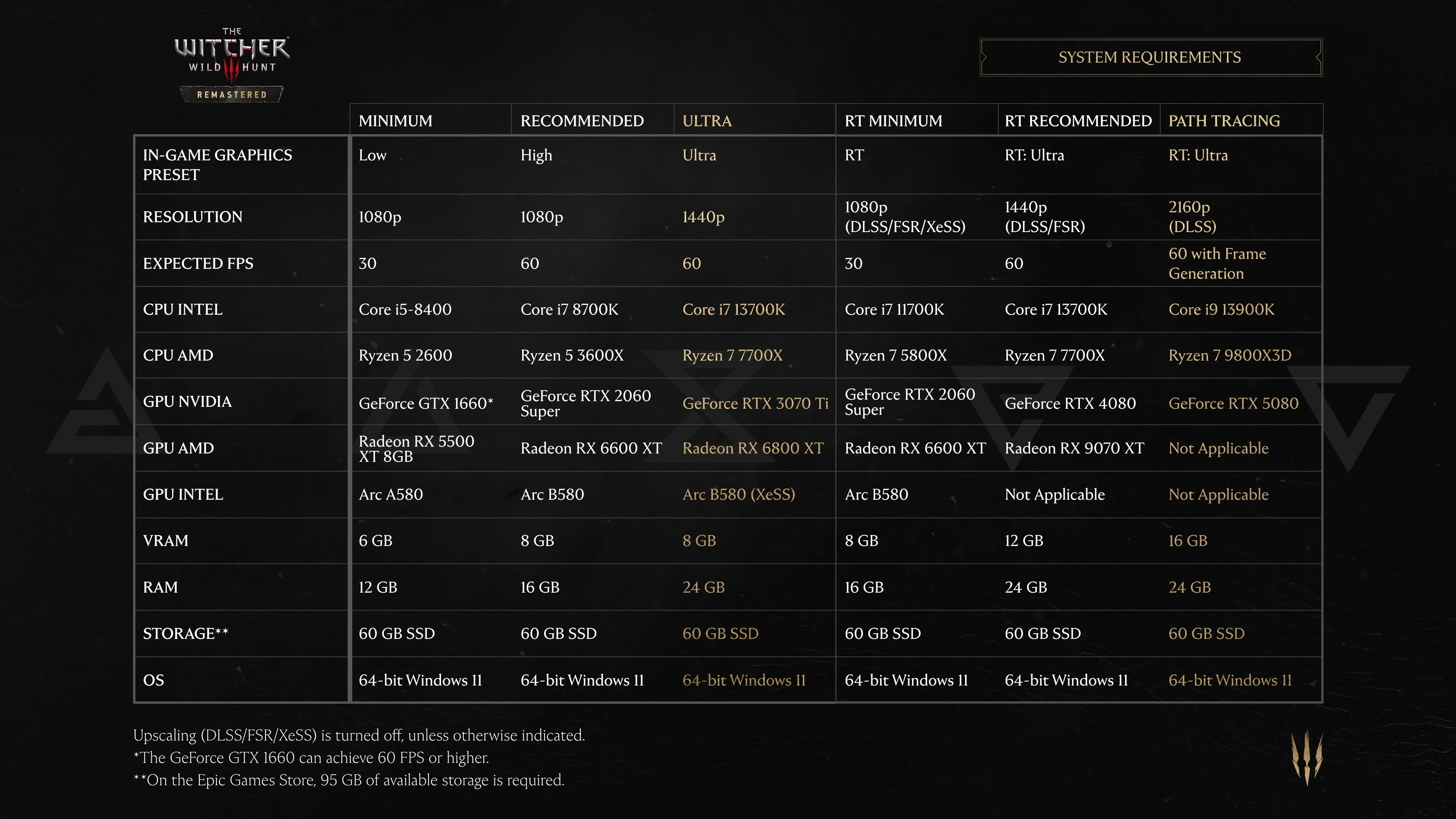
Everything else is below:
Visual and Rendering
- Implemented an improved shading model.
- Updated multiple textures and models based on assets from The Witcher 3 HD Reworked Project.
- Improved lighting and shading for grass and foliage.
- Updated the visual effects of Signs, including their upgrade versions.
- Added new visual effects for skills.
- The game now features native DirectX 12 rendering with multithreading for better performance and visuals.
- Updated tone mapping for improved colors, lighting, contrast and detail.
- Added GTAO (Ground Truth Ambient OcFeaturesclusion) as a new Screen Space Ambient Occlusion option.
- Updated the HDR calibration panel by adding new options and other improvements.
- Added Ray-Traced Local Shadows.
- Updated Screen Space Reflections.
- Updated Screen Space Shadows.
- Improved Motion Blur with a higher-quality, more cinematic look.
- Updated Subsurface Scattering for more natural skin rendering.
- Improved terrain and material rendering for more natural lighting, shadows, reflections, and highlights.
- Implemented new Image-Based Lighting (IBL) for improved ambient lighting and reflections across different environments.
- Reworked Bloom for more improved lighting effects across different environments.
Gameplay
- Improved the skill system. Skills are now organized into a skill tree and each skill has three ranks. Unlocking new skills now requires having the necessary prerequisite skills rather than spending a set number of skill points. IMPORTANT: As a result of these changes, your skill points have been reset.
- Rebalanced the skill tree by refining skill bonus values, effects and synergies.
- Renamed some skills to better reflect their effects.
- You can now Reforge your equipment to change its appearance without affecting its stats. Only master craftsmen (Yoana and Hattori) offer this service. Unlock appearances by adding new equipment and crafting diagrams to your inventory. Dyes from Blood and Wine applied to equipment will carry over to the reforged item.
- Polished the combat behavior of many non-boss monsters, including their attack patterns, counterattacks, movement, reactions, flight and the application of effects.
- Added a new "Horse control input sensitivity" slider in Settings → Controls.
- Improved Roach's and Geralt's movement, player control and animations:
- Refined Geralt's jumping animation so that it feels more natural and polished. Note: This doesn't affect jump distance and height.
- Added new finisher animations for Geralt.
- Added new idle animations for Geralt.
- Improved Geralt's ledge climbing, ladder climbing and vaulting animations as well as his speed for more responsive, fluid movement.
- Improved Geralt's gap closing animations in combat for smoother gameplay.
- Added a new exploration camera with increased FOV.
- Added a new dynamic combat camera to increase visibility when fighting enemies.
- Improved target-lock switching when moving the camera in combat.
- Updated collision avoidance when riding Roach.
- Polished animations for mounting and dismounting Roach, as well as cantering and galloping.
UI/UX
- Meditation now features a timelapse instead of a UI screen for a more immersive feel.
- The skill screen is now reorganized into a more intuitive skill tree layout.
- Updated the map screen to make switching between tracked quests easier. Untracked quests now have a distinct marker and can be tracked by selecting it.
- Increased the number of maximum markers on the map.
- Added new map markers.
- You can now hide herbs, boats and corpses on the minimap in Settings → Video → Interface for a cleaner, less distracting view.
- Improved quest notifications by combining quest updates into a single HUD notification.
- Nearby loot can now be grouped into a single window, so you no longer need to browse through multiple loot windows. You can enable this feature in Settings → Gameplay.
- Added a loot feed that displays recently collected items on the left side of the screen. You can disable it in Settings → Gameplay.
- Added item tooltips to the loot window, allowing you to preview an item's details before picking it up.
- Renamed the "HUD Configuration" section in Settings to "Interface".
- Updated the CD PROJEKT RED Account connection, My Rewards and telemetry consent menus.
Photo Mode
Updated the Photo Mode UI and vastly expanded its features and options:
- You can now choose from multiple different characters to place in your shot.
- Added a selection of poses and expressions for Geralt and placeable characters.
- Added a confirmation prompt before exiting Photo Mode to help prevent accidental exits.
- You can now lock the camera position in Photo Mode to make sure you capture the perfect shot.
- Added the option to apply different environment presets to your scene.
- Added the option to save camera presets, allowing you to save and reuse camera positions and angles.
- You can now change the aspect ratio of your screenshot.
- Added the option to toggle a first-person camera mode so you can see the world through Geralt's eyes.
- You can now enable or disable camera collisions with objects and walls.
- Set the perfect scene by changing the weather and time of day.
- Adjust the intensity of weather effects like rain or storms.
- Added an option to toggle Rule of Thirds lines in various aspect ratios, with optional cinematic black bars.
- Camera coordinates will now be visible in the UI.
- Added an option to hide surrounding NPCs.
- Added placeable props, giving you even more ways to create the perfect scene. Just don't ask where they all came from.
- The cursor is now visible in Photo Mode on PC when using a mouse.
Accessibility
- Added a new Accessibility section to the Settings menu. Moved existing accessibility-related options there.
- Added the Bard's Ballad preset. You can enable it when starting a new game on the Just the Story difficulty or during the game in the Accessibility section. It is designed to reduce cognitive load for players who experience mental fatigue or have difficulty concentrating. It streamlines gameplay by simplifying certain mechanics and disabling select features for a smoother, more focused adventure. You can enable the preset in the Accessibility tab and customize it by enabling or disabling the following options:
- Vitality Regeneration Boost - Gives the possibility to adjust its activation threshold ("Activates below (%) Vitality") and the rate at which VitalFeaturesity increases ("Regeneration Intensity").
- Infinite Breath - Geralt can't run out of oxygen while swimming and diving.
- Unlimited Item Durability - Your gear will never wear down, so there's no need to visit craftsmen for repairs.
- Unlimited Boat Durability - Boats are indestructible, making jagged rocks and sirens no longer a concern.
- Ignore Item Weight - Travel the Path carrying as much as you want.
- Faster Boats - Sail faster across the seas. The seas around Skellige just got a little bit smaller.
- Toggle Witcher Sense - Toggle on and off without having to hold the button.
Quality of Life
- Streamlined tutorials to keep them concise and focused on teaching core game mechanics. We think Vesemir would approve.
- Added an option to quickly disengage from combat. Hold the dodge button (Alt/〇/B) to unlock from your target, then press the sprint button (L Shift/X/A) to run away.
- You can now collect loot without dismounting Roach.
Modding
- Added Cross Platform Mod Support, an in-game tool powered by mod.io that allows you to easily browse and install player-created mods to customize your game. You can find it in the game's main menu in Mods. Log in with your CD PROJEKT RED Account, connect it to mod.io and start browsing. You can find more information about the Mod Manager here.
- Various engine, UI and other improvements for REDkit, making it easier for modders to create, manage and customize their content.
Fixes
- Fixed an issue where it wasn't possible to change Right Stick Sensitivity if the settings were accessed directly from the main menu.
- It's now possible to set Stick Sensitivity to the value of 0.69.
- Fixed an issue where HDR settings would sometimes not appear on consoles.
- In the Eternal Fire's Shadow - Fixed an issue where the Forgotten Wolf School Gear Diagrams weren't displayed in the UI after being received as a reward.
- Wine is Sacred – Fixed an issue where fast traveling out of Toussaint during the "Search the wine cellar with Anna Henrietta" objective could block quest progression. This fix is not retroactive, so players who encountered this issue will need to load a save from before it occurred.
Other
- Added Ukrainian text localization.
Be sure to leave a comment and let us know how you're getting on with it on SteamOS / Linux.
Maybe it is finally time for me to actually play it through.



See more from me


 You can also find comments for this article on social media:


Quoting: walther von stolzingI think all we ever saw was a banner on Steam, 'coming soon to SteamOS'; CDPR never made a statement themselves, and Valve took down that banner quickly after it went up.They considered it, but they never announced it, yeah. In the end, efforts of making native Linux versions sort of completely got dropped by big studio productions. Only small projects still do it.
I think something similar happened with Batman Arkham Knight.
Last edited by Shmerl on 29 Sep 2026 at 9:06 pm UTC

Quoting: ShmerlRemember the times when they actually entertained the idea of making a native Linux version?I have almost pre-ordered it on GOG to support that idea...
 seflasporin 29 Sep 2026

(External Link: You need to be logged in to view this.)
 Mohandevir 30 Sep 2026


First thing I noticed: FXAA is almost non-existent...
Fortunately FSR 4 works with my GPU (9060 XT on mesa 26.2.3), but I'd rather play it natively with TAA
I can't enable RT either, but as I don't know if it's optimised enough, maybe that's not really a problem
So far, no bugs in-game, but I had to restart several times because the UI is getting in the way (buttons keep being pressed, don't respond, etc.)
The game does seem to keep my settings.
So far, it's playable (everything on Ultra+)

Quoting: omer666First thing I noticed: FXAA is almost non-existent...Here's my theory on that. The game will flat out refuse to render more than 66% of native resolution. When you choose FXAA (or None) it will just do a basic scaling resulting in horrible image quality. I guess they didn't really go in and fix the terrible DX12 implementation, they just try to upscale their way out of it.
 CookieShinx 30 Sep 2026

outside of that the update seems to work fine ?
dont have much experience with that game (like 30 mins of gameplay)



Quoting: omer666Fortunately FSR 4 works with my GPU (9060 XT on mesa 26.2.3), but I'd rather play it natively with TAATry FSR4 in native resolution!
You get ML-enhanced TAA without the upscaling crap. This is the best image quality possible these days.
Quoting: TevurThat would be great, but FSR can't be set to native in this game... 😅Quoting: omer666Fortunately FSR 4 works with my GPU (9060 XT on mesa 26.2.3), but I'd rather play it natively with TAATry FSR4 in native resolution!
You get ML-enhanced TAA without the upscaling crap. This is the best image quality possible these days.


Quoting: omer666Sure it can. Set "Anti-aliasing" to "AMD FSR Upscaling" and "FSR Quality" to "Native AA".Quoting: TevurThat would be great, but FSR can't be set to native in this game... 😅Quoting: omer666Fortunately FSR 4 works with my GPU (9060 XT on mesa 26.2.3), but I'd rather play it natively with TAATry FSR4 in native resolution!
You get ML-enhanced TAA without the upscaling crap. This is the best image quality possible these days.
Quoting: tuubiThere is no Native AA in the menu on my computer 🤔Quoting: omer666Sure it can. Set "Anti-aliasing" to "AMD FSR Upscaling" and "FSR Quality" to "Native AA".Quoting: TevurThat would be great, but FSR can't be set to native in this game... 😅Quoting: omer666Fortunately FSR 4 works with my GPU (9060 XT on mesa 26.2.3), but I'd rather play it natively with TAATry FSR4 in native resolution!
You get ML-enhanced TAA without the upscaling crap. This is the best image quality possible these days.
Quoting: tuubiExactly, did that myself yesterday... 😊Quoting: omer666Sure it can. Set "Anti-aliasing" to "AMD FSR Upscaling" and "FSR Quality" to "Native AA".Quoting: TevurThat would be great, but FSR can't be set to native in this game... 😅Quoting: omer666Fortunately FSR 4 works with my GPU (9060 XT on mesa 26.2.3), but I'd rather play it natively with TAATry FSR4 in native resolution!
You get ML-enhanced TAA without the upscaling crap. This is the best image quality possible these days.
Yes, naming is garbage. FSR isn't "upscaling" or "super resolution", it's machine-learning-enhanced TAA. It's mainly used and marketed for making upscaled frames watchable but it can also used with native rendered resolution or even with downscaling.
seflasporin 30 Sep 2026
Last edited by seflasporin on 30 Sep 2026 at 2:04 pm UTC


 Patreon
 PayPal