ProtonUp-Qt gives you a hassle-free way to install various compatibility tools like GE-Proton, Wine-GE, Luxtorpeda and others for Steam, Lutris and the Heroic Games Launcher.
If you've found yourself needing GE-Proton, as it does at times have extra fixes not even available yet in Proton Experimental, ProtonUp-Qt makes it incredibly painless. Something I've shown off numerous times in videos and articles, like a Steam Deck guide.
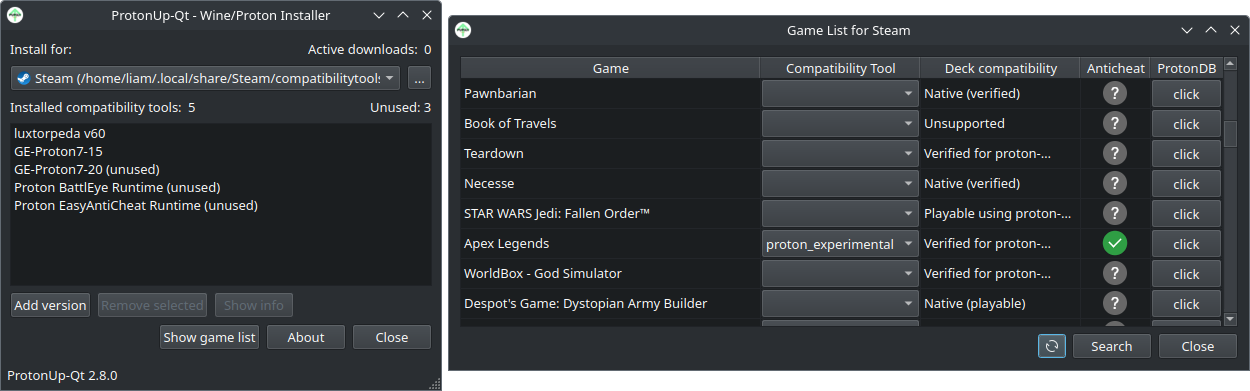
Here's what's new in version 2.8.0:
- Added the Proton-Tkg (Wine Master) compatibility tool for Steam.
- Added the Vanilla Wine compatibility tool for Lutris.
- Added sorting and searching functionality to the game list.
- Added a game list for Lutris and Heroic Games Launcher.
- Added a compatibility tool info dialog for Heroic Games Launcher.
- ProtonUp-Qt now displays non-Steam games in the game list.
- Added various keyboard shortcuts.
- Added a notification to display when the GitHub API limit is reached.
- Open for testing: Added a button which adds a ProtonUp-Qt shortcut to the Steam library.




About the author - Liam Dawe

I am the owner of GamingOnLinux. After discovering Linux back in the days of Mandrake in 2003, I constantly checked on the progress of Linux until Ubuntu appeared on the scene and it helped me to really love it. You can reach me easily by emailing GamingOnLinux directly. You can follow me personally on Mastodon [External Link].
See more from me
See more from me
Some you may have missed, popular articles from the last month:




All posts need to follow our rules. Please hit the Report Flag icon on any post that breaks the rules or contains illegal / harmful content. Readers can also email us for any issues or concerns.
5 comments
I have to admit, I do use this and it does it job really well!
It's particularly convenient to see which games are still using older versions of GE and such. :grin:
It's particularly convenient to see which games are still using older versions of GE and such. :grin:
6 Likes
 Jarmer 11 Apr 2023

Thanks to this site, I use this tool and absolutely LOVE IT. Big thanks to the maintainers of this project and of course the GE team.
1 Likes
 InhaleOblivion 12 Apr 2023
Nice gotta love this program. Definitely helps keep all my various ways to play Linux games updated and with options.
1 Likes
 MiZoG 12 Apr 2023
Yeah I surely love apps that make my life easier :heart:
Although I still haven't figured out how to install D8VK, a feature added in version 2.7.7
Although I still haven't figured out how to install D8VK, a feature added in version 2.7.7
0 Likes
fenglengshun 13 Apr 2023
You wanna know what's the greatest part about this thing is? I was a nay-sayer, I thought "normal protonup was good enough, especially as I use fish anyways."
Now I use this to install to manage Wine and Proton versions.
Now I use this to install to manage Wine and Proton versions.
1 Likes
 Patreon
 PayPal
 How to setup OpenMW for modern Morrowind on Linux / SteamOS and Steam Deck
 How to install Hollow Knight: Silksong mods on Linux, SteamOS and Steam Deck