Valve released the latest stable update for Steam across Desktop, Steam Deck / SteamOS and we have all the changes here for you to see.
While the 64-bit change only affects Windows, the Linux client may not be too far behind given some recent changes to the Steam Linux Runtime.
Here's the full list of changes for Desktop Steam:
General
Game Recording
- The Steam client is now 64-bit on Windows 11 and Windows 10 64-bit.
- Systems running 32-bit versions of Windows will continue receiving updates to the 32-bit Steam client until January 1, 2026.
- Fixed non-Steam browser windows erroneously being created sometimes when steamwebhelper is restarted.
Friends & Chat
- Fixed errors copying to clipboard or exporting H265 videos on systems with a NVIDIA 50xx series gpu.
Big Picture Mode
- Suspicious or harassing group chat messages can now be reported directly in the chat window by right clicking the message. You can optionally block and/or unfriend the other user while submitting the report.
Remote Play
- Fixed intermittent in-game purchase failures for some games.
Steam Input
- Fixed being unable to move the mouse to another monitor when using touch controls on the Steam Link app.
- Added support for Nintendo Switch 2 controllers connected over USB on Windows
- Added support for GameCube adapters in Wii-U mode with rumble on Windows
- Added an "Invert Input" toggle in "Regular Press" activator settings. When enabled, this causes button presses to generate releases, and vice versa.
- Promoted the newer gyro modes from beta to the default gyro modes loaded. Older configuration that are using the older modes will still see the option and you can also enable Steam Input dev mode under Settings->Developer to keep them visible all the time.
- Adjusted Dualsense "Create" and "Options" glyphs for better recall.
- In all Gyro Modes, when selecting multiple gyro activation buttons, you can also choose whether "Any" or "All" buttons are required to Enable/Suppress/Toggle the gyro.
- Gyro Haptic On/Off effect is now separated from Gyro Haptic Rotation Effect.
- Gyro to Joystick Deflection Mode: Added "Use Relative Roll" & "Use Relative Pitch" toggles. When enabled, this makes the output Joystick deflection relative to the controller's pose since the Gyro's activation. i.e. turning on the gyro will always center the stick output. When disabled, the deflection angle is absolute vs. the controller's gravity sensor. Previously this was only possible for "Pitch" (old name: "World Auto Tilt"), but it's now available for Roll as well.
- Gyro to Joystick Deflection: "Relative Roll" and "Relative Pitch" toggles are only available if a Gyro Activation Button is selected, because the angles are relative to the pose of the controller each time the Gyro is activated.
- Fixed a case where the desktop version of the configurator could unexpectedly close when trying to preview a configuration for another game on the Search tab
- Fixed Dualsense Edge, Xbox Elite, Nintendo JoyCons in paired mode not finding the correct config to edit.
- Fixed Gyro to Joystick Deflection: Lock Extents not working as intended.
- Fixed Gyro to Joystick Deflection: Some combinations of "Relative Roll" and "Relative Pitch" toggles resulted in zero joystick output.
And also for Steam Deck / SteamOS these look to be specific from the changes:
- Selecting Sleep in the Power menu will now prompt the user to enter Display-off downloads when appropriate.
- Fixed news items not updating in the "What's New" tab on the Home screen.
- On the Bluetooth settings screen, we will now detect and notify the player when trying to pair/connect an Xbox controller with older firmware versions that cannot properly connect to Steam Deck. To fix these issues you must connect the controller to a Windows PC and update the firmware via the Xbox Accessories App.
- Moved the Screen Reader's "Stop Talking" button to X so that external gamepads can still open the Quick Access Menu with Guide button + their equivalent of A button.
Is there specific bug you're waiting on being solved?




About the author - Liam Squires-Hand

I am the owner of GamingOnLinux. After discovering Linux back in the days of Mandrake in 2003, I constantly checked on the progress of Linux until Ubuntu appeared on the scene and it helped me to really love it. You can reach me easily by emailing GamingOnLinux directly. You can follow me personally on Mastodon [External Link].
See more from me
See more from me
Some you may have missed, popular articles from the last month:

 You can also find comments for this article on social media:
 All posts need to follow our rules. Please hit the Report Flag icon on any post that breaks the rules or contains illegal / harmful content. Readers can also email us for any issues or concerns.

It just shows: There's a reason why most Linux work is done by third parties & not directly by Valve.
But we should give some credit to Valve: It must've been rocket science to port such a bloated software like Steam to 64-bit.
But we should give some credit to Valve: It must've been rocket science to port such a bloated software like Steam to 64-bit.
6 Likes
 spacemonkey 20 Dec 2025
I would like to be able to wishlist games I already own, so I can gift them when they are discounted.
16 Likes
 fenglengshun 20 Dec 2025
Hm. Wonder if extest will need updating for when 64-bit Steam for Linux launches. It was an annoyance for me on NixOS as it throws errors due to ELFCLASS32 and LD_PRELOAD issue or something.
Though, for that matter, I do wonder how update rollout and dependency changes will be handled across the board.
Last edited by fenglengshun on 20 Dec 2025 at 2:27 pm UTC
Though, for that matter, I do wonder how update rollout and dependency changes will be handled across the board.
Last edited by fenglengshun on 20 Dec 2025 at 2:27 pm UTC
0 Likes


Is there specific bug you're waiting on being solved?Remote Play audio playing on the host even when you've turned off the "play audio on host" option remains super annoying.
2 Likes
 theinsanegamer23 20 Dec 2025

Quoting: CreakThe way I see it, Windows users are the beta testers, for once 😂Ikr! There's also more work to be done for the Linux client, using Wine/Proton in WOW64 mode should hopefully solve most of the concern around 32-bit games. I know Valve has concerns about old 32-bit native Linux games, but personally I question how much of that concern is necessarily warranted. Most of them will have Windows versions that you can run through Proton, and its very possible they may run better than the native Linux builds since a lot of old games never received updates or bug fixes for the Linux versions.
3 Likes
Quoting: spacemonkeyI would like to be able to wishlist games I already own, so I can gift them when they are discounted.Maybe an add to 'gift List' button to avoid confusion.
4 Likes


I thought I read something somewhere about the 64-bit client being unable to launch 32-bit games?
PCGamingwiki says this about the Linux client:
PCGamingwiki says this about the Linux client:
User requests for a native 64-bit client have been denied by Valve on numerous occasions since 2014, purportedly since such a client would be unable to launch 32-bit games.Last edited by Stella on 20 Dec 2025 at 5:34 pm UTC
4 Likes

Quoting: StellaI thought I read something somewhere about the 64-bit client being unable to launch 32-bit games?I wouldn't think so. Your 64 bit environment is able to start 32 bit Steam, why would the chain break if one more application is 64 bit?
PCGamingwiki says this about the Linux client:
User requests for a native 64-bit client have been denied by Valve on numerous occasions since 2014, purportedly since such a client would be unable to launch 32-bit games.
11 Likes

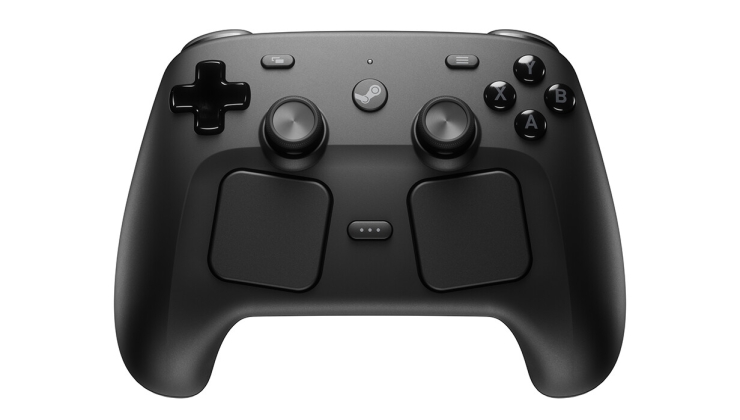
Anyone get a strange new option under external gamepad settings after updating?
I wonder what it's for. Maybe new steam controller?
It's called "Pair an Ibex Controller over USB"
And clicking pair gives an error saying no steam controller is plugged in

Last edited by zany130 on 20 Dec 2025 at 7:47 pm UTC
I wonder what it's for. Maybe new steam controller?
It's called "Pair an Ibex Controller over USB"
And clicking pair gives an error saying no steam controller is plugged in

Last edited by zany130 on 20 Dec 2025 at 7:47 pm UTC
0 Likes
Quoting: zany130Anyone get a strange new option under external gamepad settings after updating?Ibex is the new Steam Controller. Has been reported months ago.
I wonder what it's for. Maybe new steam controller?
It's called "Pair an Ibex Controller over USB"
And clicking pair gives an error saying no steam controller is plugged in

1 Likes
Quoting: Eike64 Bit wine can't launch 32 bit applications.Quoting: StellaI thought I read something somewhere about the 64-bit client being unable to launch 32-bit games?I wouldn't think so. Your 64 bit environment is able to start 32 bit Steam, why would the chain break if one more application is 64 bit?
PCGamingwiki says this about the Linux client:
User requests for a native 64-bit client have been denied by Valve on numerous occasions since 2014, purportedly since such a client would be unable to launch 32-bit games.
I think they calculate proton to be part of the Steam client(with which I agree), while the 32 bit trickery of the windows api did come build in with Windows(Win 11 is trying to change this, but thanks to legacy applications like Steam this is currently being maintained)
1 Likes

Quoting: LoudTechie64 Bit wine can't launch 32 bit applications.Proton has included support for Wine's WOW64 mode for a while now. This shouldn't be a blocker anymore.
3 Likes

Quoting: spacemonkeyI would like to be able to wishlist games I already own, so I can gift them when they are discounted.You could use https://isthereanydeal.com and make multiple categories for the waitlisted games to organize them. That would track them across multiple legit resellers as well as steam.
3 Likes
Yeah I know what's interesting is I'm getting an option in steam to pair it I haven't seen that before this update
Quoting: kuhpunktQuoting: zany130Anyone get a strange new option under external gamepad settings after updating?Ibex is the new Steam Controller. Has been reported months ago.
I wonder what it's for. Maybe new steam controller?
It's called "Pair an Ibex Controller over USB"
And clicking pair gives an error saying no steam controller is plugged in

0 Likes
Quoting: LoudTechie64 Bit wine can't launch 32 bit applications.64-bit Wine could do it for years.
3 Likes
I think they calculate proton to be part of the Steam client(with which I agree)It's not, it's a separate component downloaded with the game.
while the 32 bit trickery of the windows api did come build in with WindowsI'm not sure what you're meaning. Even if it was necessary on Windows, doesn't mean it's necessary on Linux. Aren't Proton games even run in a container (pressure-vessel), so the host system doesn't matter that much.
0 Likes

steam on linux will be 64 bit at some point. nice to have, but not so urgent for now, except for distros that dropped 32 bit packages.
0 Likes
 Caldathras 21 Dec 2025
Quoting: CreakThe way I see it, Windows users are the beta testers, for once 😂
Would that make the macOS client the alpha test? 😋
0 Likes
Quoting: tuubiBy providing 64bit and 32bit libraries(a.k.a 64 and 32 bit wine).Quoting: LoudTechie64 Bit wine can't launch 32 bit applications.Proton has included support for Wine's WOW64 mode for a while now. This shouldn't be a blocker anymore.
Those 32bit libraries make it a 32bit client.
1 Likes
 Patreon
 PayPal