 Support us on Patreon
 PayPal
I decided to upgrade my mouse from a cheap unbranded USB wired to the Logitech G305 Lightspeed Wireless, so here's my thoughts on it.
I've gone through multiple from Razer, a few from VAXEE and various other random brands including at one point being a vertical mouse convert. The problem - my old mouse was starting to come apart. I seem to have this same issue with any mouse I buy. The thumb grip on it was loose, it looked cheap and it started creaking too. All very annoying, so I thought it was actually time for something just a little bit better.
Here's the thing — I've felt like I've been just massively spoilt by wireless tech. I use the Steam Deck for gaming often right in my hands, with no wires apart from when it needs some battery juice, and if I'm docking it or gaming at my Linux PC - I use an assortment of wireless controllers. I've always felt like with a USB wired mouse that at times I'm just fighting the wire, and considering just how many hours I'm sat using a mouse, it was time to cut the cord. This will also help with my permanent wrist injury with it being a bit more free for movement overall.
Logitech are generally a reasonably good brand, so after some searching I settled on the Logitech G305 Lightspeed Wireless as it seemed to have a good price point between not cheap and not overly expensive either. It also seemed to be light enough even though it takes one full AA battery.
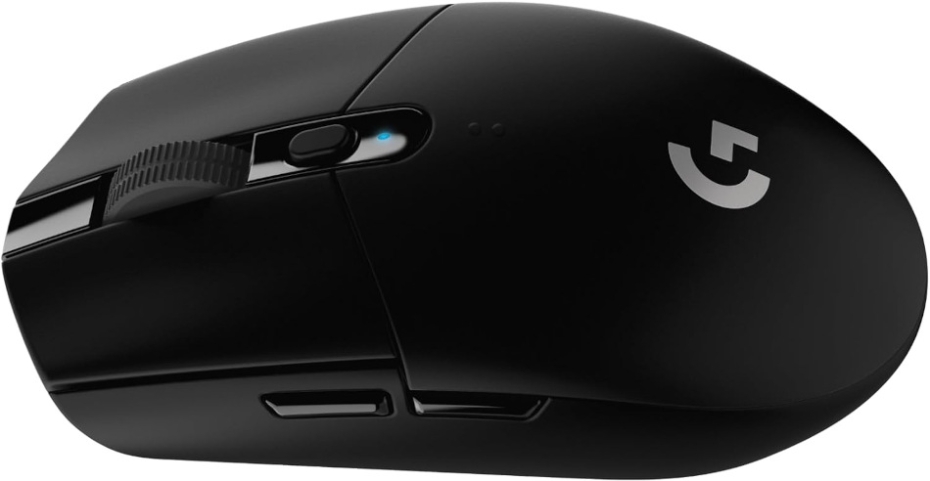
I've now been using it religiously for two and half weeks and their claim of 250 hours battery life so far seems to hold up quite well. That's with me using it every single day, often forgetting to turn it off with the switch on the bottom at night and so far - I've not needed to change the battery. So I am genuinely quite impressed there given the vast hours it's on and in constant use.
Technical Specs from Logitech:
General Specifications
- Button Technology: Mechanical Button Tensioning System
- Resolution: 200 – 12,000 DPI
- Onboard memory: 1 profile
Tracking
- Sensor: HERO
- Max. acceleration: 40 G *Tested on Logitech G240 Gaming Mouse Pad
- Max. speed: 400 IPS *Tested on Logitech G240 Gaming Mouse Pad
- Zero smoothing/acceleration/filtering: Yes
Responsiveness
- Wireless technology: LIGHTSPEED Wireless
- Wireless report rate: 1000Hz (1ms)
- Microprocessor: 32-bit ARM
Dimensions
Thanks to the four solid pads on the bottom, it glides effortlessly over my mouse pad and really does feel nice to use. With a one-button click to change the DPI, by default you have a choice between 400, 800,1600 and 3200. For me 1600 is the sweet spot. Any concern with weight has gone too, even with the full sized AA battery inside there's no issues at all, I can barely feel it which is great for gaming on top of general work.
Noise level isn't too bad either. The left and right buttons do have a clear audible click to them, but not too loud that it's annoying. The scroll wheel is the real hero here though. Rolls nicely with your finger, with a clear bump at each level that makes things like quickly swapping weapons while gaming by scrolling effortless without accidental roll-overs.
As impressed as I am with it, there's one thing holding it back from true greatness. It's too smooth. Sure it looks good, and don't get me wrong it feels good. But it's just too slick, just a bit slippery perhaps even to hold. If it had a slight texture to the top and sides, holding it would pretty much be perfection.
When it comes to software, Logitech don't support Linux directly like a lot of vendors. But, open source to the rescue (as usual!). The Piper app can detect it, and configure the DPI settings on the button quite nicely!
At £59.99 it's reasonably priced for what you get, but it's also quite often on sale (I snagged it for £27.99). Amazon has it right now for £34.99 or direct from Logitech for £29.99.





See more from me



 You can also find comments for this article on social media:
  LordDaveTheKind 4 Dec 2025

I just hate wireless mice/keyboards for the random battery dead at the worst possible time thing that always happens :grin:
I hope it serves you an uneventful decade
 MrSeatbelt 4 Dec 2025

Also if its too slippery for you then look into modding it with grip tape or even 3d printing a new shell or battery cover for it.
There's plenty of mods for it from fingertip grip, lightweight holes-everywhere stuff to ergo, vertical and even shapes from other mice like the G Pro and Viper Ult. being available.
(just search sites like thingiverse for example)

Keyboard I use a Keychron K10 Pro, which is niiice. Has USB-C and BT. I replaced my aging Turtle Beach 100 with it, which isn't available anymore, and which only had USB-A.
Cloversheen 4 Dec 2025



Disadvantage is that the quality can be a bit "meh" sometimes.


 brokeassben 4 Dec 2025
Quoting: EhvisDisadvantage is that the quality can be a bit "meh" sometimes.After going through two G305 and a G903 mice in a little over three years, and a G Pro keyboard that had a switch die and keycaps wear through in a short time, I have sworn off Logitech peripherals. My G29 driving wheel is still working well, but that may be a matter of just not using it much rather than the quality of the device.
Just bought an 8BitDo Retro R8 mouse which is nice and clicky with lots of connection methods, but man is it not made for medium to large hands. Not the most ergonomic, so I'm back to using $15 USD wired Glorious mouse. Otherwise, I'm 100% all in on 8BitDo with three of their controllers and their C64 inspired keyboard.
Last edited by brokeassben on 4 Dec 2025 at 4:44 pm UTC
 linuxjacques 4 Dec 2025
Quoting: Ehvispiper/libratbag lets you configure everything. Even better, that configuration is stored on the mouse, so it retains everything even after a reinstall.I have three G305 and I didn't know about piper. Thanks!
 Persephone the Sheep 4 Dec 2025
I have tried a Razer DeathAdder before I got my first G pro wired and hated the ever living shit out of it that shape and you had to have their software running on the computer to get full resolution of the sensor if not it had the worst resolution ever you could see it jumping pixels on a 1080p screen. So that turned away from ever thinking of Razer mice.

Last edited by chr on 5 Dec 2025 at 10:14 am UTC

Quoting: MrSeatbeltgoated mouse, got mine when my wired razer mouse (which technically had a better sensor but whatever) started double clicking, having scroll wheel issues and generally kind of fell apart a bit.Yeaaah, this is standard Razer hardware behaviour in my experience. I dumped them in 2014, and jumped ship to Roccat since they had (unofficial) Linux support. Then the Linux support dried up for Roccat devices, so I jumped ship to Corsair.
not to mention the battery also last forever on it, quite energy efficient
Last edited by elmapul on 5 Dec 2025 at 1:47 am UTC
 mi1stormilst 5 Dec 2025
I ended up upgrading to the Corsair Scimitar but I'm wary of the build quality. Many people say the scroll wheel dies quickly, and even now after a few weeks the left click has this weird creak to it.
By the sounds of it, many saw the G600 as the gold standard but they stopped making it. I loved the G502 years ago, and still have a G305 in reserve.
 benstor214 6 Dec 2025
Quoting: PyronickGreat hardware, but I'm sticking to open hardware projects like Ploopy. Once you get used to the freedom of open firmwares like QMK or ZMK on your peripherals, it's hard to go back to closed ecosystems. It is too bad, though, that open firmwares for wireless mice are still pretty much non-existent or broken.Hey!! 👋🏻 I thought I would be the only one in this thread. LOVE my nano trackball, and am looking forward to build their headphones, too.
Building the headphones would be just for the fun of building it though as I am happy with my beyerdynamic.
Last edited by benstor214 on 6 Dec 2025 at 12:25 pm UTC
 How to setup OpenMW for modern Morrowind on Linux / SteamOS and Steam Deck
 How to install Hollow Knight: Silksong mods on Linux, SteamOS and Steam Deck