 Support us on Patreon
 PayPal
A developer has submitted a draft to the KDE team for KWin to hook up a full Plasma VR mode and it looks pretty awesome. As it's currently a draft, it needs plenty more work before being accepted but the idea behind it and how it looks has me quite interested.
Could be something fun for the Steam Frame too.
The draft code from developer Stanislav Aleksandrov notes:
This plugin turns KWin (and KDE) into a 3D VR Desktop. Features:
- Floating windows
- Physical and Virtual screens
- Everything is 3D, even wayland surfaces, window decorations and shadows
- Made for work: Full keyboard control
- Headgaze: no mouse, touchpad or vr controller is required
- Native Qt rendering: direct dmabuf imports.
- Follow Mode
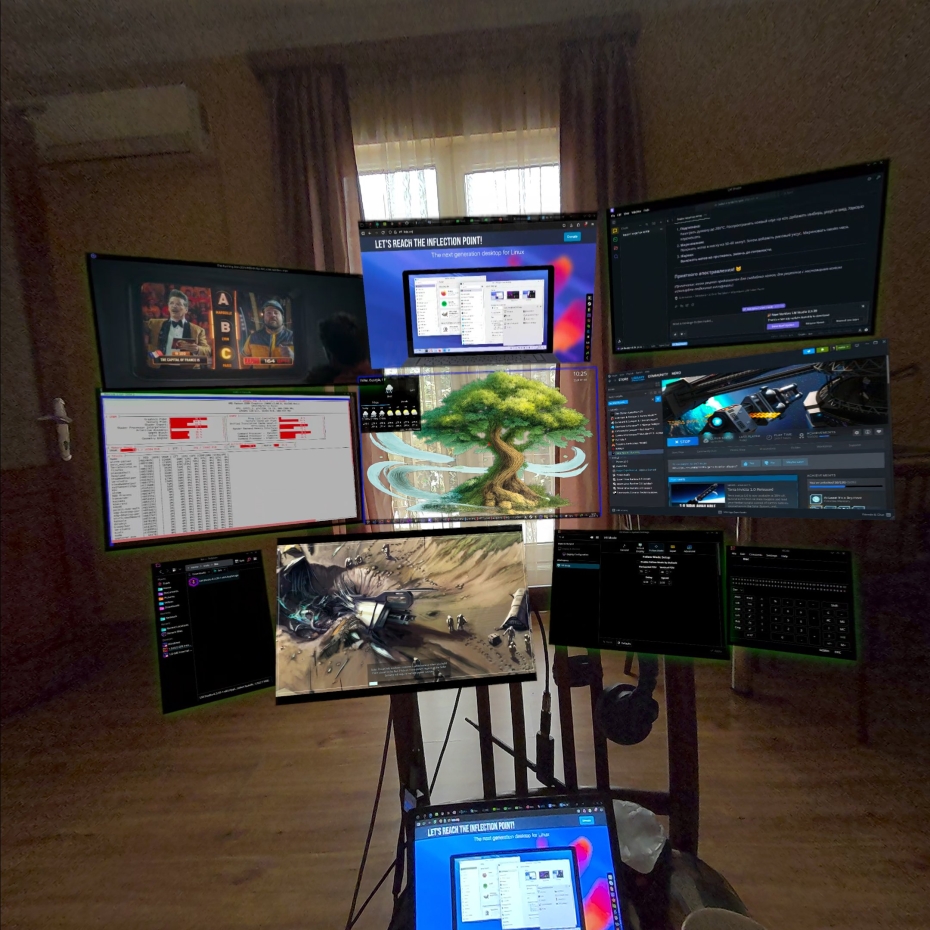 Image Credit: Stanislav Aleksandrov
In the draft merge request Aleksandrov shows a video of it in action, dragging some windows around into their own space and it looks quite futuristic.
The developer mentioned at the bottom:
There is still a lot of stuff is needed to be done. Input and Focus control should be refactored. Some settings (headgaze control, surface thinkness, maybe more) are missing. And the code needs to be polished overall.
However, it works and I use it everyday, so I think it is ready for initial review.
And there's more info on their plan for it and how it works in a comment. Aleksandrov notes the "end goal here is to make KWin run without flat displays, so KDE can be a fully fledged VR Desktop Environment".
What do you think to this? Even if it doesn't get accepted at all, I thought you might find it as interesting as I did to see.





See more from me


 You can also find comments for this article on social media:
I like that as long as the stability does not suffer.

(I guess it's supposed to be "surface thickness", but I don't get that either...?)
Last edited by Eike on 20 Jan 2026 at 8:19 am UTC
it's also actually cool.
Last edited by Lofty on 19 Jan 2026 at 4:08 pm UTC


Works pretty good. Sadly I have the Xreal glasses that have drift, causing me to have to recenter all the time. I'd buy new glasses but, all the glasses have such a low FOV. Better to just use my current glasses when I'm in a pinch. On a flight for 4 hours, I can put up with the low FOV and continual re-centering. I'd buy different glasses without the drift if there was a pair with decent FOV, I'm guessing it needs to be around 80 degrees.
I'm looking forward to these headsets coming out that are first class citizens in Linux. I'm looking forward to SimulaVR as well, it seemed to work great, but the headset I have, Quest2. Using that over ALVR sucks, and the headset sucks. Honestly if I had thought the SimulaVR headset was going to take this long, I would have also bought a Vive Pro back then. No matter now, I'm buying the Steam Frame and the SimulaVR headset comes when that comes. Hopefully an AR glasses unit gets released with at least 80 degrees FOV. It's awesome to see all these VR productivity solutions starting to emerge. The future is definitely bright.
Quoting: Highballhttps://github.com/wheaney/breezy-desktopInteresting they work with Xreal glasses ? I thought they were just two screens made to look like one big one. How is it working as VR ?
Works pretty good. Sadly I have the Xreal glasses that have drift, causing me to have to recenter all the time. I'd buy new glasses but, all the glasses have such a low FOV. Better to just use my current glasses when I'm in a pinch. On a flight for 4 hours, I can put up with the low FOV and continual re-centering. I'd buy different glasses without the drift if there was a pair with decent FOV, I'm guessing it needs to be around 80 degrees.
I'm looking forward to these headsets coming out that are first class citizens in Linux. I'm looking forward to SimulaVR as well, it seemed to work great, but the headset I have, Quest2. Using that over ALVR sucks, and the headset sucks. Honestly if I had thought the SimulaVR headset was going to take this long, I would have also bought a Vive Pro back then. No matter now, I'm buying the Steam Frame and the SimulaVR headset comes when that comes. Hopefully an AR glasses unit gets released with at least 80 degrees FOV. It's awesome to see all these VR productivity solutions starting to emerge. The future is definitely bright.
for me VR headsets are just that, a headset. Im interested in XR/AR glasses with 3D support not requiring a 3rd party dongle and Mac / Andriod only software support. The form factor is more appealing for just chilling in bed, couch and looking at a giant screen (in 3D with the right software) But if the XR glasses work in a VR-like manner on KDE plasma id like to try that out.
Last edited by Lofty on 19 Jan 2026 at 6:35 pm UTC
Quoting: LoftyInteresting they work with Xreal glasses ? I thought they were just two screens made to look like one big one. How is it working as VR ?It's AR. With Breezy Desktop + Gnome. I just see one monitor, hovering, in front of my face. I can set it to be an Ultrawide monitor. I can adjust my perceived distance to the monitor, which is great, and really makes it work. The FOV is the draw back. The Left third and right third of the monitor are black until I turn my head in that direction. "Two screens made to look like one big one", that's also an option.
for me VR headsets are just that, a headset. Im interested in XR/AR glasses with 3D support not requiring a 3rd party dongle and Mac / Andriod only software support. The form factor is more appealing for just chilling in bed, couch and looking at a giant screen (in 3D with the right software) But if the XR glasses work in a VR-like manner on KDE plasma id like to try that out.
If you just want a giant screen that's locked in front of your face, what would seem about 9ft. away, that's how AR glasses work in their default with no software. If you want a giant screen that is not locked in front of your face, you would need AR glasses with 6DoF. Most of the AR glasses have 3DoF.
What's good about Breezy, is you can pull that screen in closer. I can work on a monitor that is 9ft. away, but it's not great. When you bring the monitor in, then you need that FOV to be wider without having to turn your head left and right to see the entire monitor. Sounds like you might just need the glasses, no software, and just plug them in.
 Gerarderloper 20 Jan 2026

BUT given the way PC hardware is going, seems its all going to inflate in price and further cripple fringe industries like VR/MR.
I have a Q3 that I don't use much (too busy with other stuff), and really the BIGGEST turn off for me is the terrible LCD that just BLEEDS backlight everywhere, there are NO BLACKS, its all just grey and you can see the lamp behind the LCD.
The issue with this is basically ANY game that isn't NEON PASTEL color palette looks terrible. There are areas in games like HLA where you can't see anything because the backlight bleed washes out the finite dark room detail.
So many Dungeon crawling games I'd love to play but can't see crap and turning brightness up just ruins it so much. Black Crush!
Steam-Frame is likely to have the same issue so I think; I'll just sell off my VR stuff along with most stuff I own at this point. Need to enter ultra-conservative spending and asset ownership during these tough times. lol
Last edited by Gerarderloper on 20 Jan 2026 at 1:21 am UTC


Too much focus on novelty, too less on fixing.
Some would call this a novelty, I disagree, it would increase immersion like 10 fold if it weren't for the weight of my valve index on my face, so I'd often settle for 5 fold instead. Still an upgrade in overall mood and atmosphere of whatever I was watching.
Quoting: WMan22Absolutely love to see it. Virtual desktops and overlay applications are a highly under-represented and underrated feature of VR, back when I was on windows, I would often pick one of the coziest spots I could find in VRChat to watch a movie. Hell, I watched Serial Experiments Lain in a room modeled after Lain's room.Size & weight is still one of the biggest drawbacks of mainstream VR. It has got better but it's still designed (imo) primarily for standing & shorter play sessions with regular break intervals. It's not really great for chill sessions, it's workable but not ideal. If it were AR glasses sized but with full VR capability then that would suit the kind of thing your talking about a lot better, leaving the larger headsets for that more intense standing + flappy arm gameplay style.
Some would call this a novelty, I disagree, it would increase immersion like 10 fold if it weren't for the weight of my valve index on my face, so I'd often settle for 5 fold instead. Still an upgrade in overall mood and atmosphere of whatever I was watching.

Quoting: LoftyInteresting they work with Xreal glasses ? I thought they were just two screens made to look like one big one. How is it working as VR ?Breezy Desktop on KDE and GNOME can do multi-display now. So it's not limited to just one ultrawide, you can launch as many virtual displays as your hardware will be able to handle. Most supported glasses are only 3DoF, so you can look around but not move around. It's not VR, though, as the virtual displays are intended to just replace physical monitors and allow you to work as usual, so you use your keyboard and mouse to control just as you typically would.
for me VR headsets are just that, a headset. Im interested in XR/AR glasses with 3D support not requiring a 3rd party dongle and Mac / Andriod only software support. The form factor is more appealing for just chilling in bed, couch and looking at a giant screen (in 3D with the right software) But if the XR glasses work in a VR-like manner on KDE plasma id like to try that out.
Breezy also works with 6DoF, though only with one pair of glasses or with OpenTrack + NeuralNet at the moment. This actually allows you to lean in/away or move about the virtual displays in a more VR-ish way, but it's still controlled by keyboard and mouse, still not intended to be a VR experience.
 wit_as_a_riddle 21 Jan 2026

Quoting: LoftyInteresting they work with Xreal glasses ? I thought they were just two screens made to look like one big one. How is it working as VR ?Can't compare that to VR but I use my XR glasses a lot: https://makertube.net/w/tq6uNTgnFM2aEYXZjM5Wx1 (Demo: Breezy Desktop now with virtual desktops 😎)
This also allows me to experience Stereoscopic 3D with almost any game thanks to ReShade. Add OpenTrack to the mix and I get a very VR-like experience without the motion sickness on top. Works best with native support, of course. Demo footage with Elite Dangerous: https://www.youtube.com/watch?v=zfR6vpO7UFs (and unlike VR this even works "on foot" in ED)
YMMV.
Quoting: bekothx for the links it looks great. Im firmly in the camp of VR headsets are for standing and XR (AR?) glasses are for couch, PC desk, Bed situations (along side traveling i guess, but i prefer to remain situationally aware)Quoting: LoftyInteresting they work with Xreal glasses ? I thought they were just two screens made to look like one big one. How is it working as VR ?Can't compare that to VR but I use my XR glasses a lot: https://makertube.net/w/tq6uNTgnFM2aEYXZjM5Wx1 (Demo: Breezy Desktop now with virtual desktops 😎)
This also allows me to experience Stereoscopic 3D with almost any game thanks to ReShade. Add OpenTrack to the mix and I get a very VR-like experience without the motion sickness on top. Works best with native support, of course. Demo footage with Elite Dangerous: https://www.youtube.com/watch?v=zfR6vpO7UFs (and unlike VR this even works "on foot" in ED)
YMMV.
When you say you use ReShade is this on Linux ? Why is is needed for this, i get that OpenTrack is needed for head movements. What is handling the 3D'ification of the XR glasses for games.
thanks again.
Quoting: LoftyWhen you say you use ReShade is this on Linux ? Why is is needed for this, i get that OpenTrack is needed for head movements. What is handling the 3D'ification of the XR glasses for games.Sorry for the late reply. Must have missed the notification mail. There are various shaders for ReShade that split and shift the image for stereoscopic 3d. This requires access to z-depth buffer maps (and sometimes it picks up the wrong but this can be fine tuned per game).
In theory this could also be done with Vulkan but vkBasalt (which seems to be rather dead?) does not expose the depth maps at all so it's either native SBS or SBS with e.g. the Depth3D shader. ReShade requires DirectX so this works AFAIK(!) only for Windows games and this also works fine via Proton where the render pipeline with Wine/Proton looks like this: DirectX => ReShade => Vulkan.
The steps to get this running are exactly the same as on Windows. Install ReShade, fire the game up with the DLL overrides and configure the paths to the shader folder. There is a nifty script on Github that eases the process but it is really not required.
Quoting: bekoThanks for the info. Not to be lazy but i do sometimes wish Linux had more native apps with an actually decent GUI for doing cool stuff like this.Quoting: LoftyWhen you say you use ReShade is this on Linux ? Why is is needed for this, i get that OpenTrack is needed for head movements. What is handling the 3D'ification of the XR glasses for games.Sorry for the late reply. Must have missed the notification mail. There are various shaders for ReShade that split and shift the image for stereoscopic 3d. This requires access to z-depth buffer maps (and sometimes it picks up the wrong but this can be fine tuned per game).
External Media: You need to be logged in to view this.
In theory this could also be done with Vulkan but vkBasalt (which seems to be rather dead?) does not expose the depth maps at all so it's either native SBS or SBS with e.g. the Depth3D shader. ReShade requires DirectX so this works AFAIK(!) only for Windows games and this also works fine via Proton where the render pipeline with Wine/Proton looks like this: DirectX => ReShade => Vulkan.
The steps to get this running are exactly the same as on Windows. Install ReShade, fire the game up with the DLL overrides and configure the paths to the shader folder. There is a nifty script on Github that eases the process but it is really not required.
Quoting: LoftyThanks for the info. Not to be lazy but i do sometimes wish Linux had more native apps with an actually decent GUI for doing cool stuff like this.You know I had almost the same discussion 6 days ago on Reddit so here is a verbatim copy:
There is not really a way to do this even on e.g. Windows. This will always require tinkering with the game. Each is different, each uses different head tracking systems (if any at all and it doesn't require mapping to virtual gamepads or even mouse input) and almost no game ships with native SBS support.
When ReShade is involved you have a list of supported games but when it's missing you have to start tweaking and configuration your own config. That's worthy of an extended article in itself.
This is really exactly what VR solved (and even here it's YMMV) handling various devices and making data available via a well known and unified API. This is where Monado is a nice alternative but afair they don't support Vitures [yet].
Oh and don't get me started why there is no unified API for head tracking at all. Can probably thank Naturalsoft threatening everyone with a law suit for years while trying to protect sending 6 digits to a game for decades 🤢
tl;dr: some things users have to understand the basic concept. Too many moving parts.

Quoting: bekoOh and don't get me started why there is no unified API for head tracking at all. Can probably thank Naturalsoft threatening everyone with a law suit for years while trying to protect sending 6 digits to a game for decades 🤢This is the perfect time to share a video that recently inspired and excited me about digital rights: https://www.youtube.com/watch?v=3C1Gnxhfok0
 How to setup OpenMW for modern Morrowind on Linux / SteamOS and Steam Deck
 How to install Hollow Knight: Silksong mods on Linux, SteamOS and Steam Deck