 Support us on Patreon
 PayPal
The popular Linux Mint has a big new stable version available with Linux Mint 22.3 "Zena" supported up until 2029 as it's a long-term support release. Bringing with it a whole lot of improvements across the board, it's a genuinely good distribution overall that focuses on a no-nonsense approach to just getting you going.
Not much has changed from the Beta that I previously reported on but here's a refresher.
There's a new System Information app to help you see more about your PC and hopefully figure out any problems. With screens that cover a range of details like crash reports, USB info, GPU, PCI, BIOS and general system info. Plus a System Administration tool that currently lets you configure the boot menu.
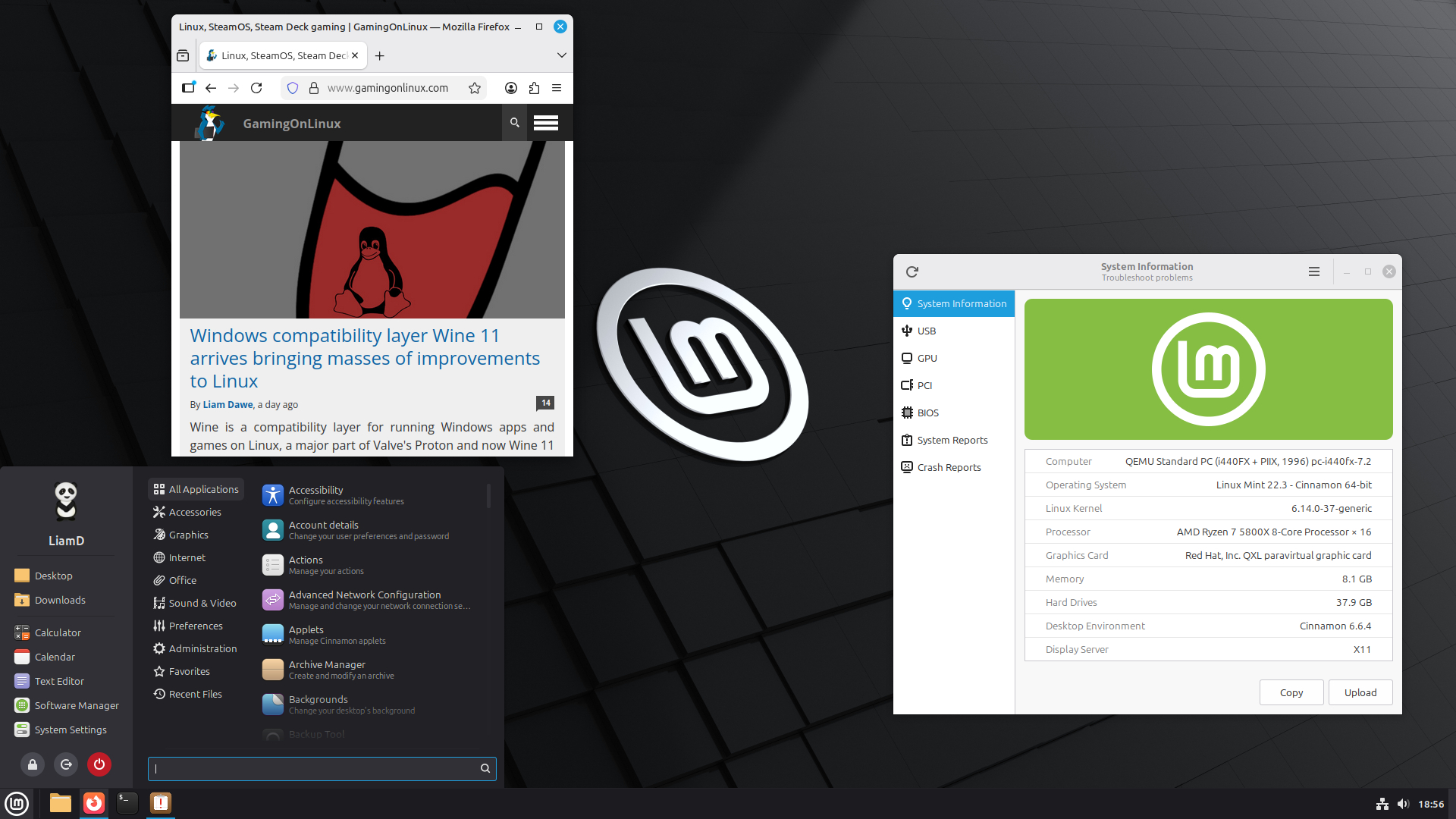
Probably one of the biggest changes is Cinnamon 6.6 with improved Wayland support, thanks to changes to keyboard layouts and input methods along with the Cinnamon window manager (muffin) also seeing improvements for Wayland. The new and improved input support is fully compatible with Wayland for both traditional layouts and IBus input methods. The on-screen keyboard also had an overhaul to be native to the Cinnamon desktop, with added support for input methods and keyboard layout switch.
Lots more like the new layout for the main Mint Menu, which looks a lot more modern and it's configurable too. The Nemo file manager got smarter with pausing and resuming of file operations, better thumbnails and improved search accuracy. There's also a notifications badge on the window list for apps,
There's a whole lot more, I'm just cherry-picking some fun bits.
See the release announcement and new features page for more info.
Going by Valve's latest data we can see around 9.27% of Linux gamers on Steam use it, making it one of the most popular Linux distributions for gaming overall.





See more from me


 You can also find comments for this article on social media:
  legluondunet 14 Jan 2026

Last edited by legluondunet on 14 Jan 2026 at 7:58 pm UTC

Quoting: legluondunetWhen will they update Flatpak version? They still provide an old 1.14 version...impotants bugs have been fixed since 1.14 version.Probably in the next version, which will be based on the upcoming Ubuntu LTS (26.04). Honestly, I got a bit disappointed with Mint during the current LTS cycle (24.04), since they haven't updated Xfce and MATE with their newer versions.
For reference: the Mint team updated their Xfce flavor (from 4.16 to 4.18) in Mint 21.2. Now, Xfce 4.20 is more than one year old and it could have been part of two Mint releases at this point. Things got even worse for MATE users, since the newest MATE release (1.28) is almost two years old.
I know that Cinnamon is their baby, but it feels odd that in the previous LTS they updated the Xfce during a point release and now completely ignored it - it wouldn't be so bad if they didn't do that before. And if my memory serves me right, Xfce is the second most popular Mint version.


Quoting: legluondunetThey still provide an old 1.14 version...They depend on Ubuntu 24.04 LTS and LTS Ubuntu releases tend to be awfully outdated, unfortunately.
 Caldathras 14 Jan 2026

Quoting: PenguinFor reference: the Mint team updated their Xfce flavor (from 4.16 to 4.18) in Mint 21.2.
Uhm... I have Mint 21.3 XFCE currently. It ships with Xfce 4.16. The update actually happened with Mint 22.0. We likely won't see Xfce 4.20 until Mint 23 comes out.
As @AsciiWolf pointed out, it has to do with the base version of Ubuntu they rely on. The only exception is Cinnamon, which the Mint Team manages themselves.
Last edited by Caldathras on 14 Jan 2026 at 9:11 pm UTC
Well, hurrah!
Quoting: CaldathrasWell, I was eagerly waiting for the (back then) new Xfce clock plugin, which was delivered in Mint 21.2 with Xfce 4.18, and I remember it well. Just to be sure I'm not crazy, I did some research, and you can read more about the Mint 21.2 release here:Quoting: PenguinFor reference: the Mint team updated their Xfce flavor (from 4.16 to 4.18) in Mint 21.2.
Uhm... I have Mint 21.3 XFCE currently. It ships with Xfce 4.16. The update actually happened with Mint 22.0. We likely won't see Xfce 4.20 until Mint 23 comes out.
As @AsciiWolf pointed out, it has to do with the base version of Ubuntu they rely on. The only exception is Cinnamon, which the Mint Team manages themselves.
https://9to5linux.com/linux-mint-21-2-victoria-is-slated-for-release-on-june-2023-heres-what-to-expect
In the article it says:
"Most notably here, the Xfce edition will be based on the latest Xfce 4.18 desktop environment."
sudo apt install xfce4 xfce4-goodies xfce4-screensaver catfish
Caldathras 16 Jan 2026
Quoting: PenguinQuoting: CaldathrasWell, I was eagerly waiting for the (back then) new Xfce clock plugin, which was delivered in Mint 21.2 with Xfce 4.18, and I remember it well. Just to be sure I'm not crazy, I did some research, and you can read more about the Mint 21.2 release here:Quoting: PenguinFor reference: the Mint team updated their Xfce flavor (from 4.16 to 4.18) in Mint 21.2.
Uhm... I have Mint 21.3 XFCE currently. It ships with Xfce 4.16. The update actually happened with Mint 22.0. We likely won't see Xfce 4.20 until Mint 23 comes out.
As @AsciiWolf pointed out, it has to do with the base version of Ubuntu they rely on. The only exception is Cinnamon, which the Mint Team manages themselves.
https://9to5linux.com/linux-mint-21-2-victoria-is-slated-for-release-on-june-2023-heres-what-to-expect
In the article it says:
"Most notably here, the Xfce edition will be based on the latest Xfce 4.18 desktop environment."
😮
Well, I'll be ... I could have sworn that Mint 21.3 was on Xfce 4.16! But, here I am on that very laptop, and sure enough ... neofetch says it is running on Xfce 4.18. I had the ISO for Mint 21.2, so I checked that too -- you are absolutely right!
I knew that Mint 22.0 was on Xfce 4.18 and one of the reasons I rolled back was because of some formatting bugs in the system tray that strangely do not appear in Mint 21.3. I just assumed it was because of a version upgrade on Xfce and never bothered to check once I was back on Mint 21.3.
I apologize for contradicting you. Now that I know, I share your sentiments ... but it looks like we will have to wait until a version of Mint based on Ubuntu 25.04 or later (or use the Xubuntu Experimental PPA -- I'll wait).
I did ended up upgrading manually Xfce from 4.18 to 4.20, but it wasn't so smooth at first and I had to do some fixes afterwards. It's ok now, but it isn't something I recommend doing it unless someone really wants to spend some time smoothing out the rough edges.
In my case I really wanted the 4.20 version because there's a very nice new feature that I didn't see mentioned anywhere (but only noticed it when testing distros that had Xfce 4.20) - the icons from the windows buttons list are finally at the right size. Previously, the icons size from windows buttons went from 16 px straight to 32 px (with nothing in between) - so, for instance, with the standard taskbar from the current Mint Xfce (with 4.18), the app launchers (24 px) are bigger than the icons in the windows buttons list (16 px). It seems something minor in theory, but for a daily usage it makes a huge difference having the icons bigger in the windows list.
Thankfully, we're only a few months from the next major Mint release with a new LTS base, so everyone will be able to enjoy the new Xfce version on Mint soon.