I finally acquired an original Lenovo Legion Go and of course I had to put Linux on it and get rid of Windows, so I finally got to see the fuss over Bazzite. As I teased in the recent Bazzite update article, I have plenty more to say about it now.
Here's the thing - I love the Steam Deck. The Steam Deck OLED especially is genuinely one of the best PC handhelds ever made, and Valve's support is basically unmatched in the PC handheld space. And since I'm obviously a Linux fan, sticking with Valve's hardware made a lot of sense.
But, times move on. I wanted something with just a bit more power that didn't come at a huge cost. Something that would just keep me going until perhaps we finally see a Steam Deck 2. That, and the other smaller vendors repeatedly put out high-priced new devices and then just entirely move on from their older models. But, a bigger vendor like Lenovo seemed a bit more trustworthy if I ever encountered hardware problems. So the Legion Go it was. And, thankfully I found it with the dock together at a ridiculous price so I grabbed it the first chance I got.
Thanks to Linux systems like Bazzite, getting Linux on various PC handhelds is quite easy. There's quite a number of quirks though, as I unfortunately found out. But, the experience overall now things have settled has been awesome.
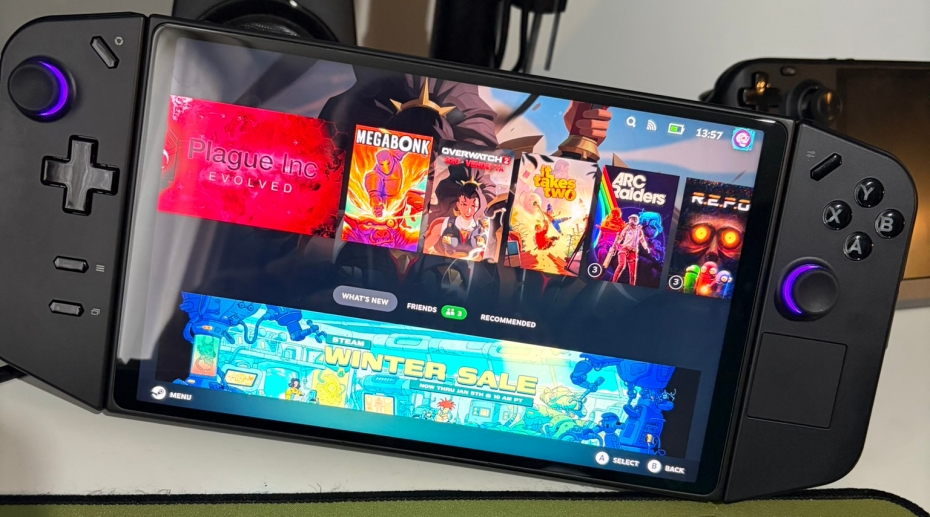
First problem was that the initial download linked on the Bazzite website when going through the options to get the right one for the Legion Go was for the previous release. Quite annoying. I didn't even realise this, because I just expected the download link on the Bazzite website to be the latest. I ended up on Bazzite 42 instead of 43, wondering why ARC Raiders was repeatedly crashing. A little system upgrade bringing the goodies of newer Mesa graphics drivers, and all is fine now.
To go back a step here though - actual install was a bit of a nuisance too. It took longer than expected and at one point I seriously thought it had frozen. The Bazzite installer definitely needs some more rolling feedback on exactly what it's doing. After it installed, eventually I got to a SteamOS screen with what looked like a blank loading bar. It was weird, nothing was happening. I could bring up a menu with power and help options but nothing else. Thinking again it was frozen in some way, but no - just another quirk that I've seen repeatedly posted about on Reddit. A force reboot, and it then just loaded into Steam Big Picture properly so I could actually login to Steam. This doesn't seem specific to Bazzite though, actual SteamOS itself seems to have this issue on some devices.
After that, all working as a handheld just — great. Holding it in my hands and resting it on my lap while chilling on the sofa has been wonderful. You definitely feel that weight more than the Steam Deck that's for sure, it's so damn big. And yet, still rather comfortable to hold, just not for longer sessions where you'll want some form of gaming pillow - or you know, just a cushion on your lap to rest your wrists a bit.
The biggest issue though? Docking it. What a freaking pain this was to start with. The official dock initially gave no HDMI output. I had to go into the Steam display settings, then enable "External display safe mode" and huzzah! It worked. And it seems to just continue working since then. Odd, but Valve's own Steam Deck still has lots of docking issues too, something Valve really need to get sorted for the new upcoming Steam Machine to work well. So I'm kind of used to the docking quirks of handhelds by now.
Anyway…I only have the one Legion Go Dock and that's attached to my main TV. I needed something else on my desk and in my bedroom without having to unplug things repeatedly. Going through multiple docks I had available I saw repeated issues of the Legion Go running out of charge, HDMI disconnecting and more. Turns out, some docks that advertise 100W pass-through power seemingly just fail at it.
Some USB-C cables are just complete junk too, it really is the wild west on what you get, as are some angled connectors that just don't work properly when it comes to a higher amount of pass-through power. In the case of the BenQ GR10 that I previously reviewed, I ended up figuring out the angled connector on it for some reason with the Legion Go just repeatedly forced the incoming power down to a static 3.5W (it worked fine with the Steam Deck). As soon as I removed that connector, it suddenly shot up to over 60W. Weird. But then it continued to have issues with the Legion Go HDMI crapping out. Just seemingly not actually giving enough power to the Legion Go. Oh dear.
Eventually, after plenty of trial and error, I settled with the JSAUX 11-in-1 Docking Station (HB1101) which has been an absolute workhorse. JSAUX sent it over quite a long time ago, and I don't think I ended up covering it, likely due to hardware overload at the time. But, to make things right - it really is great.
Not a single issue with anything at all since using the HB1101 on my desk and we've been testing it through some pretty intense multi-hour long sessions. It may not have a stand to slot the Legion Go into, but the Legion Go has one built-in. So not a problem there. The HB1101 works perfectly and that's all I need. I might actually have to buy myself one for a different room now it's that good.
I'm just thoroughly impressed by the power of the AMD Z1 Extreme. While yes, the Legion Go will use more power and battery life is an issue due to this, the pro of the performance outweighs the con of the battery life for me. Where the Steam Deck struggles, the Legion Go just purrs. Well, a little bit more, but to the point that some unplayable games on Steam Deck do work well enough on the Legion Go to be enjoyable. It has given me this little glimpse into a potential future world where a Steam Deck 2 comes along with lets say the Z3 Extreme and just kicks ass.
This is only really the start of my personal journey with Bazzite, and with a PC gaming handheld that isn't the Steam Deck but it's fun to see what's on the other side. Aside from the initial issues noted, the Legion Go absolutely rocks. And, seems like a perfectly timed purchase with the prices of everything going up, and with the generally insane pricing on the Legion Go 2 (£1,099.99 for the Z2 Extreme!) - the original Legion Go is a great companion system for me and for the Fiancée to join me in gaming sessions whenever needed.
So now you can expect more hands-on testing with Bazzite in future from me since I have a dedicated machine for it. Or, if a Linux version comes along to take the overall Linux handheld crown from Bazzite, I guess I'll get testing that with it too.





See more from me



 You can also find comments for this article on social media:

This has been fixed since, the new live isos do not use media check, avoiding this problem altogether.
Last edited by Stella on 6 Jan 2026 at 1:29 am UTC
 Linux_Rocks 6 Jan 2026

Quoting: Stellathe install trouble sounds very similar to my own Bazzite experience with the ROG Ally X, the Media Checker would get stuck at 4.8% and error out, and I could not do anything after that because it refused to let me use the iso because it was supposedly 'corrupted'. This is actually a known bug in the Fedora install media that's been present since at least 2016 (!!!) and it really caught me off guard. I had to connect a physical keyboard to be able to select the second GRUB option, that would skip the media check. Because of course the D-PAD did not work in GRUB. But after that, it went smoothly without a hitch.The D-Pad not working in GRUB sounds stupidly annoying. It's a real shame that it's not mapped to the arrow keys at all.
This has been fixed since, the new live isos do not use media check, avoiding this problem altogether.
 The_Real_Bitterman 6 Jan 2026
 Persephone the Sheep 6 Jan 2026
This review made me realize if the docking improves this maybe more convenient for travel because when I travel I bring my Steam Deck, Its dock and a PS5 controller to play on the TV where ever I'm staying, but the detachable controllers would mean I wouldn't need to bring my PS5 controller. Not that I can afford a new handheld plus dock. How well do the detachable controllers work?
 chickenb00 7 Jan 2026
Quoting: Persephone the SheepNot that I can afford a new handheld plus dock. How well do the detachable controllers work?Exactly my question to Liam also: how is LLGo Joycons support in Bazzite when they're not docked to the unit? I adore the Switch Joycons because I can rest my arms on the back of the couch, or drape one arm over my head and the other tucked under my leg if I so cared to. Freedom from standard controller "locked shoulder" pose, if you will.
How is undocked gyro support in Bazzite?


But, a bigger vendor like Lenovo seemed a bit more trustworthy if I ever encountered hardware problems.I thought the same... yet, I got disappointed by Lenovo.
As you know now, the detachable controllers have spring loaded copper pins. On my left controller, one of them fell out. I was able to plug it in and it worked again, for months no issues. Then it happened again, and I thought, hey I still have like more than half a year warranty, so why not get it fixed by Lenovo.
Nope, they claim I caused this and refused to replace or fix it for free. No matter what I told them, they stance is, this is a user caused error.
I could send it in for min. 35€ to have it checked, than I can decide if I want to get it repaired for at least 40€.
A new controller is about 70€.
Thanks Lenovo 😡
I bought a replacement controller when it was on sale, yet I'm disappointed by this service. I was one of the first to buy one, even from their store directly. Now I'm hesitant to detach the controller...
Yet, with the controllers attached and bazzite on it, it works really well, and I do enjoy using it from time to time.
I'm even thinking about getting an egpu for it. But from my experiences with bazzite on the ROG Ally where I have an egpu with their proprietary connector, I still had to use Windows to enable it and I wasn't able to get VR running on bazzite. That's why I have Cachy OS on the ROG Ally.
chickenb00 9 Jan 2026
Quoting: CorbenReminds me of Logitech when I asked them if my Logitech G815 keyboard keycaps will wear away: "no they are laser etched they cannot wear away."But, a bigger vendor like Lenovo seemed a bit more trustworthy if I ever encountered hardware problems.I thought the same... yet, I got disappointed by Lenovo.
One year later, the black plastic dye over the clear keycap is wearing away on the most used keys, e.g. everything surrounding the etched letter is disintegrating making some letters illegible.
1 year warranty.
I bought a replacement set from Aliexpress for $50 but still, buyer beware these days >:(
 Patreon
 PayPal
 Anticheat check - which competitive games actually work on Linux?
 How to give Valve feedback when Proton games have issues on Linux / SteamOS