 Support us on Patreon
 PayPal
Lutris is an all-in-one open source game manager for launching games from various stores on Linux, with version 0.5.20 out now.
This release overhauls how it runs GE-Proton, making use of the modern umu launcher to keep it all running nicely. So it should, in theory, offer a better experience than before when running Windows games. It also improves support for Wayland, adds support for the ZOOM Platform store, there's improvements for the EA App, some settings have been cleaned up and much more.
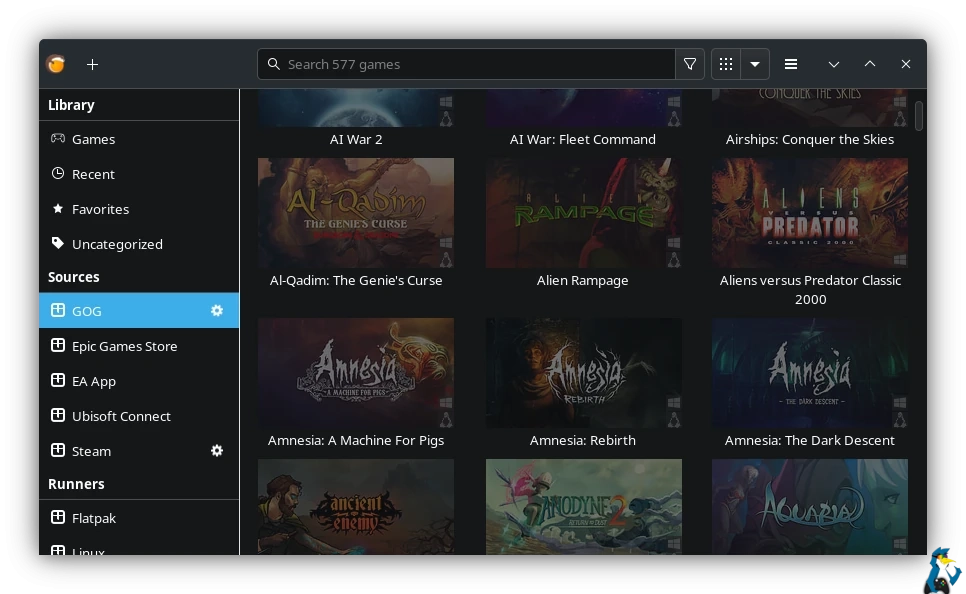
Here's the full list of changes:
- Proton-GE launched via umu is now the default. Umu takes care of keeping Proton-GE up to date.
- Fix Proton integration bugs so Proton-fixes are applied
- Do not offer VKD3D, D3D Extras or DXVK-NVAPI on Proton versions; Proton will handle these.
- The "Enable Esync" and "Enable Fsync" and "DXVK" settings are now passed on to Proton
- DXVK's integrated D8VK will be enabled in Proton
- Wine runner adds an option to select Wine's "Wayland driver"
- Add little buttons to select covert-art, banner and icons via URL in game configuration
- Cover-art or banners from sources will be used when Lutris media is not available
- Emulator BIOS file location (used by libretro) may be set in Preferences
- Fix for updated Flathub API
- Change Itch.io over to the use of API keys instead of usernames and passwords
- Update EA App source to their new API
- Simplify Itcho.io collections- if you have no collection named "Lutris", we will show all games
- MAME Machine setting uses a searchable entry for its enormous list
- Obtain the release year from GOG and Itch.io
- Add "Azahar" runner
- Add "ZOOM Platform" source
- Add "Steam Family" source to support Steam Families
- Updated versions of runners for TIC-80, EasyRPG, mGBA, Rosalie's Mupen GUI, Ruffle, 86Box
- Ryujinx runner can now specific 'application ID' for your multi-game XCIs.
- Support for importing Commodore 64 ROMs
- Support ICDs for Intel Xe GPUs
- Add option for 'ptyxis' terminal
- Redundant "Add Games" menu item removed; use the plus button in the corner
- Option to hide a source's games from also appearing in the Games view
- "Manual Script" for the context menu will now see the game's environment variables
- Add "Create Steam Big Picture shortcut" to the context menu
- Add a file association to run .lutris installer files via double-click
- Fix compatibility with Python 3.14
Source: GitHub
See more on the Lutris website.




About the author - Liam Dawe

I am the owner of GamingOnLinux. After discovering Linux back in the days of Mandrake in 2003, I constantly checked on the progress of Linux until Ubuntu appeared on the scene and it helped me to really love it. You can reach me easily by emailing GamingOnLinux directly.
See more from me
See more from me
Some you may have missed, popular articles from the last month:



 You can also find comments for this article on social media:
 All posts need to follow our rules. Please hit the Report Flag icon on any post that breaks the rules or contains illegal / harmful content. Readers can also email us for any issues or concerns.
20 comments
A month ago I had to switch to Heroic Game Launcher because there was no news from Lutris until the end of 24th year.
4 Likes
 mr-victory 17 Feb 2026
Proton-GE launched via umu is now the default. Umu takes care of keeping Proton-GE up to date.About time.
5 Likes
 Nostalgia_Realm 17 Feb 2026

Quoting: mr-victoryCould anyone enlighten me how this is better than how Proton-GE previously functioned? I am clueless about this topic. All I know is that Proton-GE has always worked fine for me on Lutris.Proton-GE launched via umu is now the default. Umu takes care of keeping Proton-GE up to date.About time.
0 Likes
mr-victory 17 Feb 2026
Quoting: Nostalgia_RealmCould anyone enlighten me how this is better than how Proton-GE previously functioned? I am clueless about this topic. All I know is that Proton-GE has always worked fine for me on Lutris.First things first I wrote that comment not because of umu but because of Proton-GE. The default runner was Wine-GE until this update which caused installation of Battle.net to mysteriously fail, some Windows apps to detect no available storage etc. I had had enough telling people to use Proton GE in Bazzite discord😆
Now about umu, it does 2 things:
* Running Proton with Steam Linux Runtime: This replicates how Steam runs proton, aiming to reduce unusual bugs.
* Game fixes: Umu contains a database of game fixes for both Steam & non Steam games, launchers capable of parsing the data automatically benefit from the unified effort of assembling game fixes. Things like passing SteamOS=1 to Wuthering Waves, enabling DLLs etc.
6 Likes

I've just installed it but it couldn't find my steam games. When I gave it the exact directory it complained that it cannot load them and I should make my profile public (whatever that means). So I tried GOG and it found my games at least but for the installation it prompted which file I want to install ..
Whatever the functionality may be, it feels like you need to read the code to just configure the program. No tool tips, no manual, no hints. Deinstalled, IMHO not really usable.
Whatever the functionality may be, it feels like you need to read the code to just configure the program. No tool tips, no manual, no hints. Deinstalled, IMHO not really usable.
0 Likes
 Caldathras 17 Feb 2026
Quoting: Nostalgia_RealmCould anyone enlighten me how this is better than how Proton-GE previously functioned? I am clueless about this topic. All I know is that Proton-GE has always worked fine for me on Lutris.
Let's see: on version 0.5.18, I had to basically employ a workaround to install a game using UMU.
1) Under Add Games to Lutris, I would select Add locally installed game;
2) manually enter the game's name and select the WINE runner in the Game Info tab;
3) enter/select the location of the WINE prefix in the Game Options tab;
4) then make sure to select a WINE version that was either Proton or Proton-GE in the Runner Options tab;
5) I would save the configuration then run the installer using the menu option to Run EXE inside Wine prefix;
6) This would start up UMU, which would configure the prefix and install the game;
7) I may have had to enter the game's launch executable after the install was completed. I don't recall.
As far as I recall, UMU would not initiate if you assigned a Proton runner as the default runner in version 0.5.18.
In Heroic Games Launcher, you enter the game's name, confirm the prefix location and provide the installer. UMU is run automatically and everything is configured for you. As a result, I stopped using Lutris to install Windows games.
With Proton-GE being launched via UMU as the default, this should simplify the process and, at least, put Lutris back on par with Heroic again.
Whether I go back to Lutris remains to be seen. There are some nice QoL features in Lutris that are not yet available in Heroic (like launching the game from its Windows shortcut, for example).
3 Likes
 fenglengshun 18 Feb 2026
It doesn't have the Save Sync function yet, but it's great to see a lot of updates. There has been a LOT of changes to the way we're doing non-Steam games in the past 1-2 years since they had a release. The changes were probably tough to get done, but hopefully everything is cleaner from here on out.
I for one have been very happy with the way they preserved my play time and list of non-Steam games.
Heroic will still be my default of GOG & EGS, but Lutris is now back as default for anything that isn't on those platforms (with Faugus for running games from the file explorer).
I for one have been very happy with the way they preserved my play time and list of non-Steam games.
Heroic will still be my default of GOG & EGS, but Lutris is now back as default for anything that isn't on those platforms (with Faugus for running games from the file explorer).
0 Likes


Am I trippin'? I am pretty sure it has been running Proton through UMU for quite a while now?
0 Likes

I am probably one of the few rare exotic people who actually like to be able to have some manual settings.
(Though I admit it is sometimes consuming more time trying out different Proton, DXVK, VKD3D than actually playing 😅)
That's also why I still am on Lutris v0.5.14
So I am asking a noob question:
Is there a way to have two versions of Lutris installed at the same time?
So I can try out just using automatic v0.5.20 but also have v0.5.14 installed if I am not happy and rather have some manual settings?
*EDIT:
I'm on POP_OS
Is there a possibility to just duplicate and rename Lutris v0.5.14 to for example LutrOs?
and then update the not renamed to v0.5.20?
So I then have Lutris (v0.5.20) and Lutros (v0.5.14) in my program overview?
(got the idea from here: https://askubuntu.com/questions/1036337/is-there-way-to-install-two-instances-of-the-same-application but am not knowing enough in Linux..)
Any tips and help would be greatly appreciated <3 !
Last edited by memvirus on 19 Feb 2026 at 9:19 pm UTC
(Though I admit it is sometimes consuming more time trying out different Proton, DXVK, VKD3D than actually playing 😅)
That's also why I still am on Lutris v0.5.14
So I am asking a noob question:
Is there a way to have two versions of Lutris installed at the same time?
So I can try out just using automatic v0.5.20 but also have v0.5.14 installed if I am not happy and rather have some manual settings?
*EDIT:
I'm on POP_OS
Is there a possibility to just duplicate and rename Lutris v0.5.14 to for example LutrOs?
and then update the not renamed to v0.5.20?
So I then have Lutris (v0.5.20) and Lutros (v0.5.14) in my program overview?
(got the idea from here: https://askubuntu.com/questions/1036337/is-there-way-to-install-two-instances-of-the-same-application but am not knowing enough in Linux..)
Any tips and help would be greatly appreciated <3 !
Last edited by memvirus on 19 Feb 2026 at 9:19 pm UTC
0 Likes
fenglengshun 20 Feb 2026
Quoting: memvirusSo I am asking a noob question:Yes. Just install through different package managements. Maybe your main is apt, and use Flatpak or Nix in addition to it - both supports downgrading and version pinning.
Is there a way to have two versions of Lutris installed at the same time?
So I can try out just using automatic v0.5.20 but also have v0.5.14 installed if I am not happy and rather have some manual settings?
Distrobox is another option and the one that I recommend - just setup an Arch distrobox with a separate home, maybe add cachyos + chaotic-aur for convenience, and then install whatever you need.
Also, I think Conty comes with Lutris as well. Again, just set up a separate home (well, XDG_CONFIG_HOME and XDG_DATA_HOME) so it doesn't collide with your existing Lutris. Login to Lutris if you want to sync them, maybe.
0 Likes
Quoting: fenglengshunThank you. I will take a look but am unsure if it makes it just too complicated.Quoting: memvirusSo I am asking a noob question:Yes. Just install through different package managements. Maybe your main is apt, and use Flatpak or Nix in addition to it - both supports downgrading and version pinning.
Is there a way to have two versions of Lutris installed at the same time?
So I can try out just using automatic v0.5.20 but also have v0.5.14 installed if I am not happy and rather have some manual settings?
Distrobox is another option and the one that I recommend - just setup an Arch distrobox with a separate home, maybe add cachyos + chaotic-aur for convenience, and then install whatever you need.
Also, I think Conty comes with Lutris as well. Again, just set up a separate home (well, XDG_CONFIG_HOME and XDG_DATA_HOME) so it doesn't collide with your existing Lutris. Login to Lutris if you want to sync them, maybe.
I have Lutris currently installed via apt/ a downloaded .deb
Will installing it via flatpak make a new directory for it?
Or I just backup my current lutris directory (which ones are the important ones?) and then upgrade - later if I want to have my old downgraded state again, just uninstall, reinstall and restore my backed up directory?
(You see, I'm not so experienced and therefore more manual :D)
Best regards and thanks for the help :)
*Edit:
I really want to try it out, also had CachyOS as idea for my next OS - but am also just happy with my PopOS at the moment, because everything is working and I prefer it to be as stable as possible and just working
But I guess I need another host system
Wisely something immutable?
Like Silverblue or NixOS (have no experience with hem)
and then put my old system (PopOS) in there as container and also set up CachyOS as container?
how would be a fast and smart way to set it up without reproducing everything manually from zero?
I guess I also need to learn some docker? (has also been on my list) because distrobox is based on it? so then docker -> distrobox would run on Silverblue/ NixOS?
And first I need to do some cleanup to get more space on my laptop :D
also sadly PopOS seems to be neither in compatible host nor container OS
https://github.com/89luca89/distrobox/blob/main/docs/compatibility.md#host-distros
Last edited by memvirus on 22 Feb 2026 at 8:46 am UTC
0 Likes
Caldathras 22 Feb 2026
Quoting: memvirusI have Lutris currently installed via apt/ a downloaded .debYes. Flatpak, being containerized by default, would install its version of Lutris separately from the one installed via apt. Flatpak keeps its file system separate. It shouldn't overlap with apt.
Will installing it via flatpak make a new directory for it?
The challenge would be telling the shortcuts (launcher) apart. They'll likely share the same name. Fortunately, you can just rename the shortcut as desired.
Quoting: memvirusOr I just backup my current lutris directory (which ones are the important ones?) and then upgrade - later if I want to have my old downgraded state again, just uninstall, reinstall and restore my backed up directory?In this case, I would suggest using Flatpak for the latest version and then choosing an earlier version to install via a .deb installer. There should be no need to back up your config files (although it never hurts - they're in hidden folders under your Home folder in multiple locations). I never have and the files & settings have remained while I've bounced back and forth between versions. Not sure how it would work with Flatpak, however. I don't know where that version stores its config files.
Quoting: memvirusalso sadly PopOS seems to be neither in compatible host nor container OSNot sure exactly what you mean by this, but Pop!_OS is based on Ubuntu. It is listed under Ubuntu in the link you provided. Generally, anything you can do on Ubuntu, you should be able to do on Pop!_OS. It supports .deb installers and LaunchPad PPAs, for example.
Being as you are new to tinkering with Linux, make sure you make a complete backup of your system and data before you start. That way, if something foobars, you'll have something solid to fall back on. Timeshift is effective but my favorite backup tool is Clonezilla (its back-ups are compressed and take less space).
Good luck and have fun.
0 Likes
Caldathras 22 Feb 2026
Quoting: memvirus(got the idea from here: https://askubuntu.com/questions/1036337/is-there-way-to-install-two-instances-of-the-same-application but am not knowing enough in Linux..)What they are talking about at this link would work best with tarball binaries. For example, with OpenMW it is possible to have multiple versions installed using tarball binaries. They all share the same configuration files, however.
Otherwise, @fenglengshun's advice would work best. I recommend keeping it as simple as possible.
0 Likes
Caldathras 23 Feb 2026
Quoting: CaldathrasWhat they are talking about at this link would work best with tarball binaries. For example, with OpenMW it is possible to have multiple versions installed using tarball binaries. They all share the same configuration files, however.Now that I think about it, this should work with AppImages too. The same caveat about shared config files, however.
Lutris isn't available as an AppImage, unfortunately.
0 Likes
Quoting: CaldathrasThank you very much!Quoting: memvirusI have Lutris currently installed via apt/ a downloaded .debYes. Flatpak, being containerized by default, would install its version of Lutris separately from the one installed via apt. Flatpak keeps its file system separate. It shouldn't overlap with apt.
Will installing it via flatpak make a new directory for it?
The challenge would be telling the shortcuts (launcher) apart. They'll likely share the same name. Fortunately, you can just rename the shortcut as desired.
Quoting: memvirusOr I just backup my current lutris directory (which ones are the important ones?) and then upgrade - later if I want to have my old downgraded state again, just uninstall, reinstall and restore my backed up directory?In this case, I would suggest using Flatpak for the latest version and then choosing an earlier version to install via a .deb installer. There should be no need to back up your config files (although it never hurts - they're in hidden folders under your Home folder in multiple locations). I never have and the files & settings have remained while I've bounced back and forth between versions. Not sure how it would work with Flatpak, however. I don't know where that version stores its config files.
Quoting: memvirusalso sadly PopOS seems to be neither in compatible host nor container OSNot sure exactly what you mean by this, but Pop!_OS is based on Ubuntu. It is listed under Ubuntu in the link you provided. Generally, anything you can do on Ubuntu, you should be able to do on Pop!_OS. It supports .deb installers and LaunchPad PPAs, for example.
Being as you are new to tinkering with Linux, make sure you make a complete backup of your system and data before you start. That way, if something foobars, you'll have something solid to fall back on. Timeshift is effective but my favorite backup tool is Clonezilla (its back-ups are compressed and take less space).
Good luck and have fun.
I have installed the most recent flatpak version to give it a try :)
but only one lutris is being displayed in the program overview in popos
and it is not opening flatpak lutris, so when I want to open my old deb lutris I have to write lutris into the terminal right now
also in flatpak there are some "problems" - I guess due to it being containerized
mangohud was not working, but I fixed that by also installing the mangohud flatpak (is it supposed to be fixed like that? or can I link my goverlay mangohud to flatpak lutris? cuz installing mangohud twice is also taking space..)
but my bigger problem which I cannot fix right now: pulseaudio latency fix in lutris is greyed out - I guess because it also cannot find it in the container?
0 Likes
Caldathras 24 Feb 2026
Quoting: memvirusThank you very much!I assume you mean that the launcher under Applications IS opening Flatpak Lutris.
I have installed the most recent flatpak version to give it a try :)
but only one lutris is being displayed in the program overview in popos
and it is not opening flatpak lutris, so when I want to open my old deb lutris I have to write lutris into the terminal right now
Sounds like the Flatpak version overwrote the shortcut instead of adding a second one. Your solution works but if you don't want to be using terminal long term, you can manually create a menu/desktop launcher (make sure you use a unique name) and point it at the apt executable. Since it is in your path, just using "lutris" as the command should work but I would supplying it's full path so you can be sure it's launching the apt version. I don't have my PC on, otherwise I'd be able to provide that path for you. Unfortunately, I don't remember how to create a launcher in Pop!_OS. You'll have to figure that out yourself.
Quoting: memvirusalso in flatpak there are some "problems" - I guess due to it being containerizedThat's how Flatpak works. All supporting "tools" have to be in Flatpak as well. While more knowledgeable types might disagree with my simplification, Flatpak is essentially like running an operating system on top of your base operating system. That's why I stopped using flatpaks. The extra space they eat up annoys me. I prefer to stick with the repositories, AppImage files or downloadable installers (.deb, tarballs, etc.),
mangohud was not working, but I fixed that by also installing the mangohud flatpak (is it supposed to be fixed like that? or can I link my goverlay mangohud to flatpak lutris? cuz installing mangohud twice is also taking space..)
but my bigger problem which I cannot fix right now: pulseaudio latency fix in lutris is greyed out - I guess because it also cannot find it in the container?
You'll probably have to install a Flatpak version of GOverlay as well. (FYI, GOverlay is also available in an AppImage. It works with my apt version of Mangohud -- I don't know if it will work with the Flatpak version.)
Unfortunately, I don't know the answer to your pulseaudio latency fix issue. It could be a Flatpak container permissions issue or it could be something else.
Last edited by Caldathras on 24 Feb 2026 at 6:56 pm UTC
0 Likes
Caldathras 24 Feb 2026
Quoting: CaldathrasWhether I go back to Lutris remains to be seen. There are some nice QoL features in Lutris that are not yet available in Heroic (like launching the game from its Windows shortcut, for example).Well, Lutris has made the decision easier for me. I haven't even upgraded to v0.5.20 yet and they managed to piss me off. Lutris has this "feature" where the devs can change the default WINE version, overriding the one I chose manually. This would be fine if it only applied to new installs but, no. Any game prefix that used the old default WINE version gets switched over to the new default as well! I always find out when I launch a game that worked perfectly fine before, only to have it lock up and/or crash now. It usually corrupts my prefix and I have to reinstall the game.
This is the third time I've been hit by this "default version override". Other than the odd exceptional case, I am done with Lutris. I will begin migrating all my game installs over to Heroic Launcher. I discovered with my test migration that Heroic Launcher v2.19.1 supports the Windows shortcut. The migrated game even performed better than it did launching from Lutris.
2 Likes
Quoting: CaldathrasThat's how Flatpak works. All supporting "tools" have to be in Flatpak as well. While more knowledgeable types might disagree with my simplification, Flatpak is essentially like running an operating system on top of your base operating system. That's why I stopped using flatpaks. The extra space they eat up annoys me. I prefer to stick with the repositories, AppImage files or downloadable installers (.deb, tarballs, etc.),thank you very much!
You'll probably have to install a Flatpak version of GOverlay as well. (FYI, GOverlay is also available in an AppImage. It works with my apt version of Mangohud -- I don't know if it will work with the Flatpak version.)
Unfortunately, I don't know the answer to your pulseaudio latency fix issue. It could be a Flatpak container permissions issue or it could be something else.
I just can't find a pulseaudio version for flatpak.. and also made sure that pulseaudio socket is activated for lutris in flatseal...
anyway, I have a bigger problem now :S :(
after updating lutris via flatpak update to 0.5.21 it is now not working anymore, at all, not even starting and when
flatpak run net.lutris.Lutris
it shows me:
Traceback (most recent call last):
File "/app/bin/lutris", line 68, in <module>
from lutris.gui.application import LutrisApplication
File "/app/lib/python3.13/site-packages/lutris/gui/application.py", line 37, in <module>
from lutris.api import get_runners, parse_installer_url
File "/app/lib/python3.13/site-packages/lutris/api.py", line 20, in <module>
from lutris.util import http, system
File "/app/lib/python3.13/site-packages/lutris/util/http.py", line 41, in <module>
class Request:
...<160 lines>...
return ""
File "/app/lib/python3.13/site-packages/lutris/util/http.py", line 46, in Request
stop_request: threading.Event = None,
^^^^^^^^^
NameError: name 'threading' is not defined. Did you forget to import 'threading'?
also after uninstalling the flatpak lutris and installing it again, still the same..
should have not upgraded.. can I install the 0.5.20 version of lutris again via flatpak?
*EDIT:
------------------------
okay, seems to be no problem on my end, phew
https://github.com/flathub/net.lutris.Lutris/issues/523
https://github.com/lutris/lutris/issues/6497
but when trying to rollback flatpak lutris (after figuring it out)
sudo flatpak update --commit=19516c28a17c7beb7dd3505322ee451eb4ae2be55ce7a8a61a99487e81d2ff45 net.lutris.Lutris
it just tells me I have net.lutris.Lutris not installed
I guess I need to wait for 0.5.22
----------------------
also I have a problem with nvidia-driver-580 after it has been automatically upgraded via sudo apt upgrade
but it seems like I just cannot install anything else anymore, if I do sudo apt install nvidia-driver-565 (which was working amazing for me) it just installs 580.........
this kinda sucks, I feel like I have no control over my linux..
are there better options for software version control?
I also like just backing up .deb of different versions.. is this the best practice?
can one downgrade flatpaks?
or do I need another distro? maybe NixOS? or what can you guys recommend?
Last edited by memvirus on 25 Feb 2026 at 6:47 pm UTC
0 Likes

Quoting: memvirusshould have not upgraded.. can I install the 0.5.20 version of lutris again via flatpak?You can install specific versions of packages with both apt and flatpak.
With flatpak you can find all available versions (or commits) of Lutris with the command:
flatpak remote-info --log flathub net.lutris.LutrisCopy the commit hash for the version you want to install, then run:
flatpak update --commit=[commit hash] [app id]Or, just copy-paste the following into your terminal to roll back to 0.5.20, at your own risk because I haven't tested it:
flatpak update --commit=19516c28a17c7beb7dd3505322ee451eb4ae2be55ce7a8a61a99487e81d2ff45 net.lutris.LutrisFor what it's worth, the 0.5.22 deb from the Lutris github works fine for me on Mint.
0 Likes
Caldathras 25 Feb 2026
Quoting: memvirusI have a problem with nvidia-driver-580 after it has been automatically upgraded via sudo apt upgradeThis happened to me as well. I commented about it here on GoL. @CatKiller kindly answered:
but it seems like I just cannot install anything else anymore, if I do sudo apt install nvidia-driver-565 (which was working amazing for me) it just installs 580.........
https://www.gamingonlinux.com/2025/11/nvidia-driver-580-105-08-out-now-for-linux-as-the-new-recommended-version/?comment_id=285291
Last edited by Caldathras on 25 Feb 2026 at 10:19 pm UTC
0 Likes
 How to setup OpenMW for modern Morrowind on Linux / SteamOS and Steam Deck
 How to install Hollow Knight: Silksong mods on Linux, SteamOS and Steam Deck