 Support us on Patreon
 PayPal
The KDE team have released KDE Plasma 6.6, the latest new feature update to the popular Linux desktop environment with lots of goodies.
With this release they've had a nice focus on accessibility, something that various Linux desktops have been a bit lacking in. There's a new and improved on-screen keyboard, the spectacle screenshot tool can now extract text, there's a new grayscale filter in the Color Blindness Correction settings, the Zoom and Magnifier feature gained the ability to keep the pointer in the centre of the screen, there's "Slow Keys" support on Wayland and the new standardized "Reduced Motion" setting is in too.
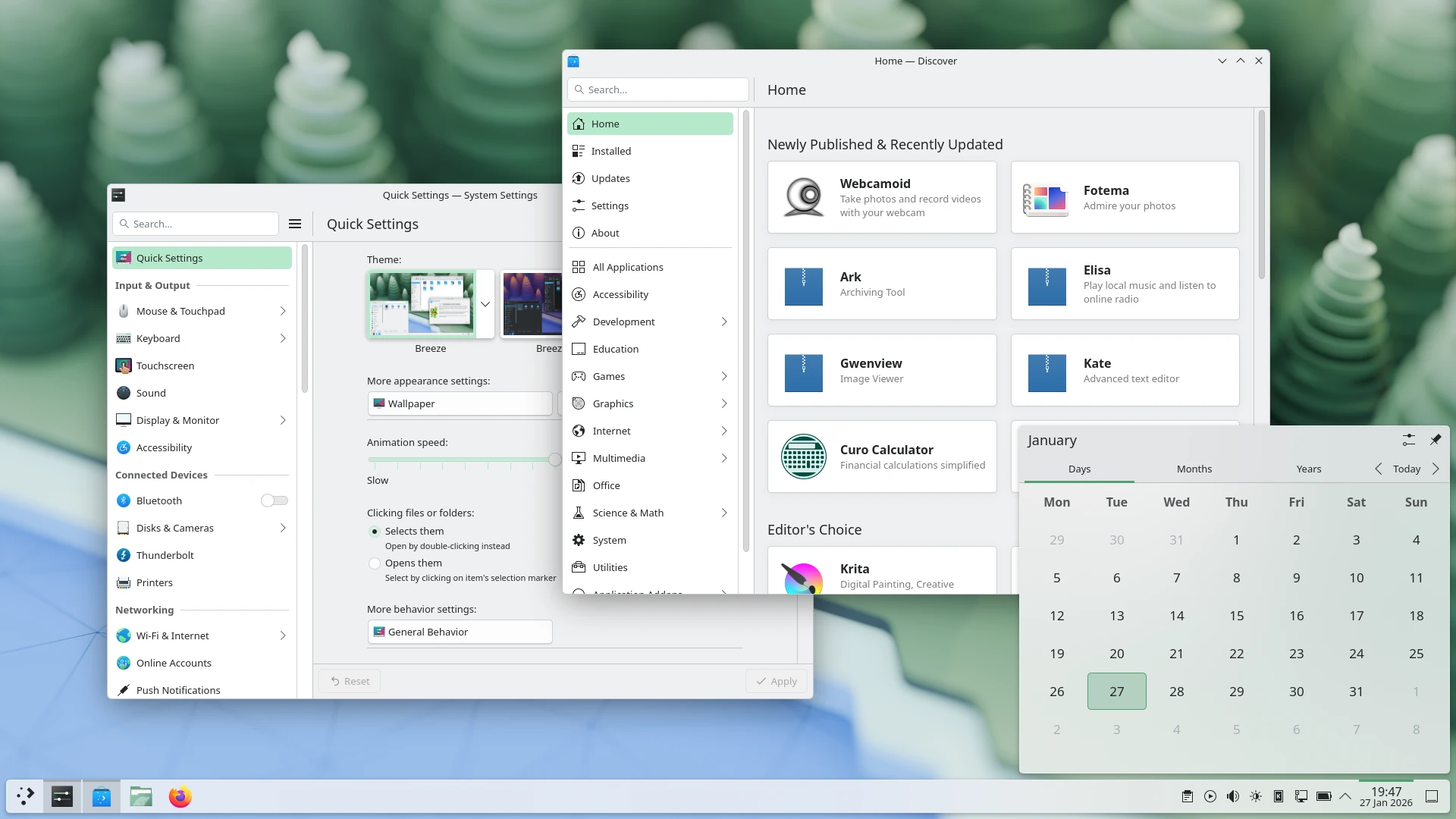
There's also the new Plasma Setup first-run tool giving user-facing steps like making an account separate from the technical steps like partitioning. A feature that's good for all kinds of uses like companies shipping hardware with Plasma.
Plus various other bits like:
- The ability to have virtual desktops only on the primary screen.
- An optional new login manager for Plasma.
- Optional automatic screen brightness on devices with ambient light sensors.
- Optional support for using game controllers as regular input devices.
- Font installation in the Discover software center, on supported operating systems.
- Choose process priority in System Monitor.
- Standalone Web Browser and Audio Volume widgets can be pinned open.
- Support for USB access prompts and a visual refresh of other permission prompts.
- Smoother animations on high-refresh-rate screens.
See the release announcement for more.





See more from me

 You can also find comments for this article on social media:
  mr-victory 17 Feb 2026
The ability to have virtual desktops only on the primary screen.Whaaaaaaaa
An optional new login manager for Plasma.
Optional automatic screen brightness on devices with ambient light sensors.Interesting, I wonder if that works on my intel macbook. (it does on bootcamp)
Not sure which one to choose , needs to be more upto date than mint/debian though but Not a 'YOLO Update' distro 🤔
Great work 👍
Last edited by Lofty on 17 Feb 2026 at 2:40 pm UTC
 walther von stolzing 17 Feb 2026

It's the issue in this 'resolved' bug: https://bugs.kde.org/show_bug.cgi?id=481222
UPDATE: It's fixed!
Last edited by walther von stolzing on 18 Feb 2026 at 10:58 am UTC

Quoting: LoftyFinally! We have an integrated onscreen keyboard under Wayland which has been a much needed accessibility feature for me. I have stayed on X11 because of this using the admittedly great application 'onboard' which has meant missing out on other gaming features & HDR. Now i will have to move from my older existing plasma install to a newer distro that supports 6.6Fedora 44 will get KDE 6.6. Worth noting that there are also immutable variants of Fedora like Kionite or Bazzite/Aurora from Universalblue. The advantage is integrated rollback functionality and the assurance of always having a working system, while staying relatively up to date
Not sure which one to choose , needs to be more upto date than mint/debian though but a 'YOLO Update' distro 🤔
Great work 👍
Last edited by Stella on 17 Feb 2026 at 2:39 pm UTC
Quoting: StellaI have considered Fedora, never really got into it so far and I've been using Linux for a good long while. I read there are some things missing OOTB that make it not as complete as a distro such as Mint, Ubuntu or even Manjaro.Quoting: LoftyFinally! We have an integrated onscreen keyboard under Wayland which has been a much needed accessibility feature for me. I have stayed on X11 because of this using the admittedly great application 'onboard' which has meant missing out on other gaming features & HDR. Now i will have to move from my older existing plasma install to a newer distro that supports 6.6Fedora 44 will get KDE 6.6. Worth noting that there are also immutable variants of Fedora like Kionite or Bazzite/Aurora from Universalblue. The advantage is integrated rollback functionality and the assurance of always having a working system, while staying relatively up to date
Not sure which one to choose , needs to be more upto date than mint/debian though but a 'YOLO Update' distro 🤔
Great work 👍
 Galactic-Man 17 Feb 2026

Now awaiting the Arch repo updating...


 Linux_Rocks 17 Feb 2026
 mr-victory 17 Feb 2026
Quoting: PyrateCould say this about a lot of Linux projects, or just any open source project really, but Plasma is the gift that keeps on giving. No enshittification, just continuous improvements. We can't stop winning.KDE Plasma updates are the few I look up to. Back in 5.24 I was installing betas to get some features early, I haven't installed a beta in years but dammit the changelogs still have gems.
Quoting: LoftyI have stayed on X11 because of this using the admittedly great application 'onboard'I use wayland but there is a bug not affecting X11: moonlight and seemingly nothing else can disable vsync so I get higher input latency.
https://discuss.kde.org/t/1-frame-latency-on-moonlight-only-on-wayland-cannot-turn-off-vsync/40157
Quoting: LoftyFedora is definitely a distro that doesn't really go out of its way to be extra user friendly and it's very vanilla, so it's kinda like Debian with newer packages or Arch without sudden breaking changes, but also the state of vanilla Linux has been so good that people have been calling Fedora a new Ubuntu for a while. Especially if you prefer flatpak apps because Fedora packaged apps have some legal issues with stuff like codecs and hardware video decoding. Also previously mentioned Fedora-based Aurora is a distro that both includes all you should need ootb and is immutable/atomic which means that no matter what you do and how long you use your system, it's guaranteed to always be in the correct state to the point that there is never any difference between an update and a fresh install.Quoting: StellaI have considered Fedora, never really got into it so far and I've been using Linux for a good long while. I read there are some things missing OOTB that make it not as complete as a distro such as Mint, Ubuntu or even Manjaro.Quoting: LoftyFinally! We have an integrated onscreen keyboard under Wayland which has been a much needed accessibility feature for me. I have stayed on X11 because of this using the admittedly great application 'onboard' which has meant missing out on other gaming features & HDR. Now i will have to move from my older existing plasma install to a newer distro that supports 6.6Fedora 44 will get KDE 6.6. Worth noting that there are also immutable variants of Fedora like Kionite or Bazzite/Aurora from Universalblue. The advantage is integrated rollback functionality and the assurance of always having a working system, while staying relatively up to date
Not sure which one to choose , needs to be more upto date than mint/debian though but a 'YOLO Update' distro 🤔
Great work 👍
Quoting: rustynailthx for the reply i will check out Aurora Linux reviews to see what it's like. I do tend to lean heavily towards flatpak usage.Quoting: LoftyFedora is definitely a distro that doesn't really go out of its way to be extra user friendly and it's very vanilla, so it's kinda like Debian with newer packages or Arch without sudden breaking changes, but also the state of vanilla Linux has been so good that people have been calling Fedora a new Ubuntu for a while. Especially if you prefer flatpak apps because Fedora packaged apps have some legal issues with stuff like codecs and hardware video decoding. Also previously mentioned Fedora-based Aurora is a distro that both includes all you should need ootb and is immutable/atomic which means that no matter what you do and how long you use your system, it's guaranteed to always be in the correct state to the point that there is never any difference between an update and a fresh install.Quoting: StellaI have considered Fedora, never really got into it so far and I've been using Linux for a good long while. I read there are some things missing OOTB that make it not as complete as a distro such as Mint, Ubuntu or even Manjaro.Quoting: LoftyFinally! We have an integrated onscreen keyboard under Wayland which has been a much needed accessibility feature for me. I have stayed on X11 because of this using the admittedly great application 'onboard' which has meant missing out on other gaming features & HDR. Now i will have to move from my older existing plasma install to a newer distro that supports 6.6Fedora 44 will get KDE 6.6. Worth noting that there are also immutable variants of Fedora like Kionite or Bazzite/Aurora from Universalblue. The advantage is integrated rollback functionality and the assurance of always having a working system, while staying relatively up to date
Not sure which one to choose , needs to be more upto date than mint/debian though but a 'YOLO Update' distro 🤔
Great work 👍
im wondering if aurora offers btrfs + Snapper snapshots like cachyos 🤔
Quoting: LoftyAurora has bootable snapshots and rollbacks out of the box, yes, but it's not really btrfs snapshots, it's sort of implemented at the level of the "package manager" roughly speaking, when you install any system updates, the new version is created as a new system snapshot which you then reboot into, and the previous version is also kept. And before you reboot, your currently running system isn't touched at all, which makes safe auto updates possible, and they are actually enabled by default iirc. I didn't really daily drive Aurora but I did daily drive Fedora Kinoite which it's based on and it has the same systemQuoting: rustynailthx for the reply i will check out Aurora Linux reviews to see what it's like. I do tend to lean heavily towards flatpak usage.Quoting: LoftyFedora is definitely a distro that doesn't really go out of its way to be extra user friendly and it's very vanilla, so it's kinda like Debian with newer packages or Arch without sudden breaking changes, but also the state of vanilla Linux has been so good that people have been calling Fedora a new Ubuntu for a while. Especially if you prefer flatpak apps because Fedora packaged apps have some legal issues with stuff like codecs and hardware video decoding. Also previously mentioned Fedora-based Aurora is a distro that both includes all you should need ootb and is immutable/atomic which means that no matter what you do and how long you use your system, it's guaranteed to always be in the correct state to the point that there is never any difference between an update and a fresh install.Quoting: StellaI have considered Fedora, never really got into it so far and I've been using Linux for a good long while. I read there are some things missing OOTB that make it not as complete as a distro such as Mint, Ubuntu or even Manjaro.Quoting: LoftyFinally! We have an integrated onscreen keyboard under Wayland which has been a much needed accessibility feature for me. I have stayed on X11 because of this using the admittedly great application 'onboard' which has meant missing out on other gaming features & HDR. Now i will have to move from my older existing plasma install to a newer distro that supports 6.6Fedora 44 will get KDE 6.6. Worth noting that there are also immutable variants of Fedora like Kionite or Bazzite/Aurora from Universalblue. The advantage is integrated rollback functionality and the assurance of always having a working system, while staying relatively up to date
Not sure which one to choose , needs to be more upto date than mint/debian though but a 'YOLO Update' distro 🤔
Great work 👍
im wondering if aurora offers btrfs + Snapper snapshots like cachyos 🤔
Quoting: Purple Library GuyI'm interested in KDE, it seems really good (I tried it a couple of times long ago and didn't quite click with it, but it wasn't like I fundamentally disliked it, there were just things, little problems that are probably long gone). But it doesn't seem to be available in any distros as user friendly as Mint. One of these days I'll give it another look.How long ago? Plasma 5 was good but full of paper cuts. With Plasma 6 KDE have really stepped up. They have a huge momentum with lots of devs and funding. You can really feel the bar being raced in every update. I don't know for how long they can keep it up. Most DE's release 1-2 times a year, Plasma does 3 releases a year.
Everyone should use whatever makes them happy and there are plenty of good options, but in my book Plasma is starting to pull away and play in a whole league of their own. Yeah there are lots of options that can be confusing but the defaults are good enough that most don't need to change anything. For most of my time the only customization I did was moving the taskbar to the right and changing wallpaper.
mr-victory 18 Feb 2026
Quoting: rustynailAurora is a distro that both includes all you should need ootbHow can I install a kernel module on aurora? It certainly doesn't have the kernel module I need for wifi (Broadcom wl) and I could not figure out how to make a custom image with the wifi driver included.
 TheLinuxPleb 18 Feb 2026
I welcome the virtual desktop only on primary monitor. Will take it in use and it will come in handy with games that are troublesome with Alt Tab.
Quoting: Purple Library GuyBut it doesn't seem to be available in any distros as user friendly as Mint. One of these days I'll give it another look.Fedora KDE is user friendly. Not having Nvidia drivers pre-installed ≠ not-user friendly. Windows comes without drivers pre-installed as well and people think that OS is user friendly. There's no harm in websearching "install nvidia drivers fedora Linux" and learning a thing or two about package management in the process. It's good practice long term.
Quoting: mr-victoryIf you can do it on normal Fedora just by installing packages (including copr repos), it is also doable on Kinoite and should be doable on Aurora.Quoting: rustynailAurora is a distro that both includes all you should need ootbHow can I install a kernel module on aurora? It certainly doesn't have the kernel module I need for wifi (Broadcom wl) and I could not figure out how to make a custom image with the wifi driver included.
mr-victory 18 Feb 2026
Quoting: rustynailIf you can do it on normal Fedora just by installing packages (including copr repos), it is also doable on Kinoite and should be doable on Aurora.So I can just layer the package? That's it, have you done it? Afaik you cannot layer kernel modules on universal blue, they must be bundled with the system image. But I'd love to be proven wrong.
Quoting: mr-victoryNo, but I did replace entire kernels, and I know people install nvidia drivers on silverblue, as well as that akmods or whatever the module building system is called can actually run when rpm-ostree builds the new image. So yes, I think you should be able to just layer it from rpmfusion or whatever. That being said, can't be sure until you try I guessQuoting: rustynailIf you can do it on normal Fedora just by installing packages (including copr repos), it is also doable on Kinoite and should be doable on Aurora.So I can just layer the package? That's it, have you done it? Afaik you cannot layer kernel modules on universal blue, they must be bundled with the system image. But I'd love to be proven wrong.
 How to setup OpenMW for modern Morrowind on Linux / SteamOS and Steam Deck
 How to install Hollow Knight: Silksong mods on Linux, SteamOS and Steam Deck