The KDE team have released KDE Plasma 6.6, the latest new feature update to the popular Linux desktop environment with lots of goodies.
With this release they've had a nice focus on accessibility, something that various Linux desktops have been a bit lacking in. There's a new and improved on-screen keyboard, the spectacle screenshot tool can now extract text, there's a new grayscale filter in the Color Blindness Correction settings, the Zoom and Magnifier feature gained the ability to keep the pointer in the centre of the screen, there's "Slow Keys" support on Wayland and the new standardized "Reduced Motion" setting is in too.
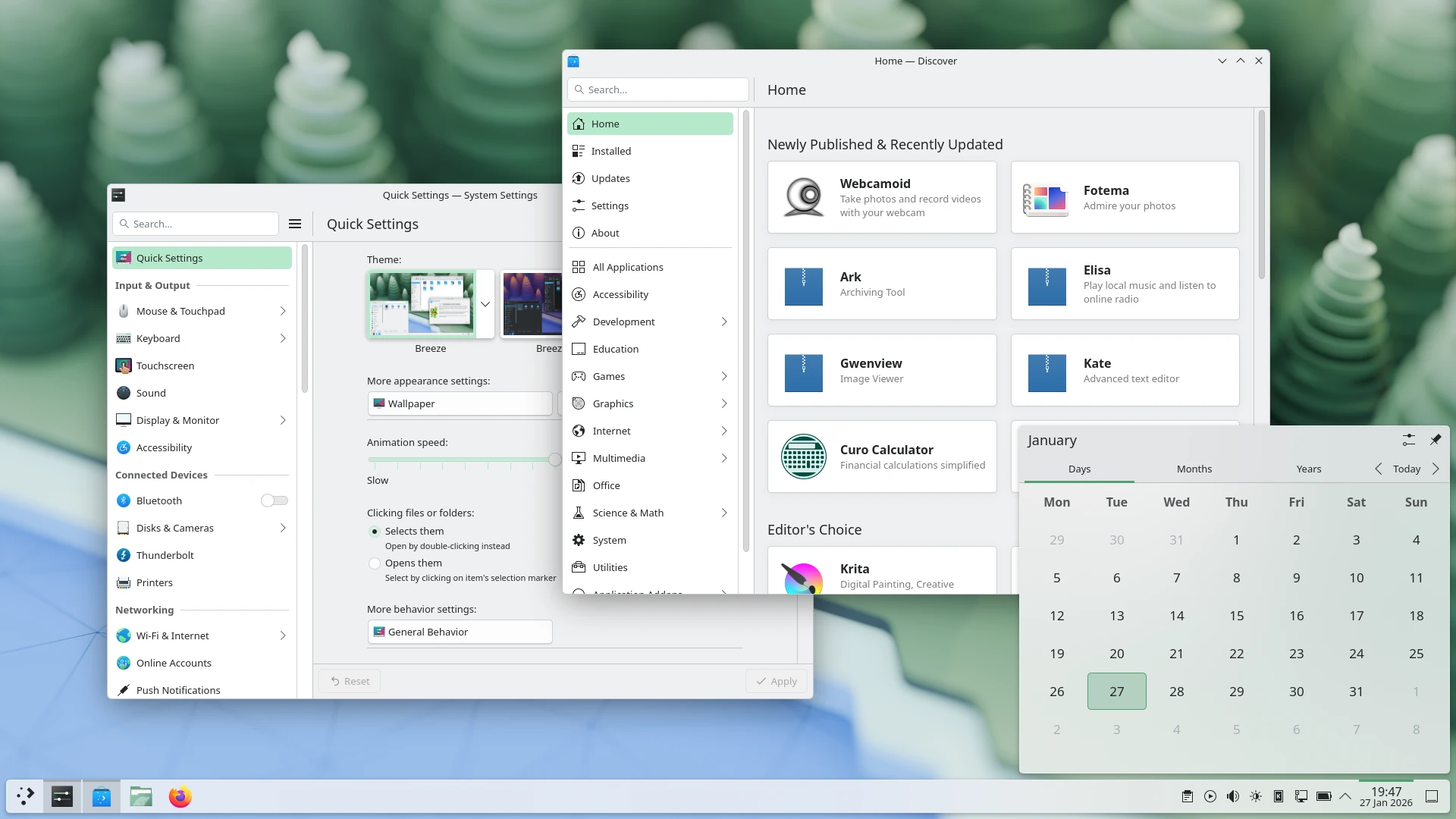
There's also the new Plasma Setup first-run tool giving user-facing steps like making an account separate from the technical steps like partitioning. A feature that's good for all kinds of uses like companies shipping hardware with Plasma.
Plus various other bits like:
- The ability to have virtual desktops only on the primary screen.
- An optional new login manager for Plasma.
- Optional automatic screen brightness on devices with ambient light sensors.
- Optional support for using game controllers as regular input devices.
- Font installation in the Discover software center, on supported operating systems.
- Choose process priority in System Monitor.
- Standalone Web Browser and Audio Volume widgets can be pinned open.
- Support for USB access prompts and a visual refresh of other permission prompts.
- Smoother animations on high-refresh-rate screens.
See the release announcement for more.





See more from me



 You can also find comments for this article on social media:
Quoting: mr-victoryohh that's not good because i do use sunshine/moonlight.Quoting: PyrateCould say this about a lot of Linux projects, or just any open source project really, but Plasma is the gift that keeps on giving. No enshittification, just continuous improvements. We can't stop winning.KDE Plasma updates are the few I look up to. Back in 5.24 I was installing betas to get some features early, I haven't installed a beta in years but dammit the changelogs still have gems.
Quoting: LoftyI have stayed on X11 because of this using the admittedly great application 'onboard'I use wayland but there is a bug not affecting X11: moonlight and seemingly nothing else can disable vsync so I get higher input latency.
https://discuss.kde.org/t/1-frame-latency-on-moonlight-only-on-wayland-cannot-turn-off-vsync/40157
Quoting: mr-victoryIn the meantime, I did actually try it in a VM and it worked. I installed Aurora, then added rpmfusion using their official command for Silverblue, then rebooted and layered broadcom-wl package and rebooted again and then "wl" kernel module is actually availableQuoting: rustynailIf you can do it on normal Fedora just by installing packages (including copr repos), it is also doable on Kinoite and should be doable on Aurora.So I can just layer the package? That's it, have you done it? Afaik you cannot layer kernel modules on universal blue, they must be bundled with the system image. But I'd love to be proven wrong.

Quoting: PyrateIn theory I agree, but installing Nvidia drivers on Fedora (especially with secure boot) is poorly documented and a pain in the ass.Quoting: Purple Library GuyBut it doesn't seem to be available in any distros as user friendly as Mint. One of these days I'll give it another look.Fedora KDE is user friendly. Not having Nvidia drivers pre-installed ≠ not-user friendly. Windows comes without drivers pre-installed as well and people think that OS is user friendly. There's no harm in websearching "install nvidia drivers fedora Linux" and learning a thing or two about package management in the process. It's good practice long term.
 Galactic-Man 18 Feb 2026

Quoting: PyrateSo, first of all "user friendly" is a very vague term and I'm willing to agree that Fedora satisfies it. "as user friendly as Mint" is less vague, and I have never heard anyone claim Fedora satisfies that.Quoting: Purple Library GuyBut it doesn't seem to be available in any distros as user friendly as Mint. One of these days I'll give it another look.Fedora KDE is user friendly. Not having Nvidia drivers pre-installed ≠ not-user friendly. Windows comes without drivers pre-installed as well and people think that OS is user friendly. There's no harm in websearching "install nvidia drivers fedora Linux" and learning a thing or two about package management in the process. It's good practice long term.
As to that second thing, no. I learned a thing or two about package management back in the 2000s. It was really annoying, as soon as they existed I moved to distros that did not make me do that. There is a finite amount of stuff I am capable of knowing a thing or two about, and a near infinite amount of stuff that would in some manner be useful to know, and I'm sorry but guts-details of operating systems is not in my top 1000. Computer people always think their particular area of knowledge is the one everyone really ought to know, but as far as I can tell there is no real basis for that belief.
 mr-victory 18 Feb 2026
Quoting: LoftyI'm guessing the bug is specific to my hardware though, the problem appears to be that nothing can turn off vsync so I have higher latency. You can test yourself by bringing the server next to client, opening the website below and shooting a video at slow motion.Quoting: mr-victoryohh that's not good because i do use sunshine/moonlight.Quoting: PyrateCould say this about a lot of Linux projects, or just any open source project really, but Plasma is the gift that keeps on giving. No enshittification, just continuous improvements. We can't stop winning.KDE Plasma updates are the few I look up to. Back in 5.24 I was installing betas to get some features early, I haven't installed a beta in years but dammit the changelogs still have gems.
Quoting: LoftyI have stayed on X11 because of this using the admittedly great application 'onboard'I use wayland but there is a bug not affecting X11: moonlight and seemingly nothing else can disable vsync so I get higher input latency.
https://discuss.kde.org/t/1-frame-latency-on-moonlight-only-on-wayland-cannot-turn-off-vsync/40157
https://dregu.github.io/frameskip/


Quoting: Purple Library GuyThis turned argumentative real quick.Quoting: PyrateSo, first of all "user friendly" is a very vague term and I'm willing to agree that Fedora satisfies it. "as user friendly as Mint" is less vague, and I have never heard anyone claim Fedora satisfies that.Quoting: Purple Library GuyBut it doesn't seem to be available in any distros as user friendly as Mint. One of these days I'll give it another look.Fedora KDE is user friendly. Not having Nvidia drivers pre-installed ≠ not-user friendly. Windows comes without drivers pre-installed as well and people think that OS is user friendly. There's no harm in websearching "install nvidia drivers fedora Linux" and learning a thing or two about package management in the process. It's good practice long term.
As to that second thing, no. I learned a thing or two about package management back in the 2000s. It was really annoying, as soon as they existed I moved to distros that did not make me do that. There is a finite amount of stuff I am capable of knowing a thing or two about, and a near infinite amount of stuff that would in some manner be useful to know, and I'm sorry but guts-details of operating systems is not in my top 1000. Computer people always think their particular area of knowledge is the one everyone really ought to know, but as far as I can tell there is no real basis for that believe
I didn't say Fedora is as user friendly as XYZ, I just that is, and in the midst of your confusion you seen to agree.
Secondly, your claim about wanting dsitros that "did not make you do [package management]" and that there's a finite amount of stuff you're capable of learning. I'm puzzled because A: what distros don't make you manage your packages? :D do you mean using GUI such as an app store ? Well Fedora KDE has the Discover store that let's you do that. And B: literally what else is there to know about a Linux system at all if not simple package management tips ? do you claim
dnf install/update/remove is a difficult thing to understand and learn ? Genuinely, tell me one other thing that's more important for a new user to learn about Linux other than learning how to properly install apps and update their system.Also, for the last unfounded assumption here: I'm not a computer people, I'm in med school.
Quoting: PyrateNo, the point is not that I should learn other things about my Linux distro rather than package management. The point is that I might want to learn about politics, or pickling vegetables. I use computers, I want them to be out of the way and let me use them to do things. Currently, Linux Mint is very good at this. You suggested that I instead use something else which would entail learning to do command line things, because "It's good practice long term."Quoting: Purple Library GuyThis turned argumentative real quick.Quoting: PyrateSo, first of all "user friendly" is a very vague term and I'm willing to agree that Fedora satisfies it. "as user friendly as Mint" is less vague, and I have never heard anyone claim Fedora satisfies that.Quoting: Purple Library GuyBut it doesn't seem to be available in any distros as user friendly as Mint. One of these days I'll give it another look.Fedora KDE is user friendly. Not having Nvidia drivers pre-installed ≠ not-user friendly. Windows comes without drivers pre-installed as well and people think that OS is user friendly. There's no harm in websearching "install nvidia drivers fedora Linux" and learning a thing or two about package management in the process. It's good practice long term.
As to that second thing, no. I learned a thing or two about package management back in the 2000s. It was really annoying, as soon as they existed I moved to distros that did not make me do that. There is a finite amount of stuff I am capable of knowing a thing or two about, and a near infinite amount of stuff that would in some manner be useful to know, and I'm sorry but guts-details of operating systems is not in my top 1000. Computer people always think their particular area of knowledge is the one everyone really ought to know, but as far as I can tell there is no real basis for that believe
I didn't say Fedora is as user friendly as XYZ, I just that is, and in the midst of your confusion you seen to agree.
Secondly, your claim about wanting dsitros that "did not make you do [package management]" and that there's a finite amount of stuff you're capable of learning. I'm puzzled because A: what distros don't make you manage your packages? :D do you mean using GUI such as an app store ? Well Fedora KDE has the Discover store that let's you do that. And B: literally what else is there to know about a Linux system at all if not simple package management tips ? do you claimdnf install/update/removeis a difficult thing to understand and learn ? Genuinely, tell me one other thing that's more important for a new user to learn about Linux other than learning how to properly install apps and update their system.
Also, for the last unfounded assumption here: I'm not a computer people, I'm in med school.
Well, no, it isn't. It's time from my life that I won't get back, that I could simply not spend if I continue to use Mint, thus allowing me to instead spend time on things I find more interesting or compelling or important.
Quoting: Purple Library GuyPlease, point to me where I suggested that you should use or not use anything. The lack of reading comprehension here is astounding.Quoting: PyrateNo, the point is not that I should learn other things about my Linux distro rather than package management. The point is that I might want to learn about politics, or pickling vegetables. I use computers, I want them to be out of the way and let me use them to do things. Currently, Linux Mint is very good at this. You suggested that I instead use something else which would entail learning to do command line things, because "It's good practice long term."Quoting: Purple Library GuyThis turned argumentative real quick.Quoting: PyrateSo, first of all "user friendly" is a very vague term and I'm willing to agree that Fedora satisfies it. "as user friendly as Mint" is less vague, and I have never heard anyone claim Fedora satisfies that.Quoting: Purple Library GuyBut it doesn't seem to be available in any distros as user friendly as Mint. One of these days I'll give it another look.Fedora KDE is user friendly. Not having Nvidia drivers pre-installed ≠ not-user friendly. Windows comes without drivers pre-installed as well and people think that OS is user friendly. There's no harm in websearching "install nvidia drivers fedora Linux" and learning a thing or two about package management in the process. It's good practice long term.
As to that second thing, no. I learned a thing or two about package management back in the 2000s. It was really annoying, as soon as they existed I moved to distros that did not make me do that. There is a finite amount of stuff I am capable of knowing a thing or two about, and a near infinite amount of stuff that would in some manner be useful to know, and I'm sorry but guts-details of operating systems is not in my top 1000. Computer people always think their particular area of knowledge is the one everyone really ought to know, but as far as I can tell there is no real basis for that believe
I didn't say Fedora is as user friendly as XYZ, I just that is, and in the midst of your confusion you seen to agree.
Secondly, your claim about wanting dsitros that "did not make you do [package management]" and that there's a finite amount of stuff you're capable of learning. I'm puzzled because A: what distros don't make you manage your packages? :D do you mean using GUI such as an app store ? Well Fedora KDE has the Discover store that let's you do that. And B: literally what else is there to know about a Linux system at all if not simple package management tips ? do you claimdnf install/update/removeis a difficult thing to understand and learn ? Genuinely, tell me one other thing that's more important for a new user to learn about Linux other than learning how to properly install apps and update their system.
Also, for the last unfounded assumption here: I'm not a computer people, I'm in med school.
Well, no, it isn't. It's time from my life that I won't get back, that I could simply not spend if I continue to use Mint, thus allowing me to instead spend time on things I find more interesting or compelling or important.
The real time of my life I won't be getting back is this back and forth, lmfao. Maybe make it clear next time that your idea of user-friendly Linux is strictly Mint and absolutely nothing else, so one won't have to waste their time and have no productive discourse.
Quoting: mr-victoryIirc on wayland vsync can only be disabled for games running in fullscreenQuoting: LoftyI'm guessing the bug is specific to my hardware though, the problem appears to be that nothing can turn off vsync so I have higher latency. You can test yourself by bringing the server next to client, opening the website below and shooting a video at slow motion.Quoting: mr-victoryohh that's not good because i do use sunshine/moonlight.Quoting: PyrateCould say this about a lot of Linux projects, or just any open source project really, but Plasma is the gift that keeps on giving. No enshittification, just continuous improvements. We can't stop winning.KDE Plasma updates are the few I look up to. Back in 5.24 I was installing betas to get some features early, I haven't installed a beta in years but dammit the changelogs still have gems.
Quoting: LoftyI have stayed on X11 because of this using the admittedly great application 'onboard'I use wayland but there is a bug not affecting X11: moonlight and seemingly nothing else can disable vsync so I get higher input latency.
https://discuss.kde.org/t/1-frame-latency-on-moonlight-only-on-wayland-cannot-turn-off-vsync/40157
https://dregu.github.io/frameskip/
Quoting: rustynailIirc on wayland vsync can only be disabled for games running in fullscreenAs I recall, "no tearing, ever" was a design principle from the start. It was much later that the option to allow tearing, such as for fullscreen games, was added. I forget the details, but I think it has to be specifically requested.
Quoting: PyratePlease, point to me where I suggested that you should use or not use anything. The lack of reading comprehension here is astounding.I would agree, but I think we differ as to where it sits. Good day, sir.

The ability to have virtual desktops only on the primary screen.Is that like how GNOME can handle multiple monitors and virtual desktops? Sounds like it.
About time! It's wonderful to be able to leave i.e. a terminal, music player, XMPP IM, and small web browser window on one screen all the time and a game on the other and be able to flip through desktops on only one of the monitors without having a bunch of complex sticky window rules. lol
Last edited by EWG on 24 Feb 2026 at 6:10 am UTC
 Patreon
 PayPal
 Anticheat check - which competitive games actually work on Linux?
 How to give Valve feedback when Proton games have issues on Linux / SteamOS