 Support us on Patreon
 PayPal
GPU-Z is a popular Windows app to give you a simple readout of your graphics card, and a new Linux alternative GPU-T was announced recently. The developer missed the simplicity of it compared with other available apps, so they built their own.
Currently it only supports AMD GPUs, but they have plans to add support for NVIDIA and Intel too.
More about it:
GPU-T is a modern desktop utility built with .NET and Avalonia UI designed to provide detailed information about your video card and GPU. It reads directly from the Linux kernel (sysfs), graphics APIs and the custom hardware database to display low-level hardware specifications, real-time sensors, and advanced feature support.
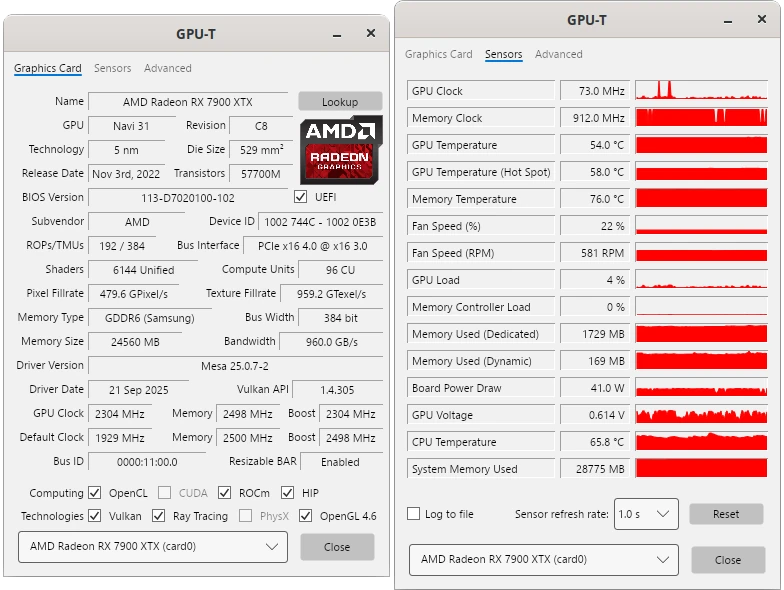
Some features it offers:
- Hardware Reconnaissance: Identifies GPU make, model, revision, die size, transistor count, and release date using a custom, updateable JSON database.
- Smart Detection (Experimental): Implements a "Best Match" algorithm that detects specific silicon revisions (e.g., distinguishing between variants of the same chip ID) and warns if an exact match isn't found. Note: As the algorithm is still being refined, exact GPU model recognition may vary.
- Real-time Sensors: Monitors Clock speeds (GPU/VRAM), Temperatures (Hotspot/Edge), Fan speeds, and Board Power Draw (PPT) in real-time. Allows logging sensor data to a file.
- Advanced Capabilities: Checks for support of Vulkan, OpenCL, ROCm, Ray Tracing, etc.
- Deep Dive:
- PCIe Resizable BAR status detection (via direct PCI resource analysis).
- BIOS and Driver version readout.
- Memory type, vendor, and bus width verification.
- Vulkan version, extensions, and features lookup.
- OpenCL version, vendor, and other capabilities lookup.
- VA-API status, including encode & decode capabilities lookup.
- Vendor-Agnostic Architecture: Built with a modular architecture. Currently supports AMD Radeon GPUs (using
amdgpudriver), but is designed to support NVIDIA and Intel in the future.- TechPowerUp Lookup: Directly open the TechPowerUp website to verify data about your specific GPU model.
In their explanation of why they created it they do make it clear that they made it with some sort of AI assistance, but they don't go into detail on what.
It's available as a simple AppImage to download and run.
You can check it out on GitHub.





See more from me


 You can also find comments for this article on social media:

 How to setup OpenMW for modern Morrowind on Linux / SteamOS and Steam Deck
 How to install Hollow Knight: Silksong mods on Linux, SteamOS and Steam Deck