 Support us on Patreon
 PayPal
Heroic Games Launcher version 2.21 is out now bringing with it a major new feature - adding in a full-screen console-like display mode. Making it far prettier and even more usable with a gamepad, it's a great fit for TV PCs when installing games from the likes of Epic and GOG on Linux / SteamOS.
I'll just call it Heroic Big Picture Mode.
Here's how it looks:
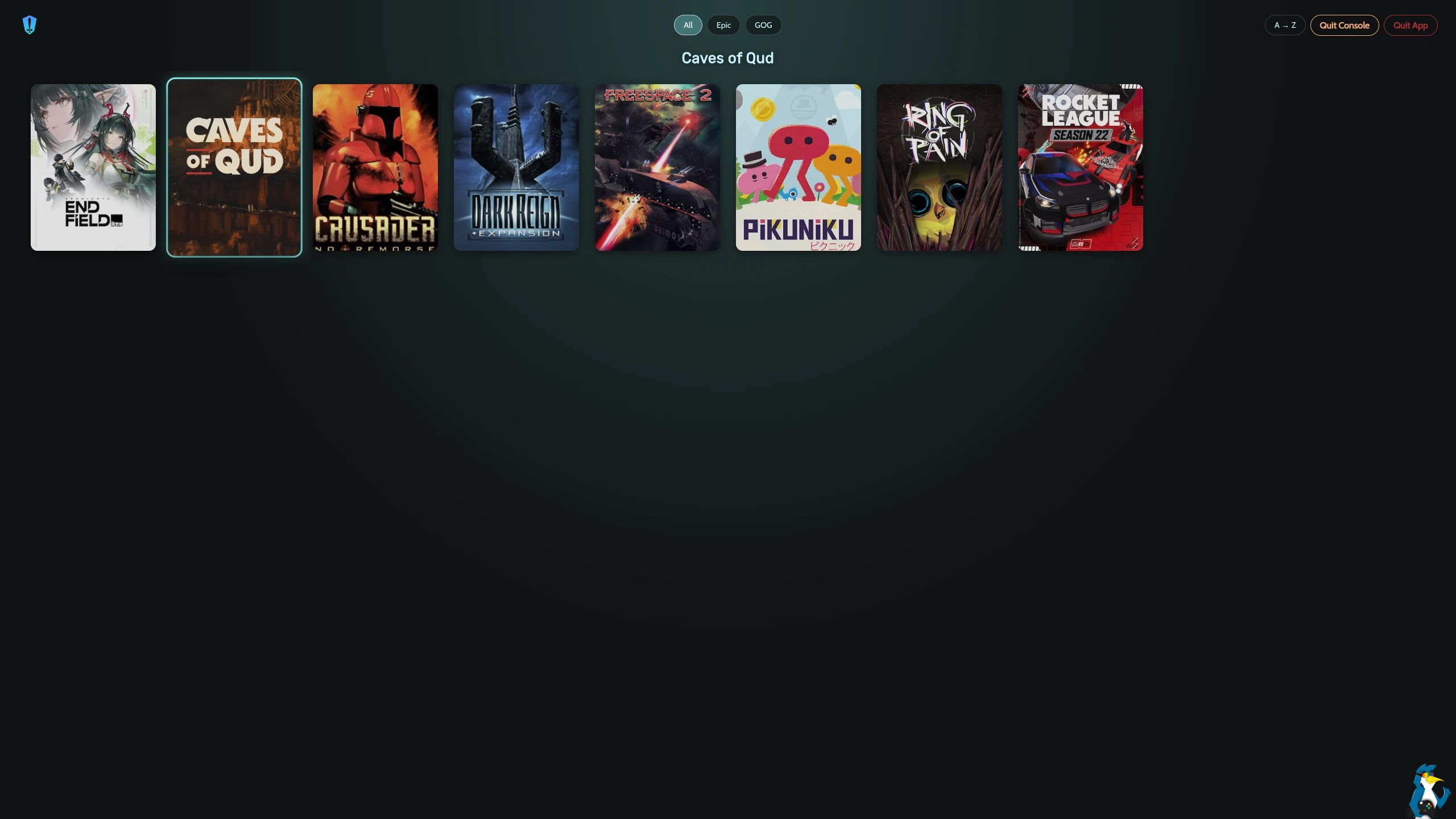
Currently, it's a little limited though as this is just the first step. For example: you can't update games yet in this console mode but it's a really nice start. Looking forward to seeing the developers expand on this idea.
From the release notes:
We now have a brand new console-like fullscreen mode built for joystick/TV navigation, a new Deals page showing current GOG promotions (and a reminder that buying games from inside Heroic helps Heroic development 👀 ), and achievements support for GOG games right on the game page.
Game covers can now be picked directly from SteamGridDB on the sideload dialog (when an API key is set on Heroic settings), the Wine manager screen has been cleaned up and gained a dedicated settings screen, Electron was updated to 41.1, How Long To Beat data is working again, and the release includes many other fixes and quality improvements.
There is also a native Windows Arm64 Build now (Linux next?!)Highlights
- New Fullscreen "Console-like" Mode for joystick navigation (#5490)
- New Deals page with current GOG promotions (#5497)
- Achievements on the game info page for GOG games (#5208)
- Pick covers from SteamGridDB directly on the sideload dialog when a SteamGrid API key is set (#5213)
- Wine manager screen cleanup + new Wine settings screen (#5306)
- Electron updated to v41.1.1 (#5467)
- How Long To Beat data fixed (#5466)4
- Fixed the Installation of Ubisoft Games bought on Epic.
- Import button moved next to the Install button for better discoverability (#5339)
- GitHub Sponsors link added to the sidebar (#5499)
See more on the Heroic website.





See more from me
 You can also find comments for this article on social media:
  hardpenguin 2 days ago
 hardpenguin 2 days ago

Quoting: hardpenguinNice look but the interface seems tiny compared to the screen size. Definitely not optimized for ten foot aka big TV screen couch gaming.That was my first thought, too. I'd say they are barely large enough for a big computer screen. I am hoping for a size slider.
 fearnflavio a day ago
Quoting: hardpenguinNice look but the interface seems tiny compared to the screen size. Definitely not optimized for ten foot aka big TV screen couch gaming.Yes, we decided to do this like a MVP first and then gather feedback and improve it over time. We will have some settings for it like to increase the zoom size, skip-update or update before launching, installing and uninstalling games and more. This is just the start. We are hearing all feedback so far.
 Liam Dawe a day ago

Quoting: fearnflavioSounds great, can't wait to see it evolve.Quoting: hardpenguinNice look but the interface seems tiny compared to the screen size. Definitely not optimized for ten foot aka big TV screen couch gaming.Yes, we decided to do this like a MVP first and then gather feedback and improve it over time. We will have some settings for it like to increase the zoom size, skip-update or update before launching, installing and uninstalling games and more. This is just the start. We are hearing all feedback so far.
 chickenb00 a day ago
I'm a little disappointed the only functionality is Play or Cancel.
It's early days though and as this grows and expands it'll be much nicer especially in Game mode on my deck.
hardpenguin a day ago
Quoting: fearnflavioGreat stuff, keep up the good work!Quoting: hardpenguinNice look but the interface seems tiny compared to the screen size. Definitely not optimized for ten foot aka big TV screen couch gaming.Yes, we decided to do this like a MVP first and then gather feedback and improve it over time. We will have some settings for it like to increase the zoom size, skip-update or update before launching, installing and uninstalling games and more. This is just the start. We are hearing all feedback so far.
Adjusting the size automatically to the screen or window size would be cool, and a slider perhaps as well. Similarly to what Steam Big Picture does.
Current options so far (for me) was to either:
1. use mouse emulation to point to the game to run
2. add the game to Steam and open via Steam when streaming.

 How to setup OpenMW for modern Morrowind on Linux / SteamOS and Steam Deck
 How to install Hollow Knight: Silksong mods on Linux, SteamOS and Steam Deck