 Support us on Patreon
 PayPal
Latest Comments by etonbears
A new Steam Beta is up with Vulkan pipeline dumping and collection along with Steam Play improvements
17 Mar 2019 at 5:19 pm UTC
One thing Feral often mention when you start their native games is the effect of the CPU cores not being set to constant performance mode. It takes time for cores to clock down and up again between bursty loads which can lead to stuttering.
You will probably find the instructions for checking and changing the CPU mode on their Web site support FAQ. See if that is affecting you ( I have pkexec scripts to switch into 'game mode' and back to 'stop heating my room' mode, and use them as needed).
17 Mar 2019 at 5:19 pm UTC
Quoting: ripper81358Does anyone know if "Vulkan pipeline dumping" is working with the Mesa Radv Driver right now ? I have really bad stuttering in most of my games that are utilizing Proton with DXVK since i have switched to an AMD Radeon RX 590. Games using wined3d and therefore the Mesa GL Driver don't have that problem at all.Obviously it depends on the game and how efficiently the virtualization provided by Wine and DXVK maps the game to your hardware.
One thing Feral often mention when you start their native games is the effect of the CPU cores not being set to constant performance mode. It takes time for cores to clock down and up again between bursty loads which can lead to stuttering.
You will probably find the instructions for checking and changing the CPU mode on their Web site support FAQ. See if that is affecting you ( I have pkexec scripts to switch into 'game mode' and back to 'stop heating my room' mode, and use them as needed).
A new Steam Beta is up with Vulkan pipeline dumping and collection along with Steam Play improvements
11 Mar 2019 at 1:36 pm UTC Likes: 1
Vulkan, on Linux, is provided as a shared library for each supported architecture. Your package manager should report "libvulkan1:amd64" and/or "libvulkan1:i386" or similar if you take a look. This does not require that you actually have any valid Vulkan hardware installed. Although this shared library can be provided by anyone, we probably all use a version written by LunarG, sponsored by Valve, which I think was recently donated to Khronos and will likely become the standard desktop version ( Linux, MacOS, Windows ).
This Vulkan library is formally called the "Vulkan Loader", in that it does not provide much function in itself, but coordinates access to Vulkan services provided by "Vulkan ICDs" and "Vulkan Layers".
Vulkan ICDs ( installable client drivers ) provide access to Vulkan-capable hardware through implementing all of the function calls documented in the Vulkan specification, and can additionally advertise extended function calls, usually for new hardware features that are not in the Vulkan specification yet. Vulkan ICDs are VERY lean wrappers around the hardware features, intended for maximum performance at runtime.
Vulkan Layers, on the other hand, are intended to provide all of the additional features that are not normally required at runtime, such as debugging, function call tracing, error reporting, function call parameter checking and validating the Vulkan state ( i.e. checking what you are requesting is complete and sane ).
A Vulkan Layer can implement one or more of the function calls documented in the Vulkan Specification, but unlike ICDs, is not obliged to implement them all. As with ICDs, a layer can offer extended function calls as well.
When an application initializes Vulkan ( a function call in libvulkan1.so ), the loader constructs a call "chain" for each Vulkan function. If any activated layer implements a particular function, that implementation is included in the call chain for the function; the end of the call chain is the guaranteed implementation in the ICD for your hardware.
These call chains are not at all efficient, but are intended to allow all sorts of checking, recording and analysis of an application while it is in development, when the execution speed is of less interest. At runtime, all development layers are deactivated, so the call chain just goes straight to the ICD implementation and the application/game runs as fast as possible.
If you are still awake and reading, you might be asking what this has to do with "Vulkan pipeline dumping". The answer is that Valve have used the Vulkan Layer mechanism to insert their own code into Steam-Launched Vulkan games, without the need to the game developer to do anything at all.
Vulkan on Linux uses 5 possible configuration directories ( to cater for different distributions liking things in different places, I guess )
/usr/local/etc/vulkan/
/usr/local/share/vulkan/
/etc/vulkan/
/usr/share/vulkan/
$HOME/.local/share/vulkan/
The Vulkan loader checks those locations for subdirectories "icd.d", "explicit_layer.d" and "implicit_layer.d", and reads any JSON-format text files in those directories to find which libraries are installed that implement ICDs and Layers.
Note that there are 2 types of Layer. Layers defined inside any "explicit_layer.d" are loaded by an application directly requesting them from code, but Layers defined in any "implicit_layer.d" are loaded automatically depending on environment variables declared in their JSON file.
If you have Steam installed, check $HOME/.local/share/vulkan/ and you should find 4 JSON files declaring implicit Vulkan Layers for 32bit & 64bit versions for steamoverlay and steamfossilize.
While there is no source code available for the libraries declared in these layers, it is clear that they intercept a small number of Vulkan calls to provide the Steam Overlay and Shader/Pipeline caches. If you activate these features in Steam, the correct environment variables will be set to let the Vulkan Loader know it should load those implicit layers.
More interesting, perhaps, is that this provides a non-intrusive mechanism for enhancing any/all Vulkan game presentations. This would allow overlaying data ( as with Steam Overlay ) of your choice from elsewhere, or applying post-process effects to your liking, as with the interesting Windows ENBSeries utility, for example.
11 Mar 2019 at 1:36 pm UTC Likes: 1
Quoting: Purple Library GuyI know there are knowledgeable people here. What the heck is "Vulkan pipeline dumping"? It sounds like either a good thing or something oil companies do when something has gone very wrong.Hello PLG. Out of curiosity, I looked into this some more; the answer requires some explanation of the Vulkan architecture, which may or, more likely, may not be of interest to you. Skip to the last 3 paragraphs if this sort of thing sends you to sleep :)
Vulkan, on Linux, is provided as a shared library for each supported architecture. Your package manager should report "libvulkan1:amd64" and/or "libvulkan1:i386" or similar if you take a look. This does not require that you actually have any valid Vulkan hardware installed. Although this shared library can be provided by anyone, we probably all use a version written by LunarG, sponsored by Valve, which I think was recently donated to Khronos and will likely become the standard desktop version ( Linux, MacOS, Windows ).
This Vulkan library is formally called the "Vulkan Loader", in that it does not provide much function in itself, but coordinates access to Vulkan services provided by "Vulkan ICDs" and "Vulkan Layers".
Vulkan ICDs ( installable client drivers ) provide access to Vulkan-capable hardware through implementing all of the function calls documented in the Vulkan specification, and can additionally advertise extended function calls, usually for new hardware features that are not in the Vulkan specification yet. Vulkan ICDs are VERY lean wrappers around the hardware features, intended for maximum performance at runtime.
Vulkan Layers, on the other hand, are intended to provide all of the additional features that are not normally required at runtime, such as debugging, function call tracing, error reporting, function call parameter checking and validating the Vulkan state ( i.e. checking what you are requesting is complete and sane ).
A Vulkan Layer can implement one or more of the function calls documented in the Vulkan Specification, but unlike ICDs, is not obliged to implement them all. As with ICDs, a layer can offer extended function calls as well.
When an application initializes Vulkan ( a function call in libvulkan1.so ), the loader constructs a call "chain" for each Vulkan function. If any activated layer implements a particular function, that implementation is included in the call chain for the function; the end of the call chain is the guaranteed implementation in the ICD for your hardware.
These call chains are not at all efficient, but are intended to allow all sorts of checking, recording and analysis of an application while it is in development, when the execution speed is of less interest. At runtime, all development layers are deactivated, so the call chain just goes straight to the ICD implementation and the application/game runs as fast as possible.
If you are still awake and reading, you might be asking what this has to do with "Vulkan pipeline dumping". The answer is that Valve have used the Vulkan Layer mechanism to insert their own code into Steam-Launched Vulkan games, without the need to the game developer to do anything at all.
Vulkan on Linux uses 5 possible configuration directories ( to cater for different distributions liking things in different places, I guess )
/usr/local/etc/vulkan/
/usr/local/share/vulkan/
/etc/vulkan/
/usr/share/vulkan/
$HOME/.local/share/vulkan/
The Vulkan loader checks those locations for subdirectories "icd.d", "explicit_layer.d" and "implicit_layer.d", and reads any JSON-format text files in those directories to find which libraries are installed that implement ICDs and Layers.
Note that there are 2 types of Layer. Layers defined inside any "explicit_layer.d" are loaded by an application directly requesting them from code, but Layers defined in any "implicit_layer.d" are loaded automatically depending on environment variables declared in their JSON file.
If you have Steam installed, check $HOME/.local/share/vulkan/ and you should find 4 JSON files declaring implicit Vulkan Layers for 32bit & 64bit versions for steamoverlay and steamfossilize.
While there is no source code available for the libraries declared in these layers, it is clear that they intercept a small number of Vulkan calls to provide the Steam Overlay and Shader/Pipeline caches. If you activate these features in Steam, the correct environment variables will be set to let the Vulkan Loader know it should load those implicit layers.
More interesting, perhaps, is that this provides a non-intrusive mechanism for enhancing any/all Vulkan game presentations. This would allow overlaying data ( as with Steam Overlay ) of your choice from elsewhere, or applying post-process effects to your liking, as with the interesting Windows ENBSeries utility, for example.
A new Steam Beta is up with Vulkan pipeline dumping and collection along with Steam Play improvements
7 Mar 2019 at 9:55 pm UTC Likes: 1
The Vulkan specification is designed such that many of the Vulkan data structures you create are visible as simple memory blocks in CPU-accessible memory. That makes it easy to save the data structure content to disk. If you will always need the same data structures when you run an application, it may be quicker and more computationally predictable to load their content from disk, rather than re-create them from scratch.
A Vulkan pipeline used by a game ( which may use thousands of pipelines ) would be unlikely to change between one run and the next unless you modify the game's quality settings, so it is a good candidate for saving to disk. So, I would assume the Steam SDK now provides some form of helper function(s) to make cacheing pipelines easier for developers. I may be wrong in that assumption, of course :)
7 Mar 2019 at 9:55 pm UTC Likes: 1
Quoting: Purple Library GuyI know there are knowledgeable people here. What the heck is "Vulkan pipeline dumping"? It sounds like either a good thing or something oil companies do when something has gone very wrong.I suspect "Vulkan pipeline dumping" is a term invented by someone at Valve, as I don't remember it being in the Vulkan specification.
The Vulkan specification is designed such that many of the Vulkan data structures you create are visible as simple memory blocks in CPU-accessible memory. That makes it easy to save the data structure content to disk. If you will always need the same data structures when you run an application, it may be quicker and more computationally predictable to load their content from disk, rather than re-create them from scratch.
A Vulkan pipeline used by a game ( which may use thousands of pipelines ) would be unlikely to change between one run and the next unless you modify the game's quality settings, so it is a good candidate for saving to disk. So, I would assume the Steam SDK now provides some form of helper function(s) to make cacheing pipelines easier for developers. I may be wrong in that assumption, of course :)
The first Steam Play update for this year is out with Proton 3.16-7 beta
4 Mar 2019 at 4:18 pm UTC
4 Mar 2019 at 4:18 pm UTC
Quoting: torbidoInteresting. Does that means you have to install each non-Steam game with its own copy of, say Origin or Uplay, I wonder. I thought you just added games you had already installed so you can launch them. I will have to look more into what the options are, though I don't really understand why one would use the feature except for running Big Picture with only a controller.Quoting: etonbearsNo, It doesn't use the main wine folder. I found it at the main steam folder with a bigger number that normal games use >>> ~/.steam/steam/steamapps/compatdata/2147483650Quoting: torbidoWhen I add non steam game, where is the prefix of these games?Each version of Proton is a management wrapper for Steam-Installed games using a specific version of Wine ( including extension libraries/patches etc ).
As you probably know, each Steam-Installed game is identified by a unique integer number; Proton creates/uses a Wine prefix for each game as a directory named for that unique integer, in the "compatdata" directory of the Steam games library you choose to install in.
I do not think Proton is capable of doing this for non-Steam games, so a non-Steam game will use the wine prefix you chose when installing that game. If you make no wineprefix choice, the default is "~/.wine/".
Note that it is generally better to install each non-steam game to a different wine prefix, since games often have conflicting configuration needs. i.e. Configuring one game may break another if they share a wineprefix.
Hope that helps.
The first Steam Play update for this year is out with Proton 3.16-7 beta
18 Feb 2019 at 8:45 pm UTC
18 Feb 2019 at 8:45 pm UTC
Quoting: 14Could be; what takes the space is very game dependent, but textures are usually the culprit for really big new games. With Bethesda games, for example, original Skyrim was 6GB with an optional 4.5GB high-resolution texture pack, whereas Fallout 4 is 28GB with an optionl high-resolution texture pack of 58GB for a whopping total of 86GB. There is quite a lot of audio in Fallout 4, but it clearly doesn't contribute much to the overall size.Quoting: etonbearsIn the case of Divinity: Original Sin 2, another factor might be uncompressed or very little audio compression. There is a lot of voiced dialogue. I'm just guessing here, but that's what came to my mind first.Quoting: Purple Library GuySome games are impressively large, aren't they? I can't speak for the detail of why any particular game is the size it is, but I can give you some indications as to why.Quoting: 14I don't enjoy having a 50 GB game backup eating up disk space.50 . . . gigs. For one game. I've had hard drives way smaller than that. I've had adventure games I plugged away at for hours and never finished that were 16K. OK, I didn't finish them mostly because they were badly designed, but still. What is the excuse for a game taking up 50 gigs?
Sorry, my old curmudgeon is showing, but really . . . 50. gigs.
The first thing to understand is that games are always trying to do more than the hardware computational ability will allow. A lot of developer time is spent in finding ways to get a higher quality or accuracy, but with the same or lower computational cost at runtime. Almost all of these techniques boil down to pre-computing "stuff" and storing it in data files ( usually image-like texture files ). Then, at runtime, the game just fetches the pre-computed values using a simple algorithm rather than using expensive calculations every frame.
If you compare games of, say, 15 years ago with today, the largest textures have increased in size from 512x512 to 4096x4096, which is 64 times the number of data locations per texture.
A typical character model 15 years ago may have used textures with fewer than 10 data values per location, most of which would be 1 byte each. A modern game renderer could easily need 10 times as much data.
Pre-calculation to data files is also used for non-character models ( buildings and other "placeable" props ) as well as light-maps and shadow maps if circumstances allow ( typically indoor environments with mostly static lighting ); in fact, whatever the ingenuity of games developers can come up with.
This explosion of texture data has partly been offset by better compression algorithms. GPUs implement the read of compressed data in hardware, so it does not cost much processing power.
Alongside this, the geometry data describing the shape of models has increased in like fashion, animation based on curve calculations has been replaced by data-intensive motion-capture, and there are now often multiple copies of everything at different quality levels to cater for the broader range of modern player hardware.
This is a generalization and simplification, but I'm sure you get the gist of it. Modern games without lots of immersive 3D models are much smaller, on the whole.
The first Steam Play update for this year is out with Proton 3.16-7 beta
18 Feb 2019 at 12:04 am UTC Likes: 4
The first thing to understand is that games are always trying to do more than the hardware computational ability will allow. A lot of developer time is spent in finding ways to get a higher quality or accuracy, but with the same or lower computational cost at runtime. Almost all of these techniques boil down to pre-computing "stuff" and storing it in data files ( usually image-like texture files ). Then, at runtime, the game just fetches the pre-computed values using a simple algorithm rather than using expensive calculations every frame.
If you compare games of, say, 15 years ago with today, the largest textures have increased in size from 512x512 to 4096x4096, which is 64 times the number of data locations per texture.
A typical character model 15 years ago may have used textures with fewer than 10 data values per location, most of which would be 1 byte each. A modern game renderer could easily need 10 times as much data.
Pre-calculation to data files is also used for non-character models ( buildings and other "placeable" props ) as well as light-maps and shadow maps if circumstances allow ( typically indoor environments with mostly static lighting ); in fact, whatever the ingenuity of games developers can come up with.
This explosion of texture data has partly been offset by better compression algorithms. GPUs implement the read of compressed data in hardware, so it does not cost much processing power.
Alongside this, the geometry data describing the shape of models has increased in like fashion, animation based on curve calculations has been replaced by data-intensive motion-capture, and there are now often multiple copies of everything at different quality levels to cater for the broader range of modern player hardware.
This is a generalization and simplification, but I'm sure you get the gist of it. Modern games without lots of immersive 3D models are much smaller, on the whole.
18 Feb 2019 at 12:04 am UTC Likes: 4
Quoting: Purple Library GuySome games are impressively large, aren't they? I can't speak for the detail of why any particular game is the size it is, but I can give you some indications as to why.Quoting: 14I don't enjoy having a 50 GB game backup eating up disk space.50 . . . gigs. For one game. I've had hard drives way smaller than that. I've had adventure games I plugged away at for hours and never finished that were 16K. OK, I didn't finish them mostly because they were badly designed, but still. What is the excuse for a game taking up 50 gigs?
Sorry, my old curmudgeon is showing, but really . . . 50. gigs.
The first thing to understand is that games are always trying to do more than the hardware computational ability will allow. A lot of developer time is spent in finding ways to get a higher quality or accuracy, but with the same or lower computational cost at runtime. Almost all of these techniques boil down to pre-computing "stuff" and storing it in data files ( usually image-like texture files ). Then, at runtime, the game just fetches the pre-computed values using a simple algorithm rather than using expensive calculations every frame.
If you compare games of, say, 15 years ago with today, the largest textures have increased in size from 512x512 to 4096x4096, which is 64 times the number of data locations per texture.
A typical character model 15 years ago may have used textures with fewer than 10 data values per location, most of which would be 1 byte each. A modern game renderer could easily need 10 times as much data.
Pre-calculation to data files is also used for non-character models ( buildings and other "placeable" props ) as well as light-maps and shadow maps if circumstances allow ( typically indoor environments with mostly static lighting ); in fact, whatever the ingenuity of games developers can come up with.
This explosion of texture data has partly been offset by better compression algorithms. GPUs implement the read of compressed data in hardware, so it does not cost much processing power.
Alongside this, the geometry data describing the shape of models has increased in like fashion, animation based on curve calculations has been replaced by data-intensive motion-capture, and there are now often multiple copies of everything at different quality levels to cater for the broader range of modern player hardware.
This is a generalization and simplification, but I'm sure you get the gist of it. Modern games without lots of immersive 3D models are much smaller, on the whole.
The first Steam Play update for this year is out with Proton 3.16-7 beta
17 Feb 2019 at 8:52 pm UTC
17 Feb 2019 at 8:52 pm UTC
Quoting: Comandante ÑoñardoSniper Ghost Warrior 3 via PROTON 3.16-7..I don't know for certain, but I would expect it to be the GPU allocation, since that is what DXVK is most interested in. CPU allocation is less important since the OS can provide virtual memory.
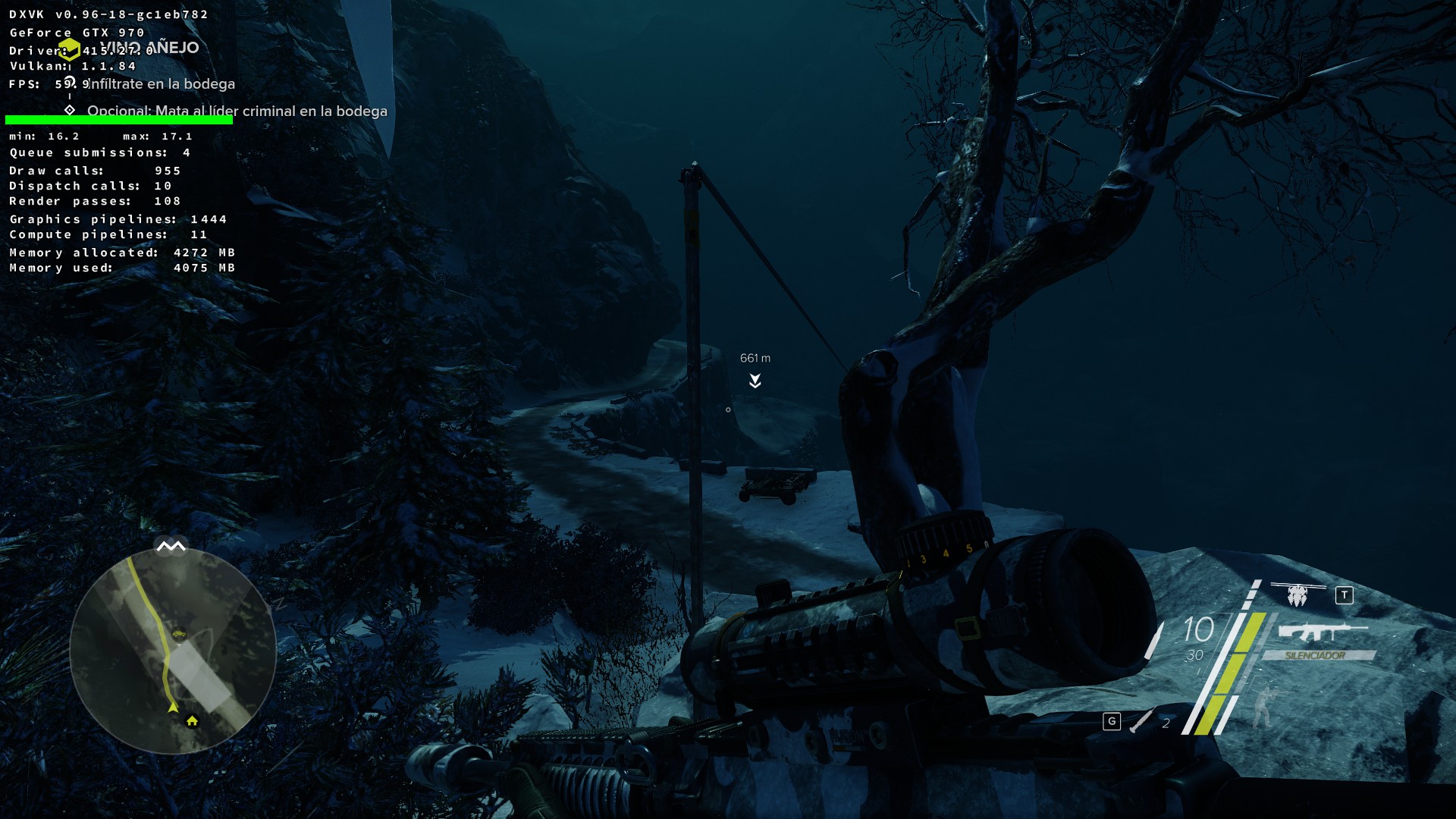
Is that the amount of system RAM used or the amount GPU memory used?
The first Steam Play update for this year is out with Proton 3.16-7 beta
17 Feb 2019 at 8:45 pm UTC
17 Feb 2019 at 8:45 pm UTC
Quoting: LakortaReally? I've never tried adding non-steam games myself, as I assumed it just meant pointing at an existing game so you could launch it from the Steam interface. Sounds like it does a bit more than I thought.Quoting: etonbearsActually, Steam does create a folder in your compatdata (~/.steam/steam/steamapps/compatdata/ or ~/.local/share/steam/steamapps/compatdata/) for non-steam games. The folder's name is a number. I don't know how that number is determined though.Quoting: torbidoWhen I add non steam game, where is the prefix of these games?Each version of Proton is a management wrapper for Steam-Installed games using a specific version of Wine ( including extension libraries/patches etc ).
As you probably know, each Steam-Installed game is identified by a unique integer number; Proton creates/uses a Wine prefix for each game as a directory named for that unique integer, in the "compatdata" directory of the Steam games library you choose to install in.
I do not think Proton is capable of doing this for non-Steam games, so a non-Steam game will use the wine prefix you chose when installing that game. If you make no wineprefix choice, the default is "~/.wine/".
Note that it is generally better to install each non-steam game to a different wine prefix, since games often have conflicting configuration needs. i.e. Configuring one game may break another if they share a wineprefix.
Hope that helps.
The first Steam Play update for this year is out with Proton 3.16-7 beta
16 Feb 2019 at 10:17 pm UTC
As you probably know, each Steam-Installed game is identified by a unique integer number; Proton creates/uses a Wine prefix for each game as a directory named for that unique integer, in the "compatdata" directory of the Steam games library you choose to install in.
I do not think Proton is capable of doing this for non-Steam games, so a non-Steam game will use the wine prefix you chose when installing that game. If you make no wineprefix choice, the default is "~/.wine/".
Note that it is generally better to install each non-steam game to a different wine prefix, since games often have conflicting configuration needs. i.e. Configuring one game may break another if they share a wineprefix.
Hope that helps.
16 Feb 2019 at 10:17 pm UTC
Quoting: torbidoWhen I add non steam game, where is the prefix of these games?Each version of Proton is a management wrapper for Steam-Installed games using a specific version of Wine ( including extension libraries/patches etc ).
As you probably know, each Steam-Installed game is identified by a unique integer number; Proton creates/uses a Wine prefix for each game as a directory named for that unique integer, in the "compatdata" directory of the Steam games library you choose to install in.
I do not think Proton is capable of doing this for non-Steam games, so a non-Steam game will use the wine prefix you chose when installing that game. If you make no wineprefix choice, the default is "~/.wine/".
Note that it is generally better to install each non-steam game to a different wine prefix, since games often have conflicting configuration needs. i.e. Configuring one game may break another if they share a wineprefix.
Hope that helps.
The war of the PC stores is getting ugly, as Metro Exodus becomes a timed Epic Store exclusive
2 Feb 2019 at 10:19 pm UTC Likes: 1
The developer then says that they do not believe all PC players are as closed-minded as those complaining and fans will buy the game. You also seem to think most people will buy the game, even if they complain.
While I would prefer all games to be available in as many formats and outlets as possible, I find the aggressive and threatening attitude displayed by some gamers over not getting exactly what they want, when and how they want it, to be deeply disturbing. It is not the way to persuade other parties to your point of view, and is not the way anyone would behave in relation to physical retailing.
2 Feb 2019 at 10:19 pm UTC Likes: 1
Quoting: GuestAnd now the Dev(s) from Metro are saying that the next Metro if there is a sequel probably wont come to PC when the sales are low. Sooo....there will be a PC version because lets be real everyone will buy it. NOW everyone is like bah epic and boycott but in the end they will buy it. Its always the same.I don't think the developer's opinion translated very well. What I think they said was, IF ALL PC PLAYERS took the view of the screaming Steam fans, spewing bile at the developers, and refuse to buy Metro Exodus, then there would be no point in releasing any future game on the PC, since there would be no sales. It was not a threat.
https://steamcommunity.com/app/412020/discussions/0/1780513643852520184/ [External Link]
The developer then says that they do not believe all PC players are as closed-minded as those complaining and fans will buy the game. You also seem to think most people will buy the game, even if they complain.
While I would prefer all games to be available in as many formats and outlets as possible, I find the aggressive and threatening attitude displayed by some gamers over not getting exactly what they want, when and how they want it, to be deeply disturbing. It is not the way to persuade other parties to your point of view, and is not the way anyone would behave in relation to physical retailing.
- Linux and open source getting age checking exemptions could be problematic
- Steam Deck stock returns but there's a big price increase
- Dusklight the reimplementation of The Legend of Zelda: Twilight Princess gets a major update
- Proton-CachyOS adds low latency layer and Discord rich presence support
- Flathub moves to ban nearly all apps and submissions made with generative AI
- > See more over 30 days here
 Anticheat check - which competitive games actually work on Linux?
 How to give Valve feedback when Proton games have issues on Linux / SteamOS
- Feedback needed - future website updates
- Liam Squires-Hand - New Desktop Screenshot Thread
- Hamish - Fully native alternative to ProtonDB
- ProfessorKaos64 - Restrict way kernel-level-anti-cheat is installed.
- PlayingOnLinuxphone - Are Mac computers good and stable?
- PlayingOnLinuxphone - See more posts