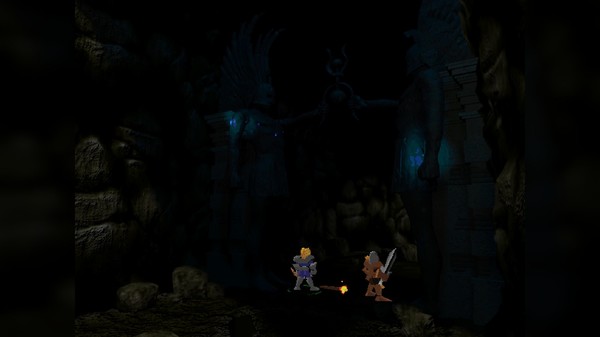
The game originally released in 1999 and here we are nearly two decades later with a Linux version, good things come to those who wait I guess? It's not the first older title they've given to Linux, as they also put out an updated version of Imperium Galactica II which had Linux support added recently as well.
Features
- Intuitive Swordplay: Silver's unique control method allows quick and intuitive handling of action, which is especially helpful in the heat of battle. In effect, the mouse becomes the player's "sword arm". Sweep the mouse to your left and your hero will slash to the left, sweep the mouse forward and your hero will lunge. Magical effects, throwing knives, arrow, and even catapults are also controlled through the mouse system.
- Interact with more than 50 characters. Be wary, not all are friendly
- Recruit allies, all with special abilities-Sekune is a master of archery, Cagen is a skilled martial artist, Jug's strength makes him a force to be reckoned with, and more
- Travel through hundreds of beautiful locations, rich in detail…and packed with danger
- Immerse yourself in battle with real-time combat
- Marvel at vivid special effects, powerful magical spells, and mighty weaponry that you'll acquire on your journey
- Use your mouse as your sword-vanquish your foes, including demons, dragons, and other insidious creatures
Find Silver on Steam. It's 20% off right now too and the price seems pretty reasonable anyway.
GOG has had it for a while, but they don't have the Linux version.




About the author - Liam Squires-Hand

I am the owner of GamingOnLinux. After discovering Linux back in the days of Mandrake in 2003, I constantly checked on the progress of Linux until Ubuntu appeared on the scene and it helped me to really love it. You can reach me easily by emailing GamingOnLinux directly. You can follow me personally on Mastodon [External Link].
See more from me
See more from me
Some you may have missed, popular articles from the last month:


All posts need to follow our rules. Please hit the Report Flag icon on any post that breaks the rules or contains illegal / harmful content. Readers can also email us for any issues or concerns.
29 comments
 Arehandoro 4 Jun 2017

This was the last game I ever let other people play with. It was returned to me with the cardboard box broken and the CDs scratched :( If they release the Linux version on GOG will buy for sure :D
0 Likes
omer666 4 Jun 2017

Quoting: fagnerlnYou need to have this as command line option:Quoting: omer666How do you disable Steam runtime?Quoting: cprnYes I sorted it out by completely disabling the Steam runtime, but the game has some big graphical bugs in combat, too bad...Quoting: omer666You probably solved but in case you didn't... Are you using some non-standard glibc libs? 3rd party maybe? Try installing the stable one from Fedora repositories. The [libstdc++6](https://packages.ubuntu.com/xenial/libstdc++6) would be the right package for Ubuntu so maybe it's named something similar in your distribution. If you don't want to change your OS libraries just LD_PRELOAD it in app properties.[...] GLIBCXX_3.4.21 not defined in file libstdc++.so.6 with link time reference [...]
Any idea?
LD_LIBRARY_PATH="" %command%It disables Steam Runtime for a single game. Very useful!
1 Likes
m2mg2 4 Jun 2017
Quoting: omer666I tried the fedora libs, the steam version and versions from other game folders. Won't start with any of them, but it does start with "LD_LIBRARY_PATH="" %command%"Quoting: fagnerlnYou need to have this as command line option:Quoting: omer666How do you disable Steam runtime?Quoting: cprnYes I sorted it out by completely disabling the Steam runtime, but the game has some big graphical bugs in combat, too bad...Quoting: omer666You probably solved but in case you didn't... Are you using some non-standard glibc libs? 3rd party maybe? Try installing the stable one from Fedora repositories. The [libstdc++6](https://packages.ubuntu.com/xenial/libstdc++6) would be the right package for Ubuntu so maybe it's named something similar in your distribution. If you don't want to change your OS libraries just LD_PRELOAD it in app properties.[...] GLIBCXX_3.4.21 not defined in file libstdc++.so.6 with link time reference [...]
Any idea?
LD_LIBRARY_PATH="" %command%
It disables Steam Runtime for a single game. Very useful!
1 Likes
fagnerln 4 Jun 2017
Quoting: omer666You need to have this as command line option:Thanks!
LD_LIBRARY_PATH="" %command%
It disables Steam Runtime for a single game. Very useful!
0 Likes
 cprn 4 Jun 2017
Quoting: m2mg2I thought setting "LD_LIBRARY_PATH" to an empty string is making it use Fedora libs (i.e. system libs in more general case)...?Quoting: omer666I tried the fedora libs, the steam version and versions from other game folders. Won't start with any of them, but it does start with "LD_LIBRARY_PATH="" %command%"Quoting: fagnerlnYou need to have this as command line option:Quoting: omer666How do you disable Steam runtime?Quoting: cprnYes I sorted it out by completely disabling the Steam runtime, but the game has some big graphical bugs in combat, too bad...Quoting: omer666You probably solved but in case you didn't... Are you using some non-standard glibc libs? 3rd party maybe? Try installing the stable one from Fedora repositories. The [libstdc++6](https://packages.ubuntu.com/xenial/libstdc++6) would be the right package for Ubuntu so maybe it's named something similar in your distribution. If you don't want to change your OS libraries just LD_PRELOAD it in app properties.[...] GLIBCXX_3.4.21 not defined in file libstdc++.so.6 with link time reference [...]
Any idea?
LD_LIBRARY_PATH="" %command%
It disables Steam Runtime for a single game. Very useful!
0 Likes
m2mg2 5 Jun 2017
Quoting: cprnI used LD_PRELOAD on the command line and it didn't work. When I used LD_PRELOAD=/usr/lib/libstdc++.so.6 %command% in launch options it did work.Quoting: m2mg2I thought setting "LD_LIBRARY_PATH" to an empty string is making it use Fedora libs (i.e. system libs in more general case)...?Quoting: omer666I tried the fedora libs, the steam version and versions from other game folders. Won't start with any of them, but it does start with "LD_LIBRARY_PATH="" %command%"Quoting: fagnerlnYou need to have this as command line option:Quoting: omer666How do you disable Steam runtime?Quoting: cprnYes I sorted it out by completely disabling the Steam runtime, but the game has some big graphical bugs in combat, too bad...Quoting: omer666You probably solved but in case you didn't... Are you using some non-standard glibc libs? 3rd party maybe? Try installing the stable one from Fedora repositories. The [libstdc++6](https://packages.ubuntu.com/xenial/libstdc++6) would be the right package for Ubuntu so maybe it's named something similar in your distribution. If you don't want to change your OS libraries just LD_PRELOAD it in app properties.[...] GLIBCXX_3.4.21 not defined in file libstdc++.so.6 with link time reference [...]
Any idea?
LD_LIBRARY_PATH="" %command%
It disables Steam Runtime for a single game. Very useful!
0 Likes
cprn 5 Jun 2017
Quoting: m2mg2[...]Ah, isn't that an entirely different thing? I think you've only used your native libstdc and the include path was still pointing to the Steam runtime.
I used LD_PRELOAD on the command line and it didn't work. When I used LD_PRELOAD=/usr/lib/libstdc++.so.6 %command% in launch options it did work.
0 Likes
m2mg2 5 Jun 2017
Quoting: cprnYes. That only overrides the libstdc++.so.6, but it does work.Quoting: m2mg2[...]Ah, isn't that an entirely different thing? I think you've only used your native libstdc and the include path was still pointing to the Steam runtime.
I used LD_PRELOAD on the command line and it didn't work. When I used LD_PRELOAD=/usr/lib/libstdc++.so.6 %command% in launch options it did work.
0 Likes
 g000h 6 Jun 2017
This reminds me when [Overlord](http://store.steampowered.com/app/11450/Overlord/) and Overlord II came to Steam, last year. I was shocked that they (two older games) received the "Linux port" treatment.
0 Likes
 Patreon
 PayPal
 Anticheat check - which competitive games actually work on Linux?
 How to give Valve feedback when Proton games have issues on Linux / SteamOS