Return to Part 1: Dumpster Diving
Continued from Part 48: Byzantine Labrythine
Candy Cruncher stands as an interesting piece of Linux gaming convergence, with it pulling on almost all of the major threads that defined the industry up to that point. The lead developer of the game was Brian Hook, who is best known for being one of the key architects behind the Glide API for 3dfx, but he would also find success working on both Quake II and Quake III Arena at id Software; founding Pyrogon was his attempt at a slower pace after being at the top of his field for so very long.
The Linux port was crafted by Ryan "icculus" Gordon, not long removed from his initial freelance work on Serious Sam, with the game also being one of the first titles to be picked up by Linux Game Publishing. Founded by retailer Michael Simms in 2001, LGP was an attempt to carry the torch dropped by Loki Software, and thus extend the shelf life of his Tux Games online store. So many people's hopes were tied up in this otherwise unassuming product, making it a shame it was but a mixed success.
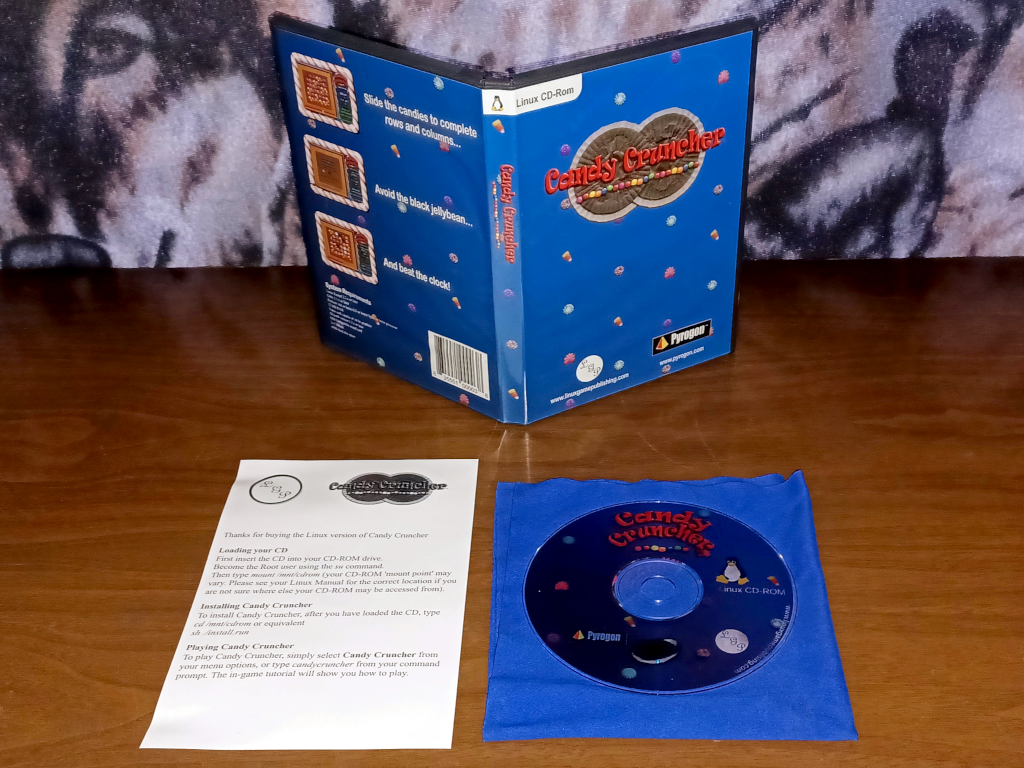
Helping to set this tone early on is the CD-ROM, with the installer not having the right executable permissions set. To install the game you should instead download the candycruncher_new_installer.sh from the archived Linux Game Publishing website, as this will pull all of the relevant files off the disc as well as provide you with additional patches. A free Candy Cruncher demo can also be found through there, although for some reason it would never let me enter my name into the high score table.
The full version sidesteps this by just grabbing the name from your user account, but Candy Cruncher would still sometimes fail to initalize and then hang before reaching full screen mode. These hitches would prove to be sporadic for me however, with the port otherwise demonstrating itself to be solid. What bothered me more was how the demo lied to me by claiming you will get to choose your starting level; instead, you can choose from starting blocks of about four levels each capped at level 22.
This forces you to replay levels that you have already solved over and over, and only seems to be done as means to artificially increase the game's difficulty. Casual games can be challenging, but they should not be frustrating, and it feels like Brian Hook was not far enough removed from Quake to realize this. In fairness he was always hesitant about the implementation of a time limit, but the blaring alarms in the game are far from relaxing, even if you can turn the sound effect itself off in the options.
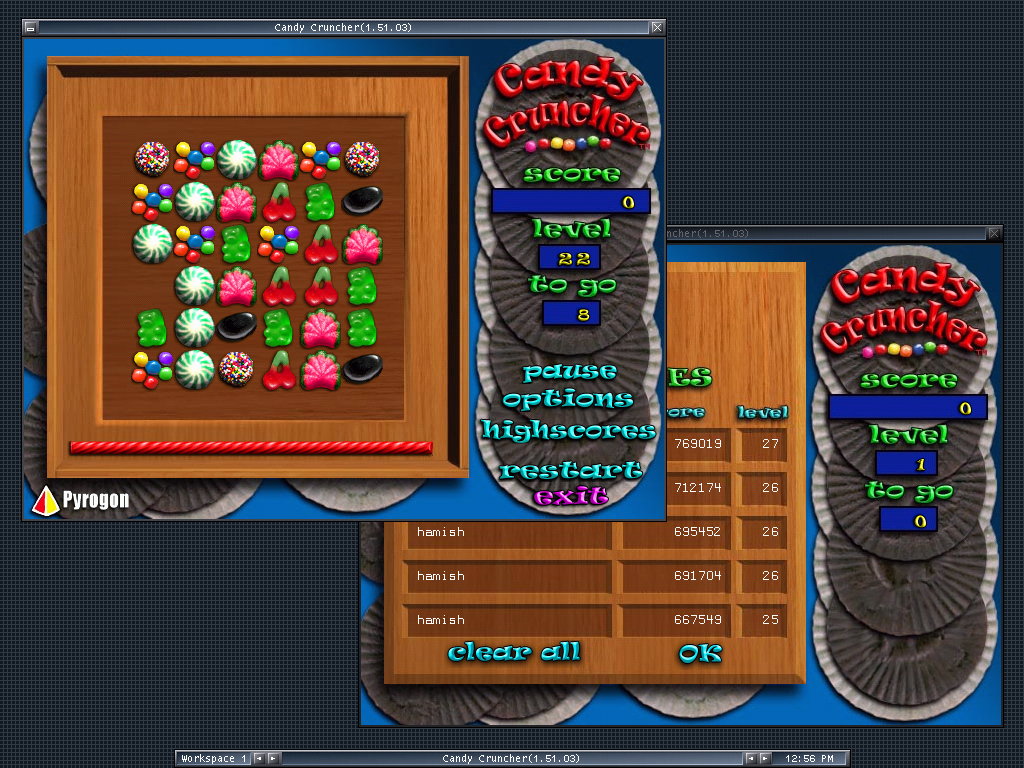
Candy Cruncher is at its best then when you treat it like Solitaire; just something you can launch to kill a few idle minutes before inevitably finding yourself stuck with a bum hand. When playing from the starting stage I usually make it to about level 19 before becoming boxed in, although when I was playing the game more studiously with the level select I did manage to achieve a high score of 769019 after coming close to solving level 27, which is about as far into the game as I think I am going to get.
There are a purported fifteen different candy types in total, so I have yet to encounter all of them, but the only real difference is in their appearance and in the points awarded. What differentiates Candy Cruncher from similar match-three games, other than the obvious fact that you match six here, is that you do not actually move the candy pieces themselves. Instead, you drag about the blank space found on the board, and use that to nudge the candies into line.
Wrapping your head around this is critical to mastering the click and drag technique required to get through the higher levels. While the game does support both mouse and keyboard controls, Candy Cruncher is optimized to be played with the mouse, and for a very specific technique in particular involving holding down and dragging the cursor that the developers themselves admit to being unintuitive at first in the supporting documentation.
The only real way forward is through trial and error, with there being enough randomness to the board layouts to make solving a stage often become a coin toss. The main strategies involved are recognizing when you have enough candies of the same type to complete a line, and navigating around the dreaded black jelly beans, fixed pieces that cannot be matched and exist solely to block your columns or rows. Candy canes can break these, or be used to match with any other candy type.
What promised to be sweet often proved sour, but Pyrogon was able to release one more title, NingPo MahJong, through LGP for Linux before closing up shop in 2003. The next installment will be the 50th part in this series, and with this in mind, I needed to choose a game that was both big enough and historically important enough to warrant that distinction. To that end, I present to you a true Linux gaming milestone: what may very well be the first big boxed Linux game to ever hit retail store shelves.
Carrying on in Part 50: Dawn of Civilization
Return to Part 1: Dumpster Diving





See more from me



 You can also find comments for this article on social media:

[https://icculus.org/~hamish/retro/part49.html](https://icculus.org/~hamish/retro/part49.html)

You are definitely better at playing it because I didn't get so far. I'm guessing that PenguinPlay can now cause some issues in Candy Cruncher because this website was closed.
I played the full version of Candy Cruncher 16 years ago, and it's one of the most addictive games for Linux. I was easily losing track of time with Candy Cruncher. I eventually decided I'm not going to play it anymore. I ran it last year, but I decided to play a few times. I didn't want to get stuck playing for hours. Losing motivated me to improve my score. It was too much fun for me.
It's a great game, and it was even more entertaining with PenguinPlay. You could compare your scores with those of other users. This feature wasn't available for Windows and Mac users.
The most interesting part is that the box version of Candy Cruncher was available exclusively for Linux users. The box version of Candy Cruncher for Windows and Mac doesn't exist. Additionally, LGP had been regularly publishing new patches only for the Linux version for many years.
You can also find the PowerPC and Sparc versions on the CD, which is only available for Linux users. You can probably play it on PlayStation 2 (and other PowerPC computers), which is amazing, but I don't have this console. It's the only Linux game where you can see Sparc on the box in the system requirements.
Linux had this advantage over Windows that commercial games weren't limited to x86/x86-64. Companies like Loki and LGP were investing time in porting some games to Alpha and Sparc. Interestingly, Microsoft never tried to port any commercial games, even for Windows NT PPC/DEC Alpha. LGP was one of the five companies that published commercial games for PowerPC. Of course, I have never heard about the company that ported a commercial Linux or Windows game to MIPS.
I was disappointed seeing a piece of paper instead of a manual. LGP also didn't include any manuals on the CD.
Lastly, Candy Cruncher for Linux was a much better product back then than the digital versions for Windows and Mac.
@Hamish, you should try playing Madblox! for Linux. I keep it on my Desktop, and play it when other games start to get too annoying for me.
Last edited by gbudny on 10 Dec 2025 at 2:22 pm UTC
Quoting: gbudnyI'm guessing that PenguinPlay can now cause some issues in Candy Cruncher because this website was closed.The installer that I used patched the game up to just before they added in support for PenguinPlay, so that sidestepped that particular issue for me.
I have never been that invested in competing for the highest possible score myself, but for those who are so inclined, I can definitely see it adding an appreciated extra dimension to the game.
Quoting: HamishI'm guessing that PenguinPlay can now cause some issues in Candy Cruncher because this website was closed.What version of Candy Cruncher did you play?
The installer that I used patched the game up to just before they added in support for PenguinPlay, so that sidestepped that particular issue for me.
Quoting: HamishI have never been that invested in competing for the highest possible score myself, but for those who are so inclined, I can definitely see it adding an appreciated extra dimension to the game.I have never been a fan of multiplayer games, and I very rarely play them. I don't like competing with other users, and I have never been very good at it. However, this game was an exception because I was interested in checking a high score table with PenguinPlay. It made Candy Cruncher more addictive for me.
It's an interesting idea for LGP to add the multiplayer mode, which was available only for the Linux version of Candy Cruncher.
It's a shame that LGP never made PenguinPlay accessible for the Linux versions of commercial games that weren't published by LGP. However, it would be impossible to make money out of it and keep it online.
Madblox! with the PenguinPlay support would be great for me.
Last edited by gbudny on 12 Dec 2025 at 6:30 pm UTC
Quoting: gbudnyWhat version of Candy Cruncher did you play?You can see it in the titlebar of the screenshot. Version 1.51.03 of the game.
[Changlog](https://ia902902.us.archive.org/19/items/lgp-patches/candycruncher/candycruncher-1.55-1.56-x86.run.txt)
Last edited by Hamish on 13 Dec 2025 at 8:10 am UTC
Quoting: HamishThank you for your response.Quoting: gbudnyWhat version of Candy Cruncher did you play?You can see it in the titlebar of the screenshot. Version 1.51.03 of the game.
[Changlog](https://ia902902.us.archive.org/19/items/lgp-patches/candycruncher/candycruncher-1.55-1.56-x86.run.txt)
I'm sorry, I have to look more carefully at these screenshots.
These names of patches and installers are quite confusing, so I have to use archive.org
The new installer is from 2007, but it contains an older version of the game than the patch released in 2006. The patch from 2006 is candycruncher-1.52-x86.run, and after installing it, it displays version 1.53.00. I checked it out, and it's the last patch that doesn't support PenguinPlay:
https://web.archive.org/web/20131225032146/http://updatefiles.linuxgamepublishing.com//candycruncher
I don't know if this patch works with Red Hat 7.3, but it could fix some of the issues.
Last edited by gbudny on 15 Dec 2025 at 9:35 am UTC
Quoting: gbudnyI don't know if this patch works with Red Hat 7.3, but it could fix some of the issues.The changelog just mentions it was "rebuilt using futureproof libraries" so I don't think there were any internal bug fixes and the newer libraries might actually be counterproductive on a retro system.
It reminds me of when I tried installing my Desura version of the Penumbra Collection on a period system that did not have SDL 2 built for it. The original binaries would have ran fine but not the update.
Quoting: HamishThe changelog just mentions it was "rebuilt using futureproof libraries" so I don't think there were any internal bug fixes and the newer libraries might actually be counterproductive on a retro system.It's still a commercial game, and I don't know what they fixed with many of these patches. You can't access a bug tracker anymore, and it's one of the companies that tested their games on much older systems. You can see the software requirements, which aren't demanding.
I understand that you don't want modern features released many years later, and I played older versions of games myself for fun. However, it could be an interesting tidbit for other users if you want to include it.
I think it's still the retro version of the game if LGP created patches for older systems. Of course, they did it many years after releasing it.
Quoting: HamishIt reminds me of when I tried installing my Desura version of the Penumbra Collection on a period system that did not have SDL 2 built for it. The original binaries would have ran fine but not the update.I had to upgrade my system to play the first version of Penumbra many years ago. Some companies focus only on the current distributions, which is bad.
I played some other games when the installer was much more modern than the game.
I won't reveal too many details because it could be a subject for your articles. For example, I played the LGP game from 2005 on a Linux distribution from 2003, and the other one was from 2009 running on a system from 2006 with patches from 2012.
Last edited by gbudny on 17 Dec 2025 at 8:59 am UTC
 Patreon
 PayPal