 Support us on Patreon
 PayPal
The Vulkan-based translation layer D7VK has version 1.3 out now, which officially expands it to also cover Direct3D 5 support for running more games on Linux. So now it supports Direct3D 5, 6 and 7. Impressive work for the DXVK fork focusing on older versions of Direct3D!
You would pair this up with Wine / Proton, to hopefully give improved accuracy and performance in certain older games compared to plain Wine.
As announced by the developer:
I'm afraid we've run out of 3DMark versions at this point, and the Final Reality benchmark isn't yet workable, however this release officially introduces support for D3D5. Don't worry, you won't run into any GPU-related performance limitations in this cursed land of our 3D forefathers, no matter what you use for translation to more modern APIs. Mind you, in the vast majority of cases you're better off using the Glide renderers that nearly all such late last century games offer as an alternative.
In addition to that, the D3D7/D3D6 sides have also seen a fair share of fixes and improvements (see below).
Fixes/additions:
- Starting with v1.3 we are opting in to FSAA emulation, rather than enabling it globally by default and keeping it disabled until the game decides to use it (or not). That will save quite a bit of memory bandwidth, since it does away with multi-sampled surface use, unless a game is known to offer support for FSAA. You can still force enable FSAA emulation at your leisure, of course, however note that AMD users may run into issues with it in some cases due to a known driver limitation around 16-bit texel buffers.
- Also starting with v1.3 logging verbosity and log file path environment variables are prefixed with
D7VK_, to allow for better logging segregation between D7VK and DXVK.- Thanks to @CkNoSFeRaTU, an obscure FPU mode setup bug, that affected all D3D6/5 titles, was spotted and fixed. The new way of handing things has done away with glaring rendering issues in titles such as Legacy of Kain: Soul Reaver (yes, Raziel is finally play-worthy, as he should be!), Homeworld: Emergence (aka Cataclysm) and subtle precision issues in many others.
- Fixed a D3D6/5 texture loading oversight which prevented us from hitting an optimal level of performance in many D3D6 titles (e.g. Drakan: Order of the Flame, Freespace 2 and Arabian Nights) and sometimes caused texture corruption.
- Thanks again to the now notorious detective skills of @CkNoSFeRaTU, we've managed to do away with our proxy interface workaround, which technically enables various games to run under Windows (e.g. Gothic 1/2, Ground Control, No One Lives Forever, Blood 2: The Chosen and other LithTech engine games) and ensures intro videos and other back buffers surfaces used by these games are displayed properly.
- Finalized an assortment of DDraw legacy surface groundwork, which was needed to properly support various D3D5 games.
A few of the titles noted to work well with it include:
- Carmageddon II: Carpocalypse Now
- Tomb Raider II
- Mortal Kombat 4
- Nightmare Creatures
- N.I.C.E 2
- Mobil 1 Rally Championship
- Deathtrap Dungeon
- Lands of Lore III
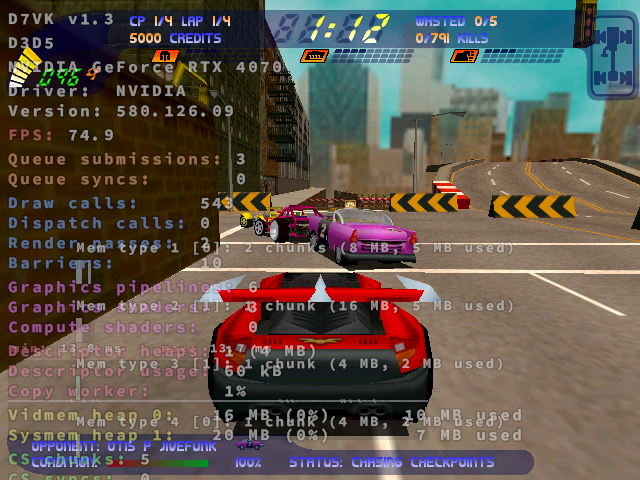
Pictured - Carmageddon II: Carpocalypse Now
Source: GitHub





See more from me

 You can also find comments for this article on social media:

if anyone have trouble enable direct3d with mortal kombat 4, in my case are needed uninstall nglide first
😄
Last edited by mrdeathjr on 9 Feb 2026 at 12:16 pm UTC
 hardpenguin 9 Feb 2026


I think the original was pure software rendering, anyway, but by the time 2 came out I think we either had a Voodoo Banshee (slightly nerfed Voodoo 2 plus 2D card built in, no VGA loopback required!) or a Voodoo 3 3000 with this then newfangled 'AGP' interface... (that wasn't compatible with the lower voltage AGP... 2x/4x of the Radeon 9800 Pro that I still have in a 'retro' PC!).
I guess the other option alluded to is to run something like nGlide to 'pre convert' that path to OpenGL? I also seem to remember something called [dgVoodoo2](https://github.com/dege-diosg/dgVoodoo2) but it looks like the maintainer there has recently stopped & archived it.

I guess the other option alluded to is to run something like nGlide to 'pre convert' that path to OpenGL? I also seem to remember something called dgVoodoo2 [External Link] but it looks like the maintainer there has recently stopped & archived it.dgVoodoo2 still gets updates, but its author doesn't provide tech support since a few years (no issues or even PRs). It's also proprietary (no source code available). Therefore, the author unarchives the repository, tags a new release then archives the repository again to prevent any new community activity on GitHub, although old issues can still be searched.
dgVoodoo2 also no longer works in WINE since a few years ago, so you need to use an older version (2.81.3 IIRC).
Last edited by Calinou on 9 Feb 2026 at 6:20 pm UTC
 Caldathras 9 Feb 2026
Quoting: KithopI also seem to remember something called dgVoodoo2
Quoting: CalinouSee this GoL article comment and the subsequent replies if you want further details:I guess the other option alluded to is to run something like nGlide to 'pre convert' that path to OpenGL? I also seem to remember something called dgVoodoo2 [External Link] but it looks like the maintainer there has recently stopped & archived it.dgVoodoo2 still gets updates, but its author doesn't provide tech support since a few years (no issues or even PRs). It's also proprietary (no source code available). Therefore, the author unarchives the repository, tags a new release then archives the repository again to prevent any new community activity on GitHub, although old issues can still be searched.
dgVoodoo2 also no longer works in WINE since a few years ago, so you need to use an older version (2.81.3 IIRC).
D7VK brings Direct3D 7 to Linux using Vulkan based on DXVK
The developer seems to be openly hostile to Linux and to his Linux users. I grabbed a backup of his last Linux compatible version (v2.8.2) just in case Lutris acquiesces to his demands. This was before D7VK began proving to be such a viable alternative. All we need is Glide support now...
 How to setup OpenMW for modern Morrowind on Linux / SteamOS and Steam Deck
 How to install Hollow Knight: Silksong mods on Linux, SteamOS and Steam Deck