 Support us on Patreon
 PayPal
Pipeweaver is a free and open source audio management tool for Linux built on top of PipeWire, designed specifically with streaming and broadcasting in mind. So if you're doing any sort of streaming or recording on Linux, this UI might make something things perhaps a little bit easier.
The developers explain it's their "attempt to bring a simple way to manage complex streaming audio setups, it allows creation of virtual audio sources, attaching physical audio sources, managing volumes (including matrix mixing), 'complex' mute arrangements, and finally routing to physical and virtual outputs".
Part of what makes Pipeweaver interesting is that you use a web page to manage it, allowing you to access the UI from any device that can load a web page. They explained their reasoning on using a web page for it on their Wiki.
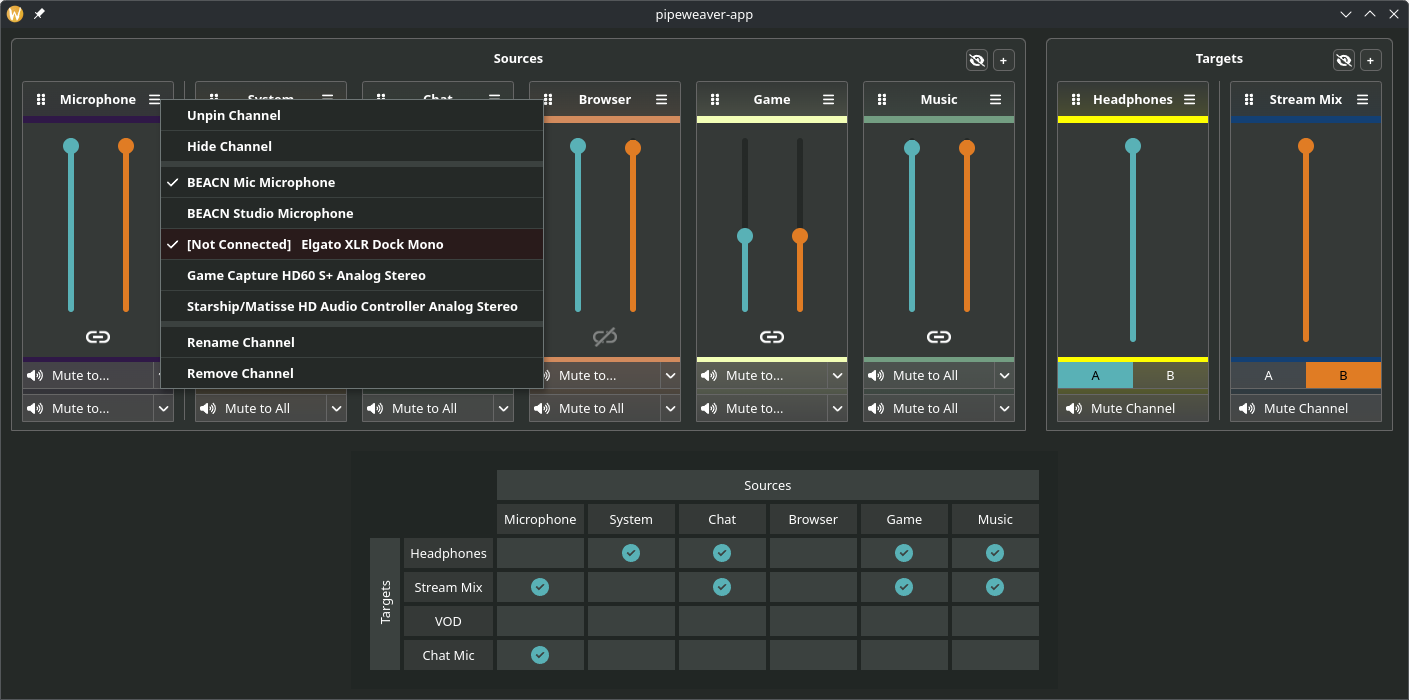
Early days for it yet though, as they mention it's under heavy development but it's looking real promising. They list the current status at time of writing as:
Implemented:
- Virtual Channel Creation
- Physical Device Mapping
- Volumes, Muting, Routing
- Configuration Saving and Recall
- Tray Icon and .desktop Files
- Custom Channel Colours
- Command Line configuration tool
- Application Management (Move Applications to channels inside the UI)
Planned:
- A 'Tablet Mode' interface
- Multiple Profile Support
- Latency Tuning
- Useful Documentation
Possible Future Plans:
- LV2 support for Mic Effects (Gate, Compressor, Expander, Eq etc)
- flatpak support
See more about it on the GitHub page.
I'll have to keep a bookmark of this one, for if I ever return to streaming it could be very useful indeed.





See more from me




 You can also find comments for this article on social media:
  Petethegoat 2 hours ago





 How to setup OpenMW for modern Morrowind on Linux / SteamOS and Steam Deck
 How to install Hollow Knight: Silksong mods on Linux, SteamOS and Steam Deck