 Support us on Patreon
 PayPal
Pipeweaver is a free and open source audio management tool for Linux built on top of PipeWire, designed specifically with streaming and broadcasting in mind. So if you're doing any sort of streaming or recording on Linux, this UI might make something things perhaps a little bit easier.
The developers explain it's their "attempt to bring a simple way to manage complex streaming audio setups, it allows creation of virtual audio sources, attaching physical audio sources, managing volumes (including matrix mixing), 'complex' mute arrangements, and finally routing to physical and virtual outputs".
Part of what makes Pipeweaver interesting is that you use a web page to manage it, allowing you to access the UI from any device that can load a web page. They explained their reasoning on using a web page for it on their Wiki.
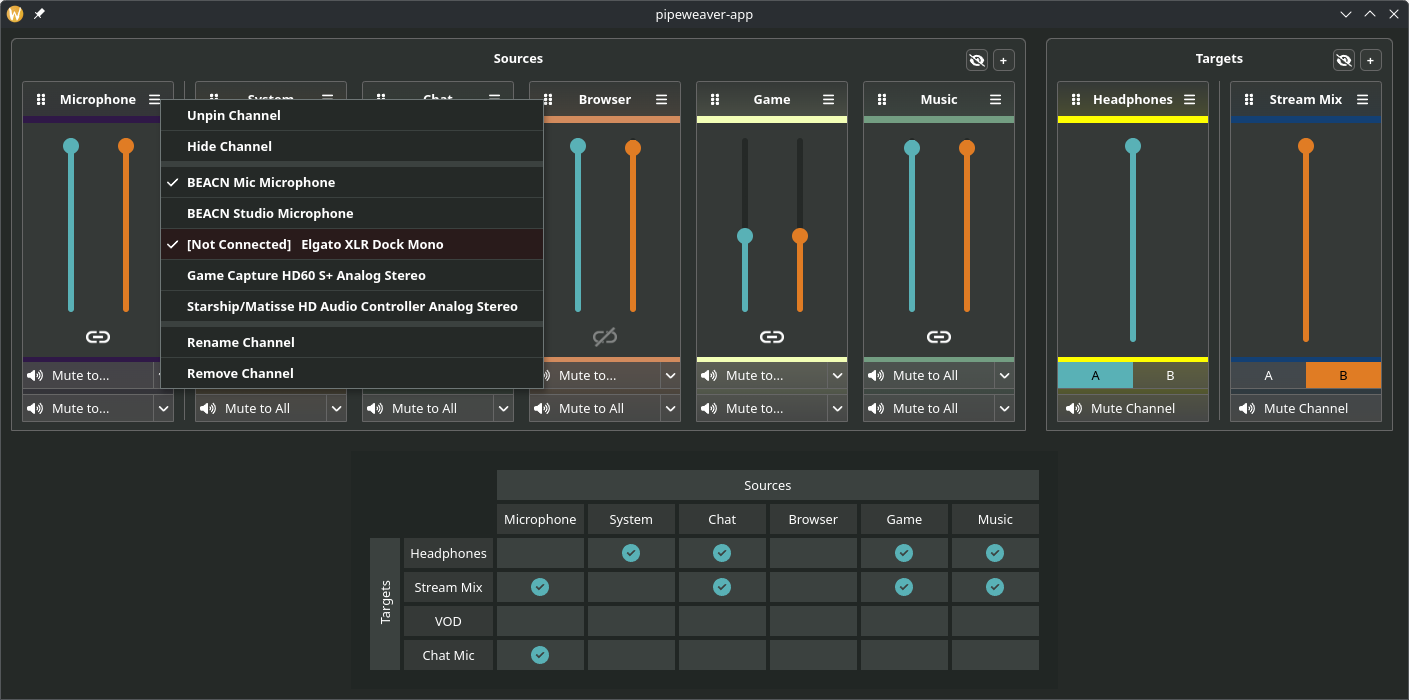
Early days for it yet though, as they mention it's under heavy development but it's looking real promising. They list the current status at time of writing as:
Implemented:
- Virtual Channel Creation
- Physical Device Mapping
- Volumes, Muting, Routing
- Configuration Saving and Recall
- Tray Icon and .desktop Files
- Custom Channel Colours
- Command Line configuration tool
- Application Management (Move Applications to channels inside the UI)
Planned:
- A 'Tablet Mode' interface
- Multiple Profile Support
- Latency Tuning
- Useful Documentation
Possible Future Plans:
- LV2 support for Mic Effects (Gate, Compressor, Expander, Eq etc)
- flatpak support
See more about it on the GitHub page.
I'll have to keep a bookmark of this one, for if I ever return to streaming it could be very useful indeed.





See more from me




 You can also find comments for this article on social media:
  Petethegoat 21 Apr 2026








Quoting: WORMI can’t help but think a similar tool targeting Windows would be super janky and cost $20.Dunno about now, but in the old days you'd also have to download it from some unknown website and it would likely have a virus in it.
Quoting: WORMI can’t help but think a similar tool targeting Windows would be super janky and cost $20.Elgato Wave Link which seems this app at least for the Desktop app seems heavily inspired by is Free on windows and doesn't required any of their mics any more
Quoting: WORMI can’t help but think a similar tool targeting Windows would be super janky and cost $20.VoiceMeeter is actually free, although they do ask for money if you want. And it provides a lot of features that makes it a breeze to manage a fair amount of real and virtual input/output with multiple routing, in addition to a pretty good networked audio solution on top of it and various built-in effects.
It's actually the piece of software I miss the most from windows, although I just coded a pair of scripts that tweak all my audio devices as needed, now, so all of this is kinda moot to me now. And it also auto-toggle when my wireless corsair headset connects, which was impossible to do on windows, as far as I know.
Still, it's nice to have more good UI for audio management moving forward. Pulsemeeter is another project, but seems to move very slowly, and not everyone is comfortable with just piping scripts in `pw-cli`.

pavucontrol worked, and still works, just fine with PipeWire, as long as its PulseAudio emulation is enabled (which it always is). Still, pavucontrol is getting a bit long in the tooth, and isn't the easiest thing to rely on on today. But since neither the DEs' system settings tools nor wireplumber provide sufficiently robust control over the audio subsystem, a dedicated tool remains necessary. Here's hoping pipeweaver shapes up to fill that void.
walther von stolzing 22 Apr 2026

Quoting: Cley_FayeI've used VoiceMeeter 'Banana' on Windows earlier this year to route the output of a midi synth instrument & microphone to OBS, & then to video conferencing -- and yeah it was a breeze to set up, there was no added noticeable latency on the midi instrument, etc.Quoting: WORMI can’t help but think a similar tool targeting Windows would be super janky and cost $20.VoiceMeeter is actually free, although they do ask for money if you want. And it provides a lot of features that makes it a breeze to manage a fair amount of real and virtual input/output with multiple routing, in addition to a pretty good networked audio solution on top of it and various built-in effects.
It's actually the piece of software I miss the most from windows, although I just coded a pair of scripts that tweak all my audio devices as needed, now, so all of this is kinda moot to me now. And it also auto-toggle when my wireless corsair headset connects, which was impossible to do on windows, as far as I know.
Still, it's nice to have more good UI for audio management moving forward. Pulsemeeter is another project, but seems to move very slowly, and not everyone is comfortable with just piping scripts in `pw-cli`.
qpwgraph is very powerful on Linux, but doesn't cover all of the use cases that 'Banana' helps with, especially the easy routing of virtual io -- so I'm really excited to see this new program.

I actually just wanted to play Resident Evil 2 Remastered last weekend. I initially used PipeWire config files for setting up immersive simulated surround sound (like Dolby Atmos for Headphones).
But this process is very tedious, because I had to manually set the virtual surround sink as system output device and set the real headphones in the EasyEffects settings. Also, I had to create a filter chain and restart the audio services after every change, causing EasyEffects to crash every time.
Then I got the idea to build an app that does everything only via the PipeWire C API. Oh my, C++ was quite a ride. I'm more of a C# or Python guy. But at last, the app is finally working, and I wanted to share this!
https://github.com/Berny23/virtual-surround-manager
Flatpak is planned but not working currently. Please help if you're a developer.