 Support us on Patreon
 PayPal
The very popular Linux distribution CachyOS roll their own advanced build of Proton, and with the latest Proton-CachyOS 11 update they added OptiScaler.
Anyone can run their own fork of Valve's Proton as it's open source, like we already have the popular GE-Proton too. Check out the GamingOnLinux Guide to all the different Proton versions. Proton-CachyOS includes a lot of extras on top of Valve's Proton, based on their testing code and various patches (so in some ways it can be more unstable).
With Version Proton-CachyOS 11.0-20260506 they've added basic integration of OptiScaler into umu-protonfixes. Using environment variables as launch options for games it allows you to inject specific DLLs to change upscaling and frame generation tech used by games. So if a game supports DLSS, FSR or XeSS you can swap it to something else or upgrade the version used in some cases. It's a very popular tool this integration just makes it easier to use.
There's also various game fixes, it pulls in new code from Valve's upstream Proton and lots more.
The full changelog:
- Proton (SLR and Native)
- Updated to the most recent Proton Experimental release
11.0-20260506- Imported a number of fixes and updates from Proton-EM for
winewayland.drv.
- Prefer
ext_data_control_manager_v1overzwlr_data_control_manager_v1when present. Thanks to @Etaash-mathamsetty- Implemented
VK_COLORSPACE_HDR10_ST2084_EXTusingwindows_bt2100image description when version 3 of thewp_color_manager_v1protocol is supported (no compositor supports it yet). Thanks to @Etaash-mathamsetty- Fixed crashes when the Wayland output image description changes. Thanks to @Etaash-mathamsetty
- Simplified client surface caching and made it handle more cases. Thanks to @Etaash-mathamsetty
- Fixed mouse pointer moving abruptly after entering a window when using
winewayland.drv(#153). Thanks to @Etaash-mathamsetty- Fixed an issue that "upgraded" FSR3.1 to FSR4 on RDNA3 GPUs automatically even without using the intended environemnt variables. Thanks to @Etaash-mathamsetty
- Removed
PROTON_ENABLE_HDRas an option. It doesn't make much sense to have it any more, as it also requiredENABLE_HDR_WSI=0in certain cases. If it is required, you can useDXVK_HDR=1instead, optionally withENABLE_HDR_WSI=1on Nvidia driver versions older than595.x.x.- Fixed more than a few media playback issues.
- Fixed an issue where some H264 videos would fail to play (e.g. Stella Sora). Thanks to @NelloKudo
- Fixed an issue where some videos would fail to start on winedmo due to flawed Seek() implementation (e.g. Danganronpa V3). Thanks to @NelloKudo
- Fixed a crash in faudio and improved WMA videos playback, DMC1 videos should now play fine on winedmo. Thanks to @NelloKudo
- Fixed intro video not playing in Guilty Gear XX Accent Core Plus R. Thanks to @NelloKudo
- Fixed semi-transparent webviews in Wuthering Waves. Thanks to @NelloKudo
- Thanks to @Vyrolian's efforts, improvements have been made in
winepulse.drvin Valve's Proton, and as a result their older more hacky patch forwinepulse.drvhas been removed. The multi-channel audio patches forwinealsa.drvare still included.- Imported the changes from https://gitlab.winehq.org/wine/wine/-/merge_requests/10829 which tries to make collisions on the futex queues much less likely.
- Imported the changes from https://gitlab.winehq.org/wine/wine/-/merge_requests/10871 to respect runtime font smoothing settings.
- Improved
WINE_BLOCK_HOSTSto block second-level domains too.WINE_BLOCK_HOSTS=test.orgwill block all ofthis.test.org,other.test.org. Word of caution, the domain name matching is very naive, soWINE_BLOCK_HOSTS=orgwill block any.orgTLD.- Added basic integration of OptiScaler into
umu-protonfixesand Proton-CachyOS, see below.
- Presently it is controlled by two environment variables,
PROTON_USE_OPTISCALER=1to enable it, andPROTON_OPTISCALER_NAME=to control the DLL that should be injected. Three names are supported forPROTON_OPTISCALER_NAME,dxgi.dll,d3d12.dllanddbghelp.dlland defaults todxgi.dllunless explictly set.- When enabled, the
PROTON_options can be used to dictate the versions of the upscaler DLLs to download and use, so_UPGRADE PROTON_FSR4_RDNA3_UPGRADE=4.0.2will download the FidelityFX DLLs for version4.0.2.PROTON_FSR4_RDNA3_UPGRADE=1still defaults to4.0.0andPROTON_FSR4_UPGRADE=1defaults to4.1.0. You will need either of these to enable FSR4 upscaling presently.- The configuration files are placed with the DLLs in
in case you need to edit them. Further configuration options exposed through environment variables are not planned, and likely to not be implemented./drive_c/windows/system32/umu/ - Right now drop-in DLL replacements are not possible, since the files are validated on each startup. If you need more fine-grained control than what is offered by the in-game menu, it's probably better to manually set up OptiScaler.
- I consider this work-in-progress, and it will certainly not work with all games. Do not report issues to OptiScaler when using this, always try their own manual installation first (and of course disable this feature when doing so).
- Thanks to @FakeMichau from the OptiScaler dev team for making this kind of integration possible by identifying and resolving various issues, and @mrlukyxd and @noel-personal for their input and testing while I was implementing it.
- Updated
d7vksubmodule tov1.9.- Updated
dxvk-sareksubmodule to01e9165ato include the back-portedd7vkupdates.- Proton (SLR specific)
- None
- Proton (Native specific)
- Converted it back into a multilib package until it's no longer possible for us to build it as such.
- Wine (Standalone)
- None
You can use a tool like ProtonUp-Qt to install Proton-CachyOS on any Linux distribution:
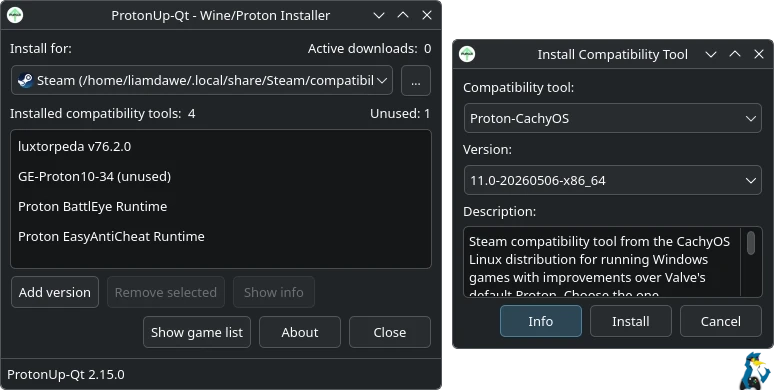
Source: GitHub





See more from me



 You can also find comments for this article on social media:
 How to setup OpenMW for modern Morrowind on Linux / SteamOS and Steam Deck
 How to install Hollow Knight: Silksong mods on Linux, SteamOS and Steam Deck