 Support us on Patreon
 PayPal
Valve released another new Steam Client Beta update for all platforms on May 13th, bringing with it a few styling changes to Big Picture Mode and various fixes.
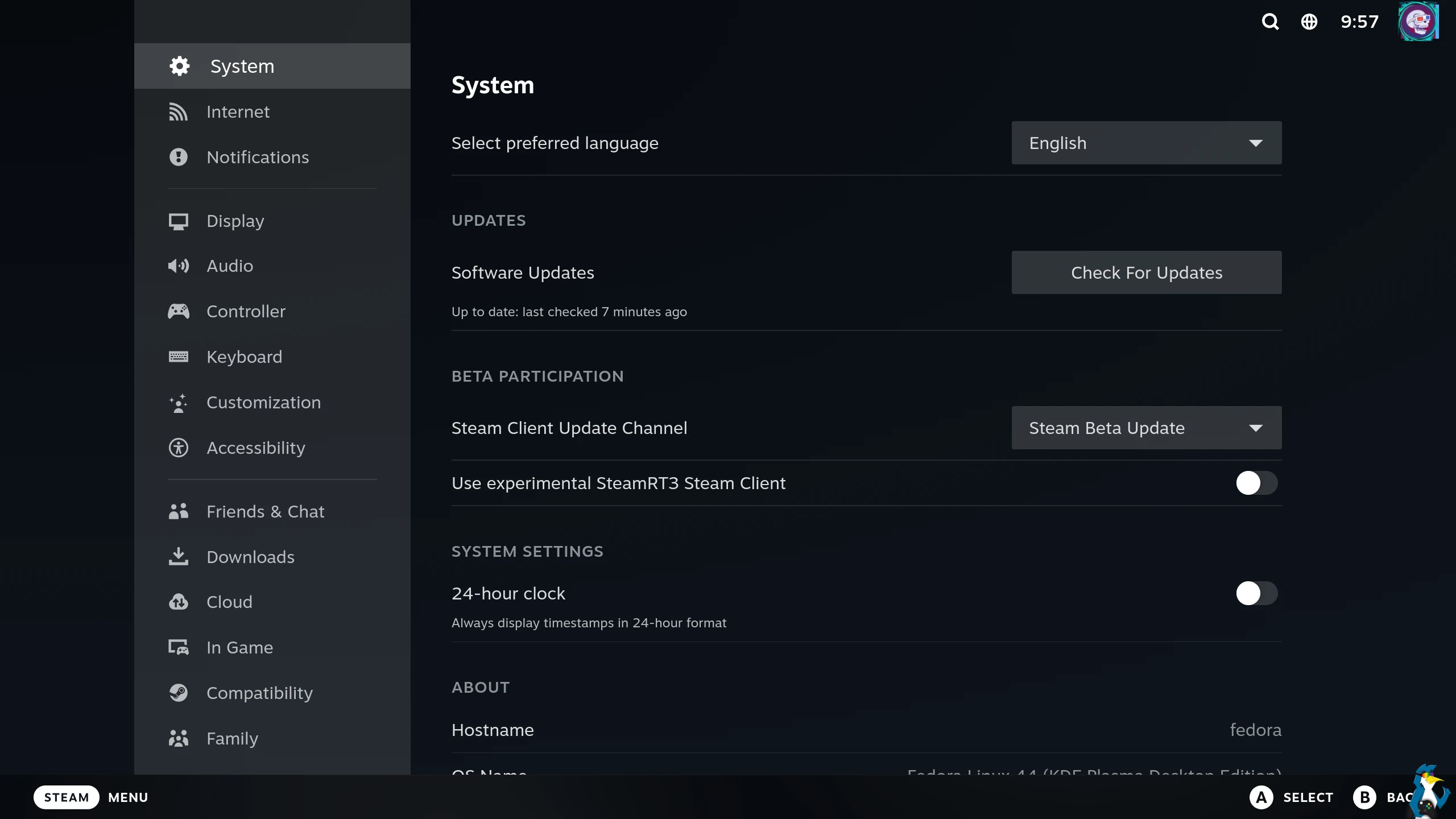
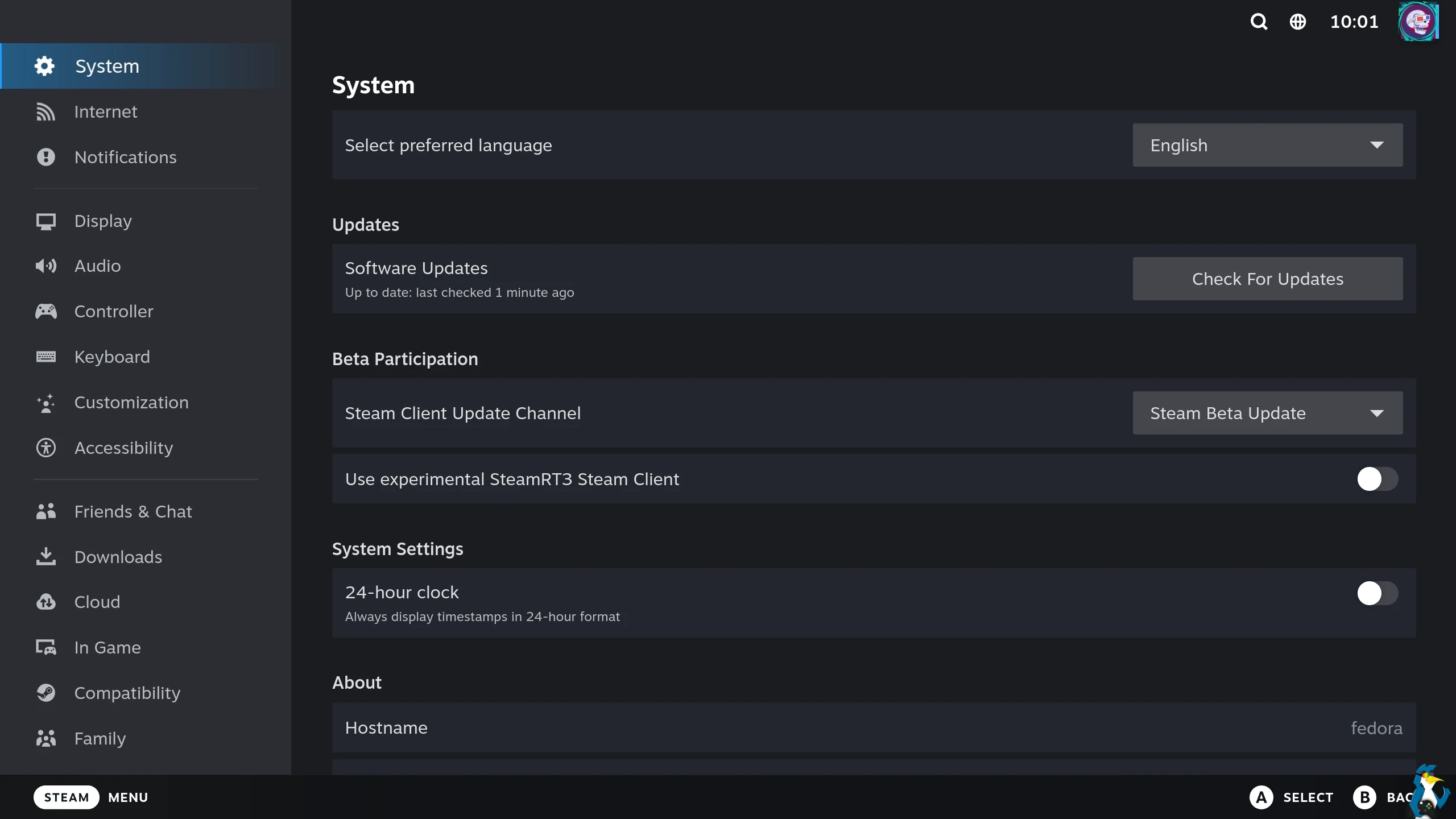
For the Big Picture Mode they've slightly adjusted the layout and colouring which should better match the rest of Steam, improve readability and improve the overall organisation of settings. All work towards the Steam Machine and Steam Frame release to get them looking as good as possible. We're getting close now with the recent Proton 11 Beta update too.
As an example the original look is below:
And now the new look below:
From the main Steam Client Beta changelog:
Settings
- Updated the layout and styles for client settings across desktop, Big Picture and controller configuration to improve readability and organization.
- Notification settings has been updated to allow changing e-mail, client, and mobile notification preferences in one place.
Linux
- The 'Legacy Steam Runtime' compatibility tool is now an optional standalone download instead of being bundled with the Steam client.
- Fixed a case where dropdown windows and profile hover windows could get stuck on screen.
- Fixed a crash related to the Steam Controller on Linux
SteamRT3 Beta
- Fixed a failure to start the client and proton games on systems where SDL_VIDEO_DRIVER doesn't include the x11 or windows options.
Steam Input
- Removed several configuration options from incompatible inputs. Digital Buttons can no longer be set Press types that require Analog input and Gyro can no longer be set to incompatible Radial Menu or Hotbar. These options will still be available for all compatible inputs.
- Fixed Gyro to Joystick Camera timing issue - should appear smoother across all controllers.
- Added an extra option to Gyro to Joystick Camera - Angle Catchup can be active while gyro ratcheting.
- Fixed micro-stutter in Steam Controller gyro
- You can now turn off "Track Pad locking" - by default each trackpad is disabled while the corresponding joystick is either deflected or the joystick's capacitive sensor has been activated. This is to avoid accidental track pad touches when using a joystick. Find the setting in: Settings->Controller->Details->Calibration & Advanced->Trackpad Lockout.
- Fixed Grip Sense sensor page Grip Range slider, and adjusted explanations.
And for the Steam Deck Beta these changes are specific to the Deck:
- Fixed a crash related to the Steam Controller.
- Improved EULA scrolling behavior when using a controller.
- Directly navigating to a specific settings page (i.e by activating the network icon in the header) will now focus the first setting in that section instead of the settings navigation menu.
- Friend status will now update much more quickly after waking your device from sleep or toggling network connectivity.




About the author - Liam Squires-Hand

I am the owner of GamingOnLinux. After discovering Linux back in the days of Mandrake in 2003, I constantly checked on the progress of Linux until Ubuntu appeared on the scene and it helped me to really love it. You can reach me easily by emailing GamingOnLinux directly. You can follow me personally on Mastodon [External Link].
See more from me
See more from me
Some you may have missed, popular articles from the last month:
 You can also find comments for this article on social media:
 All posts need to follow our rules. Please hit the Report Flag icon on any post that breaks the rules or contains illegal / harmful content. Readers can also email us for any issues or concerns.
No comments yet!
 How to setup OpenMW for modern Morrowind on Linux / SteamOS and Steam Deck
 How to install Hollow Knight: Silksong mods on Linux, SteamOS and Steam Deck