A fresh Steam Client Beta was released for Desktop and Steam Deck, bringing more fixes for the Steam Controller and the Steam Deck.
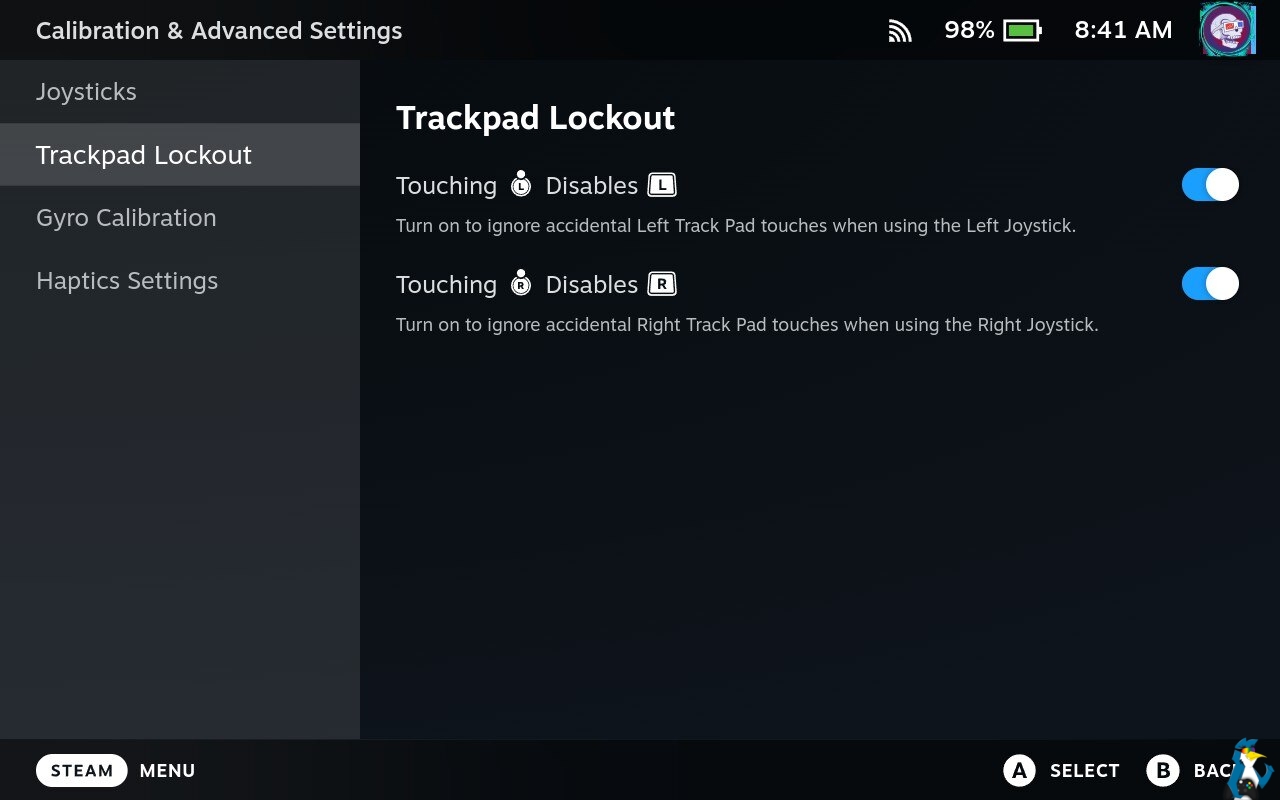
One issue some have been seeing is double inputs when leaving the Steam Controller charging on the Puck, while also gaming with it. That should now be solved with this Beta. And on the Steam Deck, you can now configure the Track Pad locking behaviour when touching the Joysticks.
From the main Desktop changelog:
General
- Fixed streamable non-Steam games showing when "Ready to Play should include Streamable games" is toggled off
Steam Input
- Fixed an issue where Steam Controller grip thresholds were loaded incorrectly in the device calibration screen
- Fixed an issue preventing the Steam button chord configuration from being edited for the Steam Controller
- Fixed an issue with doubled input when the Steam Controller is charging on the puck
And on the Steam Deck Beta changelog these are specific to the Steam Deck:
- Fixed the "View friends list" link in the Big Picture home page opening the older non-QAM version of the friends list
- Track Pad Locking - You can now turn off the Joystick vs Trackpad Locking behavior in Settings->Controller->Details->Calibration & Advanced->Trackpad Lockout. This feature is intended to avoid accidental touches on the touchpad while using a Joystick, but it can now be turned off.




About the author - Liam Dawe

I am the owner of GamingOnLinux. After discovering Linux back in the days of Mandrake in 2003, I constantly checked on the progress of Linux until Ubuntu appeared on the scene and it helped me to really love it. You can reach me easily by emailing GamingOnLinux directly. You can follow me personally on Mastodon [External Link].
See more from me
See more from me
Some you may have missed, popular articles from the last month:



 You can also find comments for this article on social media:
 All posts need to follow our rules. Please hit the Report Flag icon on any post that breaks the rules or contains illegal / harmful content. Readers can also email us for any issues or concerns.
No comments yet!
 Patreon
 PayPal
 How to setup OpenMW for modern Morrowind on Linux / SteamOS and Steam Deck
 How to install Hollow Knight: Silksong mods on Linux, SteamOS and Steam Deck