 Support us on Patreon
 PayPal
System76 have today finally released Pop!_OS 24.04 LTS with the newly launched COSMIC Desktop Environment. Giving the team at System76 their own foundation to build upon and help make their hardware more tailored and unique, it will be interesting to see the wider reception for the COSMIC desktop.
I'm certainly not expecting perfection from the first proper release of COSMIC, but from the time I've spent playing around with it - I am quite impressed with what they've done. The way everything flows is quite nice. Although, I really don't like the big thick borders by default.
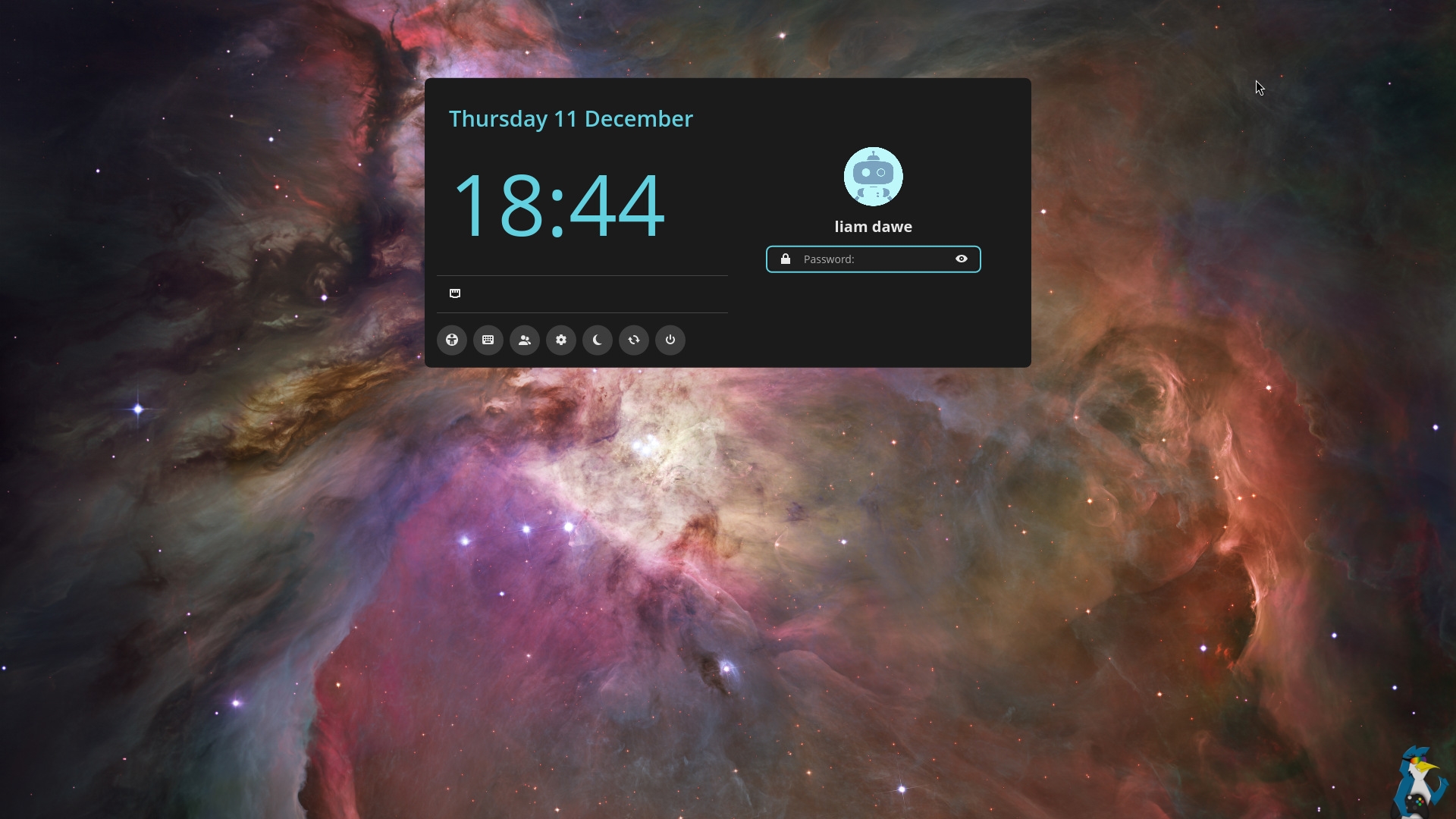
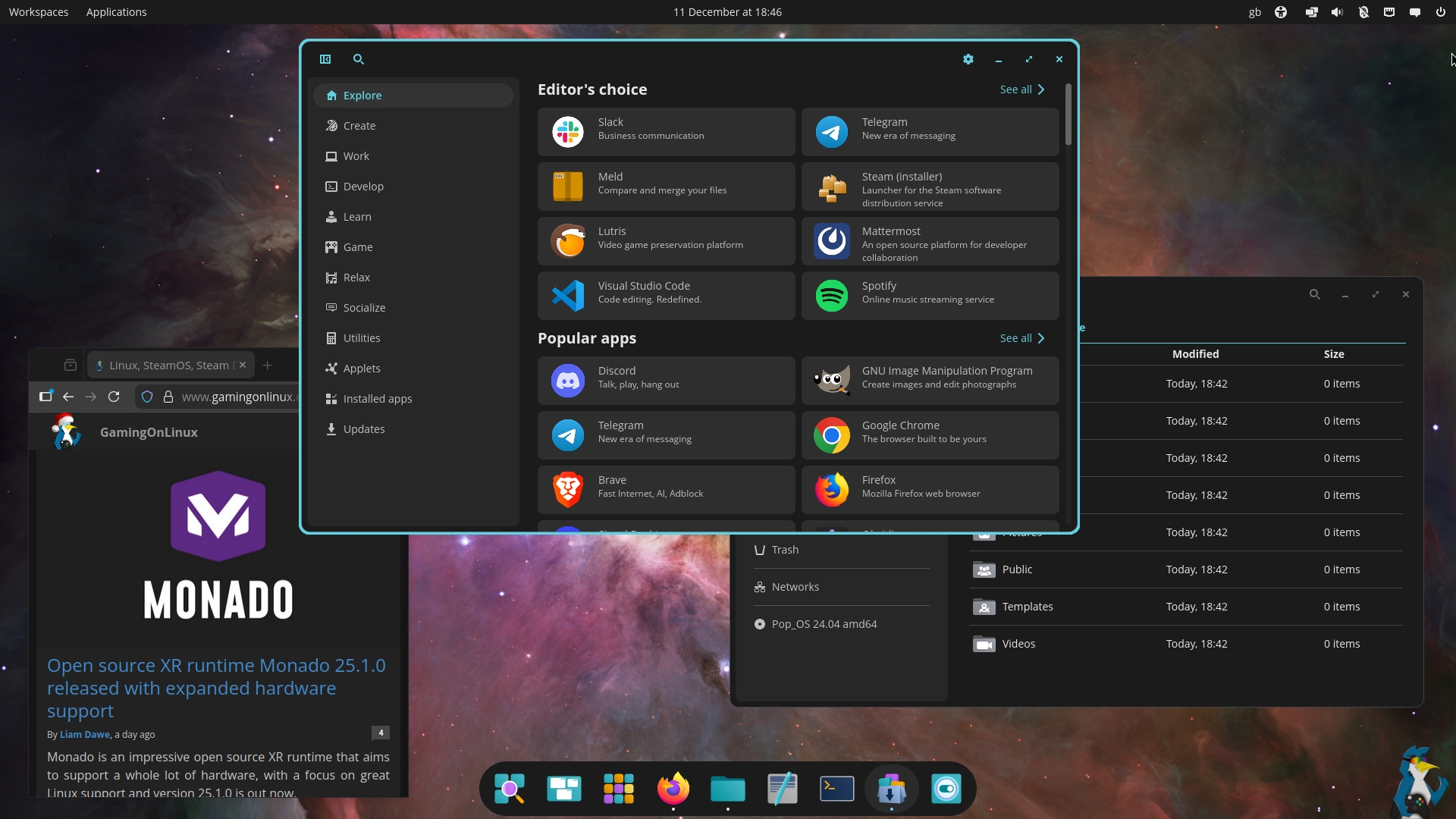
Pictured - Pop!_OS 24.04 LTS with COSMIC
Pop!_OS 24.04 LTS Highlights
- New COSMIC Desktop Environment Experience
- New Pop!_OS 24.04 LTS for ARM computers
◦ Officially supported on the System76 Thelio Astra desktop
◦ Community support for non-System76 hardware enabled by Tow-Boot- New hybrid graphics support for longer battery life
◦ No need to change modes
◦ Apps that request the discrete GPU will automatically run on the correct GPU
◦ Manually run an app on your preferred GPU by right-clicking on the app icon- Easy installation with full disk encryption
- Refresh install feature by holding Space at boot or from the ISO
◦ Reinstall the OS anytime while keeping files, settings, and Flatpak user applications
◦ The Refresh feature will also arrive in COSMIC Settings after release- Broad hardware support
COSMIC Desktop Environment Highlights
- Intuitive window tiling that can be used with the mouse or keyboard
◦ Activate tiling with a simple toggle in the panel
◦ Tiling per workspace and per display
◦ Easy to learn keyboard shortcuts
◦ Rearrange windows by dragging them with the mouse. Visual hints show where the window will land.- Featureful Workspaces
◦ Horizontal or vertical workspaces
◦ Workspace per display or spanned across displays
◦ Drag workspaces to re-arrange them or move an entire workspace to a different display
◦ Pin workspaces so they’re never removed
◦ Workspace settings are persistent. A tiled and pinned workspace will be tiled and pinned after reboot.
◦ Add the “Numbered Workspaces” applet to your Panel or Dock to always see the workspace number you’re on- Smooth multi-display experience
◦ Effortlessly mix and match hi-dpi and standard resolution displays
◦ Displays are automatically scaled based on pixel density and display scaling can be fine-tuned in Settings
◦ Display settings are persistent. Plug in the same display and its settings will return.
◦ Unplug a display and the windows on that display will move to a new workspace on a remaining display- Customization galore
◦ Theme your desktop from Settings with easy color pickers
◦ Setup your personalized layout
••• Panel + Dock or single Panel
••• Put the Panel and Dock on any screen edge
◦ Add and arrange features (Applets) on the Panel or Dock from Settings- Fast desktop navigation and easy keyboard shortcuts
◦ Press the Super (or the Windows key) to activate the Launcher
••• Type the app you want and press enter
••• Type the name of an open app then enter to switch to it
••• Type ? to learn more features like web and GitHub search, calculator, and running commands directly from the launcher
◦ Use the same keyboard shortcuts to focus or arrange windows across workspaces and displays
• Super+Arrows to change the focused window. Super+Shift+Arrows to move windows.- Stacks, snapping, and sticky windows
◦ Stack windows to combine them into tab groups like a browser
••• Right click on the header and choose Create Window Stack. Then drag another window to the stack.
••• When tiling windows, simply drag the window on top of another to create a stack.
◦ When using floating (non-tiled) windows, drag them to the display edges to snap them into a quarter or half tile
◦ Make a window stay on top of other windows and follow you around to other workspaces or displays by right-clicking the header and choosing “Sticky window”- Faster, more responsive applications
◦ COSMIC Files
◦ COSMIC Store
◦ COSMIC Terminal
◦ COSMIC Text Editor
◦ COSMIC Media Player
◦ COSMIC Screenshot
◦ Install more apps Made for COSMIC from COSMIC Store- Written in the Rust programming language
◦ For memory safety and high performance
See more on the System76 website.




About the author - Liam Squires-Hand

I am the owner of GamingOnLinux. After discovering Linux back in the days of Mandrake in 2003, I constantly checked on the progress of Linux until Ubuntu appeared on the scene and it helped me to really love it. You can reach me easily by emailing GamingOnLinux directly. You can follow me personally on Mastodon [External Link].
See more from me
See more from me
Some you may have missed, popular articles from the last month:

 You can also find comments for this article on social media:
 All posts need to follow our rules. Please hit the Report Flag icon on any post that breaks the rules or contains illegal / harmful content. Readers can also email us for any issues or concerns.
19 comments


 Persephone the Sheep 11 Dec 2025

Had to set up a computer with Pop!_OS for a science center is October. They needed AR sandbox and system76 had instructions and everything setup for it but even tho the doc says Pop!_OS 22.04 or newer the software isn't in the 24.04 repo. I just when and installed 22.04 since the computer will be setup and never touched again.
Just wish I didn't have to research everything since they where the ones that wanted a to have a topography exhibit all they knew is they needed a computer and kinect. I Should say the only reason I was involved is because my aunt runs the place, so my dad was asked to get the computer since she knows nothing about computers. They original just asked for a computer with linux so we installed linux mint since they didn't specify and that's what my dad default to for people asking for linux. Then they said they couldn't figure out how to install the kinect drivers so they asked for windows. So I installed windows 11 with the kinect drivers (Fun fact the kinect driver doesn't with memory protection enabled). Then they wanted me to show everything working for them. I show up and nothing new has happened they did nothing and surprise the software needed doesn't exist on windows just one project a dad made for their kid that i couldn't get working. So I just took the computer back home and installed Pop!_OS now i just have to wait for them to finish the exhibit,
Uh sorry for the rant the whole thing just annoys me I'm just realizing this is similar to when my mom is asked for constantly changing goal from non programmers at her job.
Just wish I didn't have to research everything since they where the ones that wanted a to have a topography exhibit all they knew is they needed a computer and kinect. I Should say the only reason I was involved is because my aunt runs the place, so my dad was asked to get the computer since she knows nothing about computers. They original just asked for a computer with linux so we installed linux mint since they didn't specify and that's what my dad default to for people asking for linux. Then they said they couldn't figure out how to install the kinect drivers so they asked for windows. So I installed windows 11 with the kinect drivers (Fun fact the kinect driver doesn't with memory protection enabled). Then they wanted me to show everything working for them. I show up and nothing new has happened they did nothing and surprise the software needed doesn't exist on windows just one project a dad made for their kid that i couldn't get working. So I just took the computer back home and installed Pop!_OS now i just have to wait for them to finish the exhibit,
Uh sorry for the rant the whole thing just annoys me I'm just realizing this is similar to when my mom is asked for constantly changing goal from non programmers at her job.
3 Likes

Absolutely love what System76 is doing with Cosmic! I tried it out a few months ago with my Cachy install, and it definately wasn't ready, still had some major bugs. But I know they've been hard at work with everything so I'm VERY tempted to give it another go. I love that we have a nice modern new DE!
1 Likes
 Fester_Mudd 11 Dec 2025
Gonna download this now for a tryout! I wish there was a torrent download though :/
KDE Linux is another interesting up and coming new flagship distro. It has both snap and flatpak by default.
KDE Linux is another interesting up and coming new flagship distro. It has both snap and flatpak by default.
3 Likes

They haven't even finished the release candidate yet. How can they release now?
https://github.com/orgs/pop-os/projects/23/views/1
I'm using PopOS 24.04 Epoch 1 JSYK
Last edited by Highball on 11 Dec 2025 at 11:14 pm UTC
https://github.com/orgs/pop-os/projects/23/views/1
I'm using PopOS 24.04 Epoch 1 JSYK
Last edited by Highball on 11 Dec 2025 at 11:14 pm UTC
1 Likes
 psycho_driver 12 Dec 2025

Can you use their terminal as a quake style drop down mode?
0 Likes
Quoting: psycho_driverCan you use their terminal as a quake style drop down mode?Not that I see. I don't see a feature like that in COSMIC Terminal. Loved Guake for that. Saddly had to let it go in favor of a slimmer and lighter apps on my miniPC.
0 Likes
 Gerarderloper 12 Dec 2025

So is COSMIC desktop decently different compared to GNOME? because when I see people trying it out I just keep thinking I'm looking at GNOME.
0 Likes
Linux_Rocks 12 Dec 2025
Pop!_OS makes me think of Pop-Up Video on VH1 back in the day for some reason. lol
0 Likes


Customization galoreI tried COSMIC about a month or two ago and I was vastly underwhelmed by its customisation options. No clock format, no window decorations,... I know it's not KDE, but I want my clock to show the day of week (for example, Thursday), date in %F format (for example, 1970-01-01), and 24-hour clock without seconds (for example, 00:00).
0 Likes
Quoting: GerarderloperSo is COSMIC desktop decently different compared to GNOME? because when I see people trying it out I just keep thinking I'm looking at GNOME.It's super different. Old cosmic was just a heavily modified gnome, but this new cosmic is completely custom built in rust from the ground up.
2 Likes
I switched to popos when Beta dropped. Very similar to Gnome. Cosmic is very light weight, at least for now. The fan on my MiniPC hasn't needed to spin up since I switched. I'm never going back to Gnome if System76 keeps this up. The only thing I am missing is digitizer support. I'm not an artist, but I do use a digitizer for white boarding (dark dark blue boarding???) with Lorien. They have Cosmic support for a bunch of distros out there. Definitely worth a go.
0 Likes
Weird question, but can you get rid of those borders around the active window?
0 Likes
Quoting: Renzatic GearWeird question, but can you get rid of those borders around the active window?Yes, just reduce the Active Window Hint size to 0.
3 Likes
Thanks, Highball. I might give it a whirl one day.
1 Likes

New hybrid graphics support for longer battery lifeI will have to try it out on my laptop for that reason alone. That's big! I am mostly happy with Fedora KDE on my laptop with only two annoyances (copy+paste from Flatpak app isn't reliable; updates take a very long time).
◦ No need to change modes
◦ Apps that request the discrete GPU will automatically run on the correct GPU
◦ Manually run an app on your preferred GPU by right-clicking on the app icon
1 Likes

Quoting: tmtvlyou can configure 24h clock without seconds, but not the date :-/ But is it really necessary? usually you KNOW what day it is ^^Customization galoreI tried COSMIC about a month or two ago and I was vastly underwhelmed by its customisation options. No clock format, no window decorations,... I know it's not KDE, but I want my clock to show the day of week (for example, Thursday), date in %F format (for example, 1970-01-01), and 24-hour clock without seconds (for example, 00:00).
my concern with popos! is, that gaming is a real problem with my setup: triple screen: 27"(60Hz) 1080p - 32" (144Hz HDR) 1440p - 27"(60Hz) 1080p
got so much flickering in games or just a black screen. Fullscreen on middle main screen rarely has the 1440p resolution, often only 1080p with thick black borders. trying every possible proton, cachyOS etc. compability on steam, it's a real pain.
As long as this isn't solved, they will never get gamers.
what i like is how ultrafast it is, big bonus. Use it daily on my laptop at work, but it's not a productive laptop, only for surfing, discord, some ssh to my servers
1 Likes
Quoting: PhreezeBut is it really necessary? usually you KNOW what day it isDo I? After hours of breaking my brain I don't have the mental capacity for knowing which century it is, let alone which day of the week.
1 Likes
Quoting: tmtvlDo I? After hours of breaking my brain I don't have the mental capacity for knowing which century it is, let alone which day of the week.I don't even know where I'm at right now.
1 Likes
 Anticheat check - which competitive games actually work on Linux?
 How to give Valve feedback when Proton games have issues on Linux / SteamOS