Valve have been cooking! A new Steam Client Beta is available with something quite special for Linux gamers, as Valve work to continue improving Linux gaming.
This is some pretty impressive sounding stuff that Valve have done here, and should eventually (when stable) ensure we get a great Steam experience across many different Linux distributions - and finally with 64bit too that people have been asking for a long time. It's called the "Linux SteamRT3 Beta" and Valve explained it in the patch notes as:
The Steam for Linux client can now be run inside a Steam Runtime container. This will help the Steam client provide a more consistent experience across multiple distributions. This is the same technology we use for Steam games.
The SteamRT3 beta client is distributed alongside the regular beta client. You can opt-in to the beta client via the 'Use experimental SteamRT3 Steam Client' toggle in Settings->Interface.
The SteamRT3 beta client has been updated to 64 bits.
Please report issues specific to the SteamRT3 beta in the Beta Forums or the steam-for-linux issue tracker.
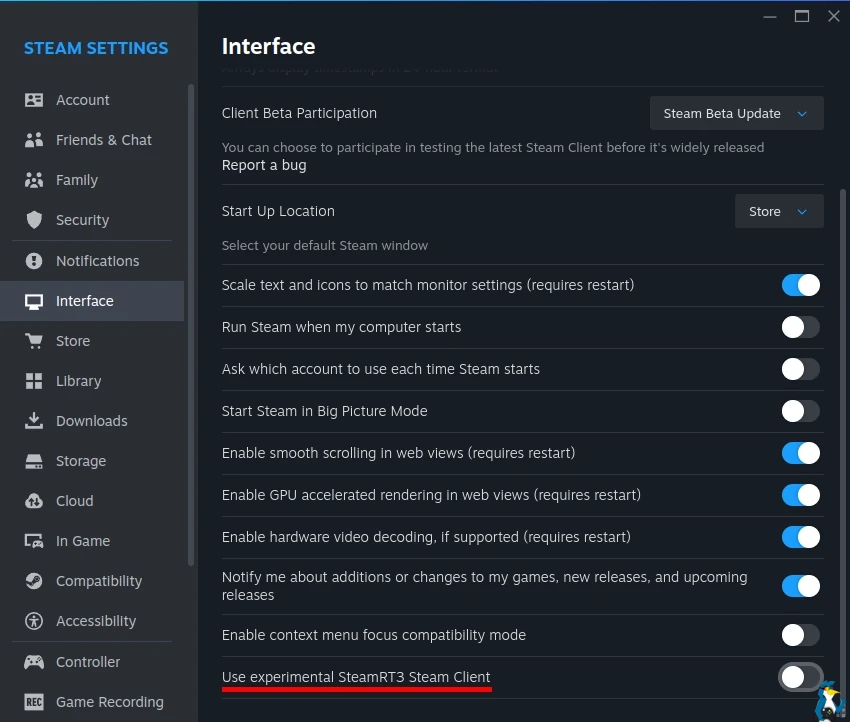
Plus some other useful changes came along for the ride:
Big Picture Mode
Moved Steam chat into the quick access menu, making it easier to access while in-game.
Introduced new quick chat feature for Steam Deck and Big Picture Mode
When in a chat, press and hold the view button to bring up quick chat options.
Move thumbstick and release view button to send a quick chat.
Quick chats can be edited in Settings > Keyboard
Remote Play
Enabled streaming while Remote Desktop is active on Windows
Added more flexible options to the Advanced Host Options for selecting primary display, resolution, refresh rate, etc. while streaming from a Windows computer. This will also allow setting whether HDR is enabled while streaming.
Added support for the SudoVDA virtual display driver on Windows. If you have the SudoVDA driver installed and select this as your primary display in the Advanced Host Options, Steam will automatically create a virtual display to match the client display settings.
Source: Valve





See more from me



 You can also find comments for this article on social media:

Quoting: praz01Why is this even being done? As someone else said in these comments Flatpak Steam already works brilliantly with marked improvements in performance over native. I'm reluctant to invest in another container implementation when I'm so heavily invested in Flatpak. Is this another Snaps? Why can't they tweak the existing flatpak implementation?Why would anything run faster in Flatpak than outside?


Quoting: EikeAs built/as tested! Unless you can match lib versions on your native OS with one tested by Steam/Lutris/Heroic or compiling wine/proton and fine tuning it, this is optimal. Most of the benchmarks out there are on Snap vs deb, but same holds for flatpak vs native.Quoting: praz01Why is this even being done? As someone else said in these comments Flatpak Steam already works brilliantly with marked improvements in performance over native. I'm reluctant to invest in another container implementation when I'm so heavily invested in Flatpak. Is this another Snaps? Why can't they tweak the existing flatpak implementation?Why would anything run faster in Flatpak than outside?


Quoting: praz01Why is this even being done? As someone else said in these comments Flatpak Steam already works brilliantly with marked improvements in performance over native. I'm reluctant to invest in another container implementation when I'm so heavily invested in Flatpak. Is this another Snaps? Why can't they tweak the existing flatpak implementation?LOL what on earth is this comment.
- flathub steam app is not published by Valve
- flathub steam app is not supported by Valve
- Valve themselves recommend using the native deb
- flathub steam app is WAY out of date (7 months ago was most recent update)
- flatpak steam has lots of issues and problems being reported by users
- your "marked improvements in performance" comment is misleading. I'm assuming you mean because of the libraries? This has a positive effect on some systems and negative effect on others. So it is DEFINITELY not an improvement for everyone on all systems.
using the flatpak steam app is fine, just please don't go around telling people this version "works brilliantly and performs way better" ... it's simply not true.
Last edited by Jarmer on 23 Mar 2026 at 3:28 pm UTC


 Patreon
 PayPal