 Support us on Patreon
 PayPal
Making it easier to manage downloads and updates across systems from desktops to Steam Decks and other handhelds, Steam adds Remote Downloads Management.
With all the different ways you can play games from Steam on different systems, along with streaming via Remote Play, this seems like a really useful addition to the Steam Client. In my screenshots below you can see the new option on the downloads page, where I can switch between my desktop and Steam Deck:
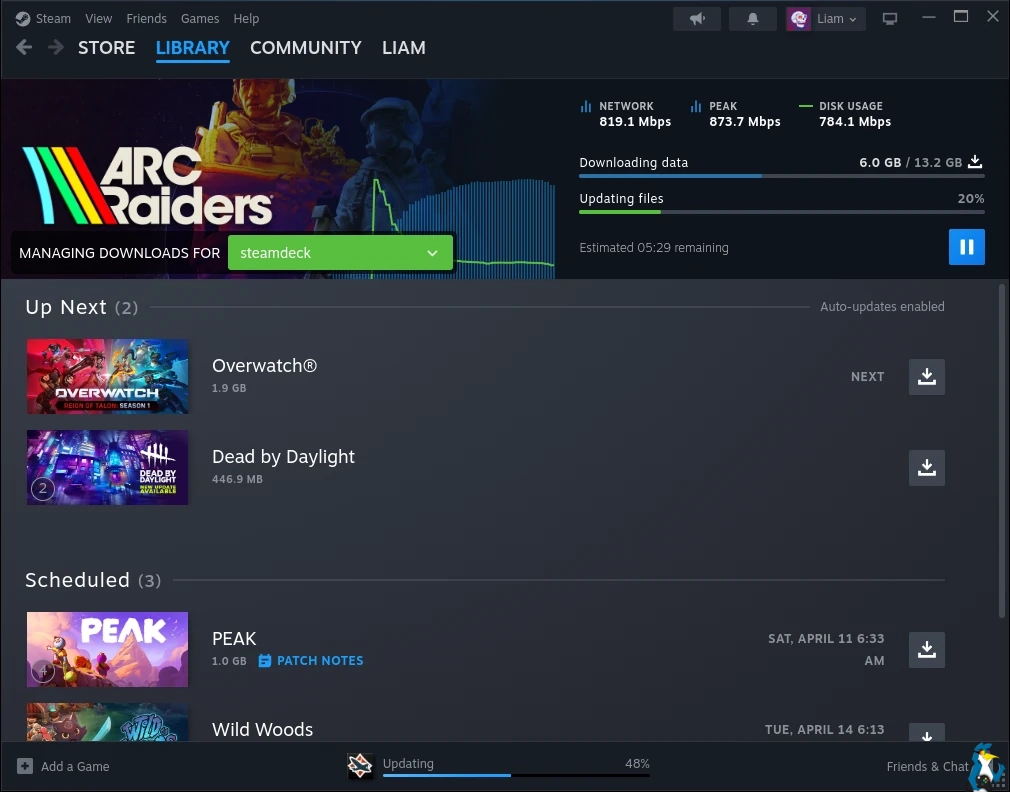
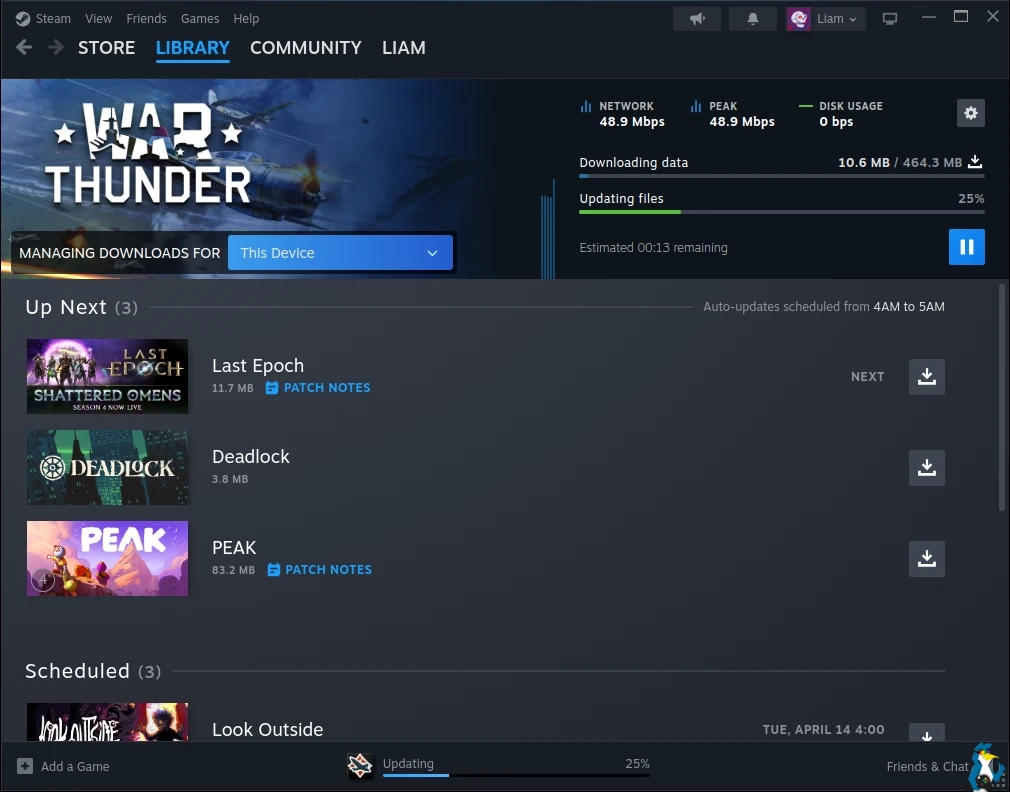
Testing it myself, the feature also works with the Steam Deck's screen-off downloads mode too, as they continue running.
From the changelog:
Downloads
- Added Remote Downloads Management. This allows you to manage downloads on Remote Steam Clients from the downloads page.
- The App Details page now has the same options and statuses for remote clients as the local client.
- Both the local and remote clients must be updated to enable this feature.
Windows
- Updated CPUID SDK used for CPU Temperature in in-game overlay performance monitor when enabled
Store Home Beta
- Fixed "..." context menu in Discounts & Events section
- Increased number of capsules per page in various carousels
- Smoothed the Featured & Recommended carousel transitions
- Updated the Recently Updated section's capsules to link to the corresponding announcement for the game
Steam Input
- Fixed a case where radial menus would fail to dismiss after releasing the joystick on Steam Deck
The same applies to Steam Deck / SteamOS systems too.
Valve only continue to show why they get my money - constantly improving the Steam Client and store with actually useful features that make a lot of sense.
Now we just need that "Download All" button we've been asking for years, instead of having to individually click the download button on each or drag them into the Up Next section. I do wonder what the real reason is as to why they seem reluctant to add it.





See more from me



 You can also find comments for this article on social media:
  Drawing Pixels 3 Apr 2026

They do provide an option to set specific games to high priority with immediate download, but for the rest of your collection they'd rather schedule those downloads during low traffic periods.
 Liam Squires-Hand 3 Apr 2026

Quoting: Drawing PixelsThe lack of a download all is simply that they want to spread the load on their servers over the whole 24 hours, most people download in the evening after work.I really doubt that is the actual real reason, because it's a bit silly if so considering you can just drag them all into the Up Next like I do.
They do provide an option to set specific games to high priority with immediate download, but for the rest of your collection they'd rather schedule those downloads during low traffic periods.
Being able to manage this on a TTY via SSH, or through a web interface like Cockpit, would be a game-changer. Even better would be an accessible CLI structure so we could easily wrap our own DIY bash/Python scripts or a custom web dashboard around it.
Drawing Pixels 3 Apr 2026
Quoting: Liam DaweI really doubt that is the actual real reason, because it's a bit silly if so considering you can just drag them all into the Up Next like I do.The automated scheduling is intentional, the vast majority of people might have games installed they aren't immediately playing every day, and for the ones they do there is an option to avoid having to drag it at all.
Just to make sure you know about it, right-click on a game and go to its properties. Go to "Updates" then "Automatic Updates", you can select "Immediately download updates" for that title.
Last edited by Drawing Pixels on 3 Apr 2026 at 10:44 am UTC
 mr-victory 3 Apr 2026
Quoting: PyronickThis new remote download feature in the Steam Beta looks incredibly useful, but it honestly just makes me wish we could do the exact same thing directly through steamcmd remotely.I don't recall how exactly but I can start downloads on steam's website
Being able to manage this on a TTY via SSH, or through a web interface like Cockpit, would be a game-changer. Even better would be an accessible CLI structure so we could easily wrap our own DIY bash/Python scripts or a custom web dashboard around it.


 Philadelphus 3 Apr 2026

I suspect most people are not bothered by the lack of a Download All button. Like, I get it; I get that itch in my brain too when I go to the Downloads page and see a bunch of things queued up. But if I'm not looking at the Downloads page, I don't really think about it. As I checked just now, I have twelve games in the queue (from a library of over two hundred). At most I might want to play "a few" of those today, but it's not like I'm going to be playing all of them today, so whether they download right now or over the course of the day doesn't really make a meaningful difference to me. Any single game I want to update I can do so, but otherwise, the ability to update twelve games at once – while it might scratch that mental itch – doesn't actually do anything for me, practically.
That's not to say there aren't situations where the ability to queue up everything wouldn't be handy, like if I'm updating my Steam Deck library right before a trip where I won't have connectivity. But I suspect most users wouldn't particularly care if a Download All button existed. (Given Steam's huge userbase, there has to be a long tail of users with just a small number of games, most of which won't all have updates available at the same time – so even if they're prioritizing downloads, they might see two or three rather than 10+, at which point they can just click a few update buttons.)
Quoting: Liam DaweI really doubt that is the actual real reason, because it's a bit silly if so considering you can just drag them all into the Up Next like I do.According to Steam and Reddit forums, it apparently used to be a feature, but was removed during the pandemic because of the heavy load on their servers.
 Linux_Rocks 5 Apr 2026

(Yes, I usually shutdown my computer when I'm done and shut the monitors and speakers off too. The only difference from back in the day is no static covers to put on afterwards. Even in standby, it's still probably electricity pumping CO² into the atmosphere.)
Quoting: Linux_RocksI remember when I had a big chunk of my huge ass Steam library installed. So many updates when I'd boot up the computer. lolI feel you!
(Yes, I usually shutdown my computer when I'm done and shut the monitors and speakers off too. The only difference from back in the day is no static covers to put on afterwards. Even in standby, it's still probably electricity pumping CO² into the atmosphere.)
About five years ago, I moved from a rural village with gigabit+ FTTH internet to the center of a picturesque Dutch fortified town. Surprisingly, despite moving to a much livelier area, I was stuck with an ancient 8Mbit DSL connection.
When my friends got back into gaming during COVID, I constantly needed to download new games. Since those downloads took hours on that slow line, I usually had to run them while I was away at work. However, I also try to conserve energy, especially after the war in Ukraine caused electricity prices to spike. To avoid leaving my computer running all day, I used my OpenWrt router or Home Assistant to wake my PC via LAN and handle the downloads on SteamCMD through SSH or Cockpit. It was the perfect way to get my games ready without wasting power. After the downloading was done, a simple shutdown command would make the PC go off again.
hardpenguin 7 Apr 2026

 How to setup OpenMW for modern Morrowind on Linux / SteamOS and Steam Deck
 How to install Hollow Knight: Silksong mods on Linux, SteamOS and Steam Deck