OptiScaler is a tool that lets you replace upscalers in games, and the OptiScaler Client can make it all a lot simpler to do. OptiScaler Client is made by a different team so it's not directly affiliated with OptiScaler.
From the GitHub page: "OptiScaler Client is a modern, high-performance desktop utility designed to simplify the installation, management, and update of the OptiScaler mod across your entire game library. Built with C# and Avalonia UI."
If you're still confused, OptiScaler allows you to switch out one upscaler / frame generation for another, or in some cases upgrade them to a later version if the game is left on an older one. It can be incredibly useful for boosting performance and visual quality across lots of different games.
Back on May 2nd, version 1.0.5 of the OptiScaler Client arrived and noted: "This update introduces Linux support (tested on Ubuntu, CachyOS, and Bazzite) featuring a dedicated GPU detection system and Steam runtime optimizations. A new Custom Version Management system has been implemented, allowing the use of personal OptiScaler, FakeNVAPI, and NukemFG builds. Additionally, FSR 4 INT 8 is now automatically selected based on GPU architecture, and the update includes advanced library filters and an anti-cheat warning system."
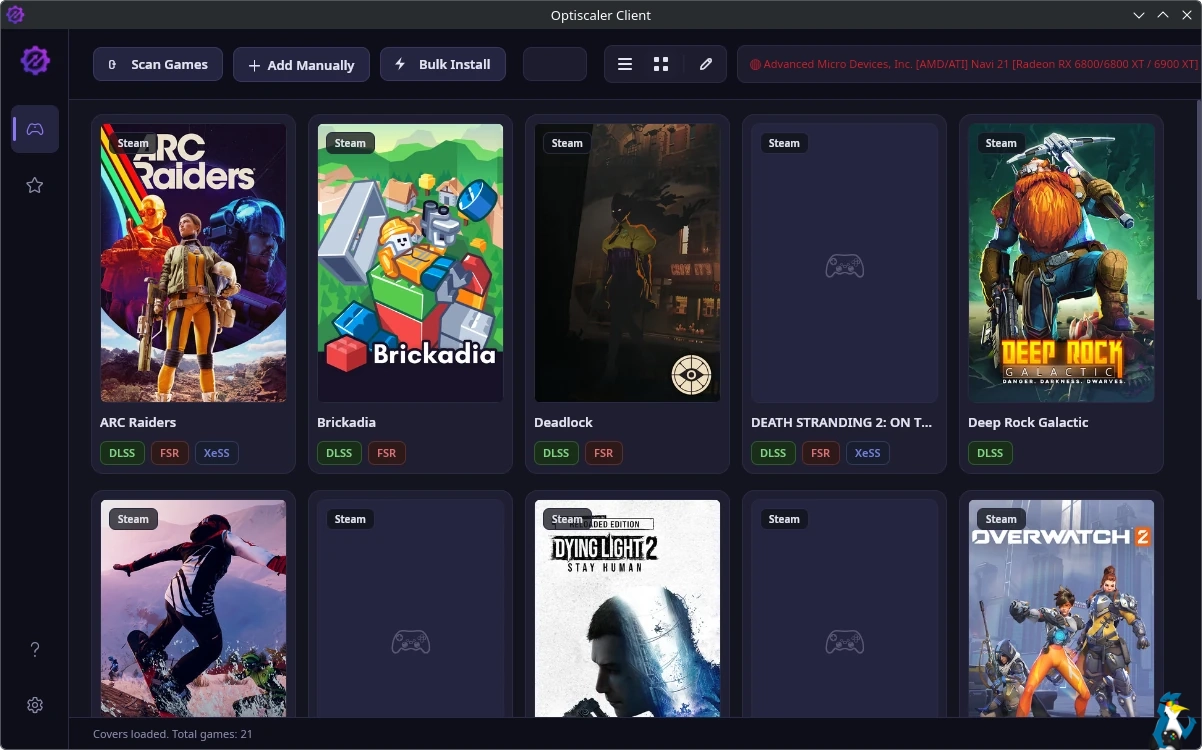
I love open source communities! Doing amazing work for us like this.





See more from me



 You can also find comments for this article on social media:
  MekaDragon 2 hours ago

 Patreon
 PayPal
 Anticheat check - which competitive games actually work on Linux?
 How to give Valve feedback when Proton games have issues on Linux / SteamOS