While you're here, please consider supporting GamingOnLinux on:
Reward Tiers: Patreon. Plain Donations:
  PayPal.
This ensures all of our main content remains totally free for everyone! Patreon supporters can also remove all adverts and sponsors! Supporting us helps bring good, fresh content. Without your continued support, we simply could not continue!
You can find even more ways to support us on this dedicated page any time. If you already are, thank you!
Reward Tiers:
Patreon. Plain Donations: PayPal.This ensures all of our main content remains totally free for everyone! Patreon supporters can also remove all adverts and sponsors! Supporting us helps bring good, fresh content. Without your continued support, we simply could not continue!
You can find even more ways to support us on this dedicated page any time. If you already are, thank you!
Login / Register
- Linux and open source getting age checking exemptions could be problematic
- Steam Deck stock returns but there's a big price increase
- Dusklight the reimplementation of The Legend of Zelda: Twilight Princess gets a major update
- Proton-CachyOS adds low latency layer and Discord rich presence support
- Flathub moves to ban nearly all apps and submissions made with generative AI
- > See more over 30 days here
 Anticheat check - which competitive games actually work on Linux?
 How to give Valve feedback when Proton games have issues on Linux / SteamOS
- Feedback needed - future website updates
- Liam Squires-Hand - New Desktop Screenshot Thread
- Hamish - Fully native alternative to ProtonDB
- ProfessorKaos64 - Restrict way kernel-level-anti-cheat is installed.
- PlayingOnLinuxphone - Are Mac computers good and stable?
- PlayingOnLinuxphone - See more posts
I found this game (忍屋/Shinobiya) today but I'm not able to run it properly on Wine.
The game runs with no visual/sound glitches, but the FPS is no more than 10FPS.
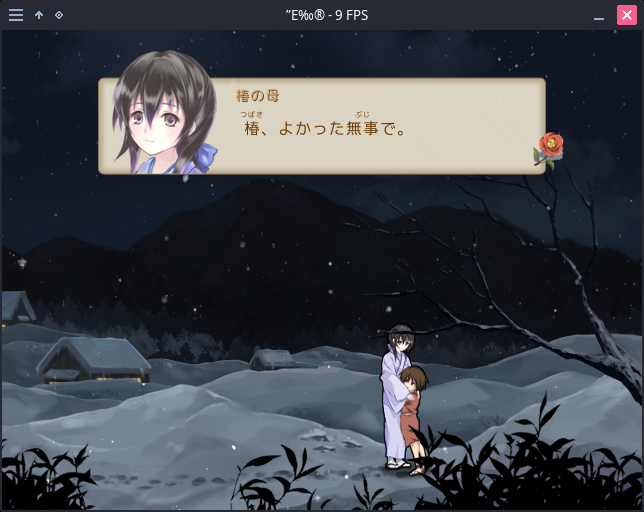
So, I have an Intel UHD Graphics 620 and a NVIDIA GeForce MX110.
I tried both GPUs.
With Intel, the game shows up with poor FPS.
With Nvidia (prime-run), the graphics does not appear (only the sound and input work).
Downloading the game is free, so anyone can try it out.
Official site: https://dokococo.com/shinobiya/
Official download site: https://freegame-mugen.jp/action/game_9491.html
The site is entirely in Japanese, so here's a tip on how to download it:
Just scroll down and click on a green button like the following one:
More system info:
OS: Manjaro Linux x86_64
Kernel: 5.11.18-1-MANJARO
Nvidia driver: linux511-nvidia 460.73.01-3
Wine version: wine 6.7-1
Last edited by tumeo on 15 May 2021 at 8:22 am UTC
By the way, do you know japanese or does this game has a translation somewhere?
I'm still learning Japanese, unfortunately there is no translation yet.
Last edited by tumeo on 16 May 2021 at 9:32 pm UTC
For maximum compatibility though, IIRC disabling or changing d3d9 dll (or was it d3d11? Pretty sure it's d3d9) and setting LANG=ja_JP.UTF-8 (or LC_ALL, though that one will re-configure your wine prefix) to be good enough for most RPG Maker games.
Also, there was [two](https://learnjapanese.moe/vn-linux/) [guides](https://gist.github.com/eshrh/5bbf4deab58fefdab9eacf77b450efc0) on how to run Japanese VNs I found a few days ago, which is all about running Japanese games in general, so it might be worth a read. I did make sure to create its own wine prefix though, and then added a menu item to launch the game using that Wine Prefix and using the JP language, to make it easier to open from file manager instead of using Lutris.