System76 have outlined some of their plans for upcoming upgrades to the new COSMIC desktop, and I have to admit I'm quite excited about what's coming to it. Right now COSMIC is pretty good, but there's a fair amount of work needed to get it up to the level of the likes of GNOME and KDE Plasma and it seems the gaps are going to be filled quite rapidly.
They've split COSMIC upgrades into "Epochs", which have a period of development over six to eight months. In a new blog post they've noted a whole lot planned for COSMIC Epoch 2 and gaming is a clear focus for it, as there appears to be a number of clear issues spread across their GitHub pages (#1, #2) so hopefully Epoch 2 will make COSMIC a great place for gaming on Linux.
Some of the other highlights coming for Epoch 2 include:
- Vulkan renderer.
- Live / dynamic wallpapers.
- A Firmware manager.
- More accessibility work like keyboard navigation for Panels and Applets.
- COSMIC screenshot tool to include video recording, markup tools etc.
- Support for the File Transfer portal with Flatpaks.
- Various big performance improvements
- Wacom tablet support.
- + lots more.
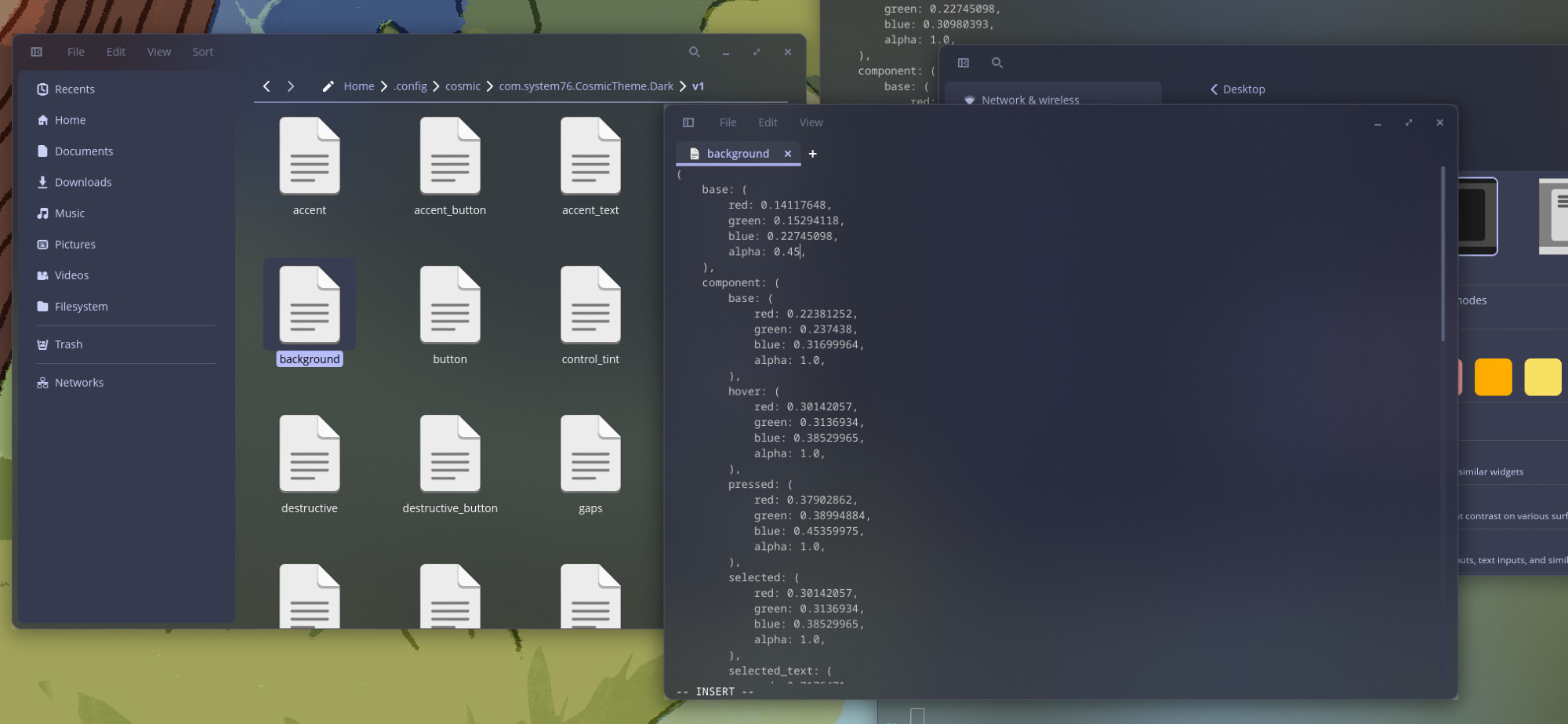
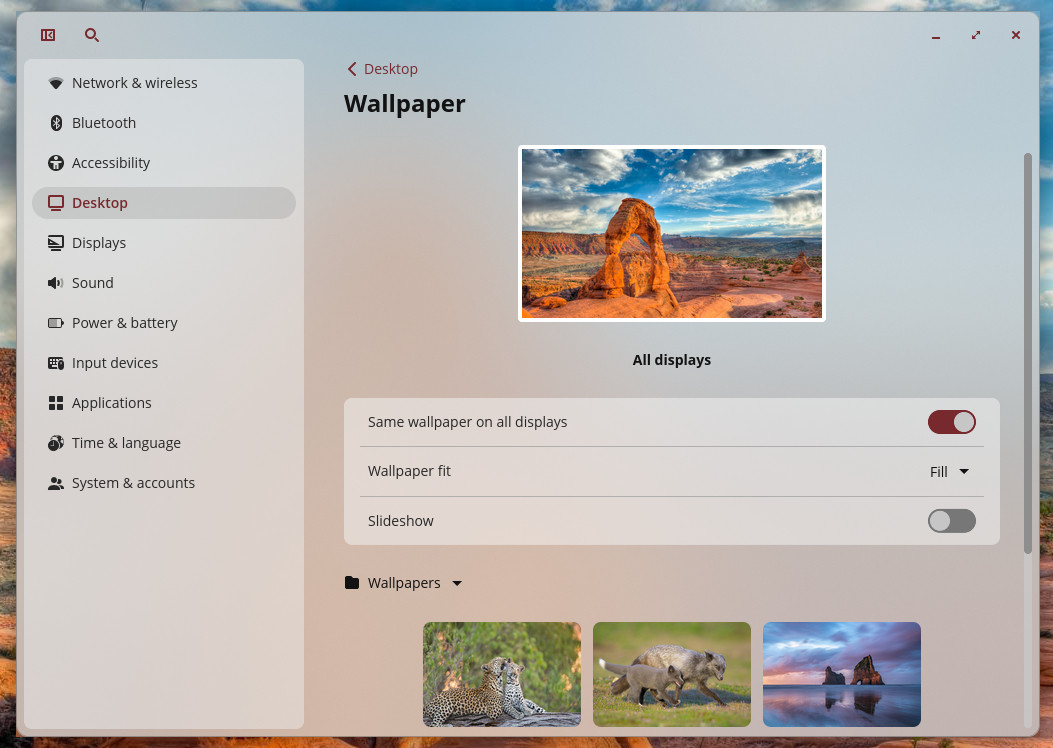
I quite like their experimentation with a frosted glass effect for the COSMIC UI, which is coming as part of Epoch 2, that CEO and Founder Carl Richell posted about on Bluesky with a few example shots:
Further out is COSMIC Epoch 3, which would then likely be next year, with plans to include the likes of:
- HDR support.
- Night Light.
- Gamepad / controller support.
- Notification improvements.
- Plenty of accessibility work like cursor sizing, mobility options and more.
- Improvements to their audio player.
- Upgrades to their COSMIC app store.
Seems like 2026 and beyond is going to be very interesting for System76 COSMIC.





See more from me

 You can also find comments for this article on social media:
  Woodlandor 6 Feb 2026
I didn’t even try out Cosmic, I immediately installed Fedora KDE on it.
Does that make me a monster? 😂


Right now, a lot of people say "pick gnome or plasma" when installing distros and I can see a future a few years out where cosmic replaces gnome in that sentence.
I was actually thinking of trying out cosmic again but the github issue where the games aren't capturing the mouse and letting it go to second monitors is a deal breaker. So I'll patiently wait for epoch 2 / 3 / whatever.
Quoting: JarmerAbsolutely love what S76 is doing with Cosmic. 🥰I am really still missing some features. As the whole printing / scanning / cups implementation (that said, the gnome implementation is pretty bad too, KDE does a really good job there). Which I do understand why they didn't do yet. Cups being cups, and well.. who prints and scans stuff nowdays?. Except for me, of course.
Right now, a lot of people say "pick gnome or plasma" when installing distros and I can see a future a few years out where cosmic replaces gnome in that sentence.
I was actually thinking of trying out cosmic again but the github issue where the games aren't capturing the mouse and letting it go to second monitors is a deal breaker. So I'll patiently wait for epoch 2 / 3 / whatever.
 Cyba.Cowboy 8 Feb 2026

Quoting: STiATCups being cups, and well.. who prints and scans stuff nowdays?. Except for me, of course.I haven't used CUPS in years... My Linux machines (mostly running Pop!_OS, but occasionally other stuff) al "see" my Brother MFC wirelessly, allowing me to print to it with no drivers or anything. And I can also scan directly from it to an e-mail address.
In saying that, if you really want local software, Brother provided their own software suite with step-by-step instructions to install, and their after-sales support for Linux puts everyone else to shame (my MFC is ~ years old and they still give me prompt support under Linux).
Quoting: Cyba.CowboyI haven't used CUPS in years...That's not actually true ;-). Gnome and KDE use avahi and cups-browsed for auto discovery and register the printers automatically with cups. So you are using cups, even if you don't realize it.
The difference is, you often get "bad" settings that way, and if you want to change the defaults, you have to have some way of configuring it and the printing system actually remembering the printers and settings instead of re-configuring it on every printing job you do.
My printer is a hp m183fw and discovered automatically, which has .. strange automatic settings (letter instead of A4 even if A4 is the devices default, always grayscale, wants the feeder as default and not the paper holder ...). It's probably the driver cups uses by default which has those settings as default which are bad "for me".
For scanning, gnome shows 3 scanner devices (it has just two scan options, flatbed and sheet feed) with weird names, one does not work (which is about right for not existing). KDE shows them properly.
 mr-victory 8 Feb 2026
Cups being cups, and well.. who prints and scans stuff nowdays?. Except for me, of course.I do! Funnily neither windows nor almost any linux distro has out of the box support for my printer. On Linux either the driver (splix) is missing or the printer is assigned the wrong model. On Windows you need to go to Windows Update -> Optional Updates and the printer driver is there, no it is not automatically installed.

Quoting: JarmerAbsolutely love what S76 is doing with Cosmic. 🥰I don't think it'll replace Gnome in the recommendations, but just be additive.
Right now, a lot of people say "pick gnome or plasma" when installing distros and I can see a future a few years out where cosmic replaces gnome in that sentence.
I was actually thinking of trying out cosmic again but the github issue where the games aren't capturing the mouse and letting it go to second monitors is a deal breaker. So I'll patiently wait for epoch 2 / 3 / whatever.
As you point out, Cosmic isn't fully fleshed out yet and doesn't meet the needs to many at the moment. In addition to the printing issue brought up, it's gesture implementation is fairly minimal. It looks like Epoch 3 will address gestures and their modification (unless someone programs an add-on in the interim). For someone like me needing to use a lot of windows and apps simultaneously on a laptop during my workday, Gnome and its essential gestures extensions will be a must for me for the foreseeable future....
Quoting: Cyba.CowboyI second the strong Brother printer recommendations for Linux.Quoting: STiATCups being cups, and well.. who prints and scans stuff nowdays?. Except for me, of course.In saying that, if you really want local software, Brother provided their own software suite with step-by-step instructions to install, and their after-sales support for Linux puts everyone else to shame (my MFC is ~ years old and they still give me prompt support under Linux).

Quoting: JarmerAbsolutely love what S76 is doing with Cosmic. 🥰⚰️RIP 🐭Xfce 😖
Right now, a lot of people say "pick gnome or plasma" when installing distros and I can see a future a few years out where cosmic replaces gnome in that sentence.
I remember when that was a notable third choice. It's not completely dead, just outshined.
That said, I have to admit that I am getting pretty hyped about Cosmic DE and hope to see it as a frequent third option.
 Patreon
 PayPal
 How to setup OpenMW for modern Morrowind on Linux / SteamOS and Steam Deck
 How to install Hollow Knight: Silksong mods on Linux, SteamOS and Steam Deck