With the most recent big stable update released for Discord, they rolled out a nice improvement for video calls on Linux making them better than ever.
The March 6 update for the popular chat app was quite a big one, filled with new features and bug fixes. But one particular change for Linux caught my eye:
"We recently shipped background replacement for video calls on Linux! You can now set your background to that sweet green binary stream from… uh… that one movie."
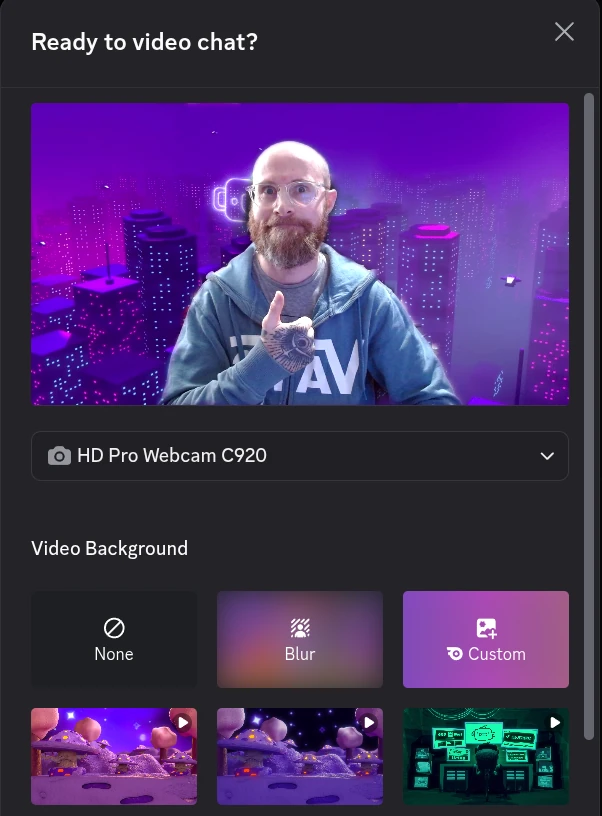
So yes, now you can add all sorts of backgrounds to get rid of the mess that is your gaming room. And it does seem to work well enough, although nowhere near perfect it's a good start to see it actually available fully on Linux now. Here's me just testing it out because a picture is worth a thousand words:
Some other highlights they noted include the app starting up a fair amount faster now:
- Ok, pull up a chair: we got a big’n to talk about. Until recently, using escaped mentions (like ”\@everyone”) wouldn’t get detected as a true mention on the client, but would absolutely mention a Role when sent. This was especially fun on large servers, where you wouldn’t get a warning that you were about to mention a lot of users. Messages like these would just… let themselves be sent and notify everyone with zero indication that it was going to happen. We discovered this first-hand when one of our engineers tried to make a joke in a meeting and inadvertently @’d a decent portion of the company. So now, we properly respect escape characters on the backend for @everyone and @here explicitly, so “\@everyone” won’t actually trigger a mention. For real this time.
- We changed the ordering of payloads from our API to Desktop clients, which reduced p50 TTI (aka: the median time it takes the app to launch) by 11.8%. Along with the navigation performance improvements from last week, we’re sorta developing a theme of Desktop performance wins to start this year!
- We’re in the midst of a thorough pass on Accessibility and have addressed many issues affecting the Quest, Events, Profiles, Activities, and Nitro surfaces. There were frankly too many changes to list each one for these particular surfaces in the Accessibility section. These changes should help users dependent on screen readers navigate these portions of Discord more effectively. (And of course, this is alongside everything else we fix up in the Accessibility section of Patch Notes.)
See the full patch notes for all the goodies.





See more from me

 You can also find comments for this article on social media:
  mr-victory 10 Mar 2026

 Philadelphus 10 Mar 2026

What does doing "\@everyone" actually do? It's unclear from the patch note.

Quoting: PhiladelphusI did notice that video backgrounds were a thing recently while video-chatting with my brother. Nice to see that finally happen.It was working the same as @everyone (mentioning everyone giving them a notification), but without warning you that you're sending a very broad notification
What does doing "\@everyone" actually do? It's unclear from the patch note.
mr-victory 10 Mar 2026
Quoting: middle_pickupLMAO Just in time for everyone to delete their Discord account.Leaving it is like leaving whatsapp (or telegram or whatever depending on where you live) you end up deserted, though can be done if you just chat with your friends and aren't in any communities
Quoting: middle_pickupLMAO Just in time for everyone to delete their Discord account.Yeah I'm self hosting matrix now with https://github.com/element-hq/ess-helm
Last edited by SlayerTheChikken on 10 Mar 2026 at 8:35 pm UTC
mr-victory 10 Mar 2026
Quoting: SlayerTheChikkenYeah I'm self hosting matrix now.
Quoting: mr-victoryHow are you self hosting? Is the server on your home network or on a hosting provider?In my opinion it's not really "self hosting" if it's not running on a machine you control, might as well slap it on AWS with cloudflare in front like everything else then :P That's just a personal opinion though..
Quoting: SlayerTheChikkenYeah I'm self hosting matrix now.
But I'm using this https://github.com/element-hq/ess-helm as they finally added Element Call support which was the last major puzzle piece.
Last edited by SlayerTheChikken on 10 Mar 2026 at 8:35 pm UTC


Spoiler, click me
 thelimeydragon 11 Mar 2026
hardpenguin 11 Mar 2026
thelimeydragon 11 Mar 2026
hardpenguin 11 Mar 2026
 Philadelphus 13 Mar 2026
Quoting: PikoloThanks! I'm just still unclear what an "escaped mention" is, or at least what it's supposed to do. If "\@everyone" does the same as "@everyone" now (if I understand the fix)…what's the point of the backslash? 🤔 Or does it do something different now? What does "\@<user>" do differently from "@user"?Quoting: PhiladelphusI did notice that video backgrounds were a thing recently while video-chatting with my brother. Nice to see that finally happen.It was working the same as @everyone (mentioning everyone giving them a notification), but without warning you that you're sending a very broad notification
What does doing "\@everyone" actually do? It's unclear from the patch note.
Quoting: PhiladelphusIt's not supposed to do anything besides showing the text ;) It's a relatively common issue in programming - you want to be able to do more than just show the literal text, but sometimes you need to show the very sequence of characters that would normally do something special.Quoting: PikoloThanks! I'm just still unclear what an "escaped mention" is, or at least what it's supposed to do. If "\@everyone" does the same as "@everyone" now (if I understand the fix)…what's the point of the backslash? 🤔 Or does it do something different now? What does "\@<user>" do differently from "@user"?Quoting: PhiladelphusI did notice that video backgrounds were a thing recently while video-chatting with my brother. Nice to see that finally happen.It was working the same as @everyone (mentioning everyone giving them a notification), but without warning you that you're sending a very broad notification
What does doing "\@everyone" actually do? It's unclear from the patch note.
One place it comes up is in error messages and instruction manuals - if you want to tell the user how to achieve and effect, you need to show them the "magic words", but not "cast the spell". Backslash is a very common escape character. If you want to actually show a backslash in a language where it's an escape character, you escape the escape character itself - so `\\` would show up as `\` in javascript strings.
https://en.wikipedia.org/wiki/Escape_character
Philadelphus 14 Mar 2026
Quoting: PikoloAh! Gotcha. That was unclear, thank you. I'm familiar with the concept of escaping characters, but the description in the patch notes just wasn't making sense to me (and I didn't know about escaping the @ symbol in Discord.) So the issue was that it wasn't correctly escaping "@everyone/@here", and now it does. 🙂Quoting: PhiladelphusIt's not supposed to do anything besides showing the text ;)Quoting: PikoloIt was working the same as @everyone (mentioning everyone giving them a notification), but without warning you that you're sending a very broad notificationThanks! I'm just still unclear what an "escaped mention" is, or at least what it's supposed to do. If "\@everyone" does the same as "@everyone" now (if I understand the fix)…what's the point of the backslash? 🤔 Or does it do something different now? What does "\@<user>" do differently from "@user"?
 Patreon
 PayPal
 How to setup OpenMW for modern Morrowind on Linux / SteamOS and Steam Deck
 How to install Hollow Knight: Silksong mods on Linux, SteamOS and Steam Deck