 Support us on Patreon
 PayPal
Along with fixes for other parts of Steam, the latest Beta brings more essential fixes for the Steam Controller with a firmware upgrade.
Once you've updated Steam and turned on a Steam Controller, it will pop up a notification about the needed update. This will bring you to the settings page to allow you to do the updates to the Puck and Steam Controller.
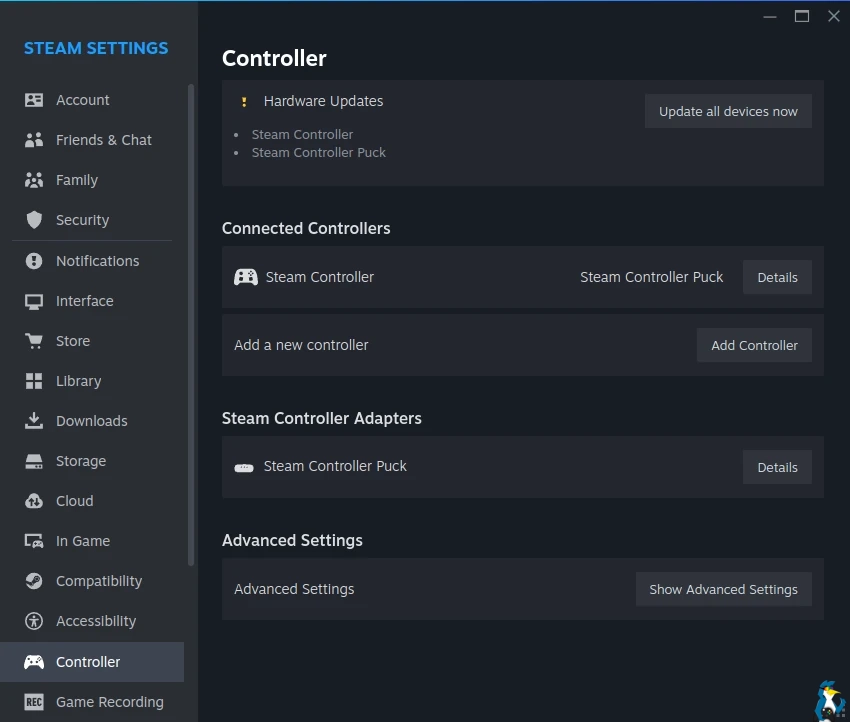
From the Steam Beta changelog:
General
- Fixed a rare case where the Steam Controller welcome dialog could appear while updating the controller's firmware.
Remote Play
- Fixed the client disconnecting after a short period of time when doing non-local streaming
In-Game Overlay
- Fixed a case where Performance Monitor could over report frame rate if a game erroneously calls NVIDIA APIs to get new frame tokens at a much higher rate than their actual Present frame rate
- Fixed cases where the overlay may not immediately cover the entire screen when first invoked
- Fixed cases where the Big Picture mode overlay notifications may be positioned incorrectly until the overlay is first invoked
Steam Input:
- Fixed several small styling regressions from the previous beta client
Steam Controller Firmware:
- Fixed an issue where continuous rumble would sometimes break Gyro input
- Another adjustment to trackpad touch settings
The Steam Deck client beta has the same changes.




About the author - Liam Squires-Hand

I am the owner of GamingOnLinux. After discovering Linux back in the days of Mandrake in 2003, I constantly checked on the progress of Linux until Ubuntu appeared on the scene and it helped me to really love it. You can reach me easily by emailing GamingOnLinux directly. You can follow me personally on Mastodon [External Link].
See more from me
See more from me
Some you may have missed, popular articles from the last month:


 You can also find comments for this article on social media:
 All posts need to follow our rules. Please hit the Report Flag icon on any post that breaks the rules or contains illegal / harmful content. Readers can also email us for any issues or concerns.
No comments yet!
 How to setup OpenMW for modern Morrowind on Linux / SteamOS and Steam Deck
 How to install Hollow Knight: Silksong mods on Linux, SteamOS and Steam Deck